
Safe + Password Manager
Safe + Password Manager generates an estimated $200–$4k/month in revenue from 200–1k downloads/month on the App Store, according to AppCurrents estimates (updated 2026-08-02).
| Est. revenue / month | $200–$4k |
|---|---|
| Est. downloads / month | 200–1k |
| Estimate confidence | medium |
| Pricing | Paid $2.99 |
| Rating | 4.77 ★ (456 ratings) |
| Category | Productivity |
| Best chart rank | #91 Productivity Paid |
| Released | 08.04.2014 |
| App last updated | 30.07.2026 |
| Platform | iOS |
Modeled monthly estimate · rating velocity · medium confidence


About
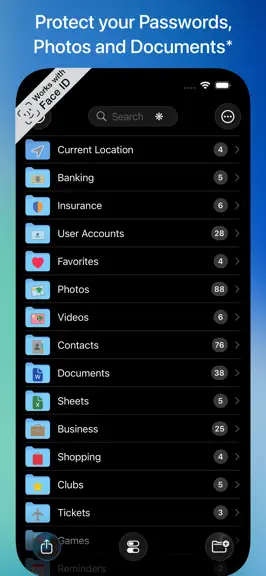
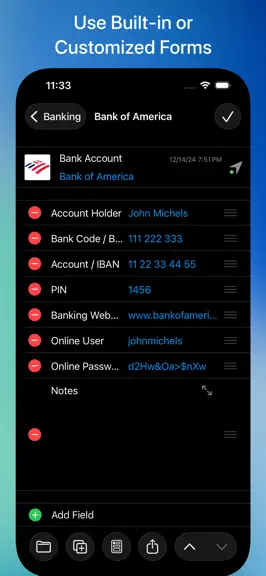
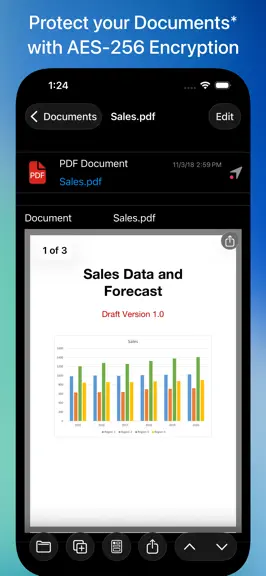
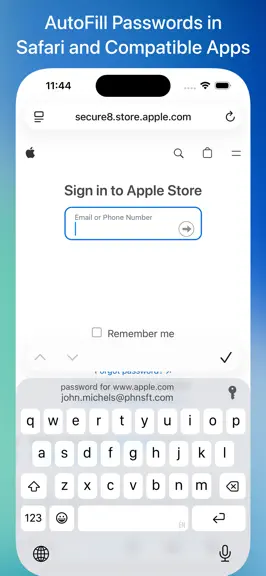
• Manage your Passwords and Passkeys • AutoFill Passwords in Safari and Apps • Protect your Photos and Contacts • Safeguard your Videos* • Protect PDF, iWork and Office Documents* • Securely Sync your Data via WiFi • Login with Touch ID or Face ID • Two-Factor Authentication (2FA / TOTP) • Generate Strong Passwords • Encrypt Stored Data with AES-256 • Add Geofences to Items • Access Items Nearby f…
Trends & analysis
Chart rank trend
US · categoryWhy it's surfacing
Scout 16Ratings & velocity
★ -0.01 in windowRating distribution
96% positive · 453 ratingsGeographic reach
best rank · 10 storefrontsRevenue & downloads trend
ARPU $2In-app purchases
10 tiersUpdate history
5 updates tracked- v26.6.25d ago
• Safe + v26 supports iOS / iPadOS 26 • New design (with current operating system) • As an alternative to the list view for folders and items, a tile view with large icons can be selected on a folder basis • Folder options for automatic or manual sorting • Support for find and replace in the full-screen view of notes • v26.6.2: Improved distance information in the widget • v26.6.2: More code has been modernized and rewritten in Swift • v26.6.2: Optimizations • v26.6.2: Compatibility with Safe + for Mac v26.6.2 If you bought Safe + before version 14.5 you can buy the feature upgrade to Safe + v26 as an in-app purchase. Note: Please also update Safe + for Mac to v26 or later. We recommend to use the Safe + backup feature to create a backup before you update.
- v26.6.127d ago
• Safe + v26 supports iOS / iPadOS 26 • New design (with current operating system) • As an alternative to the list view for folders and items, a tile view with large icons can be selected on a folder basis • Folder options for automatic or manual sorting • Support for find and replace in the full-screen view of notes • v26.6.1: More code has been modernized and rewritten in Swift • v26.6.1: Optimizations • v26.6.1: Compatibility with Safe + for Mac v26.6.1 If you bought Safe + before version 14.5 you can buy the feature upgrade to Safe + v26 as an in-app purchase. Note: Please also update Safe + for Mac to v26 or later. We recommend to use the Safe + backup feature to create a backup before you update.
- v26.61mo ago
• Safe + v26 supports iOS / iPadOS 26 • New design (with current operating system) • As an alternative to the list view for folders and items, a tile view with large icons can be selected on a folder basis • Folder options for automatic or manual sorting • Support for find and replace in the full-screen view of notes • v26.6: The widget allowing quick access to items nearby has been updated to use the same code base on all supported platforms • v26.6: More code has been modernized and rewritten in Swift • v26.6: Compatibility with Safe + for Mac v26.6 If you bought Safe + before version 14.5 you can buy the feature upgrade to Safe + v26 as an in-app purchase. Note: Please also update Safe + for Mac to v26 or later. We recommend to use the Safe + backup feature to create a backup before you update.
- v26.5.21mo ago
• Safe + v26 supports iOS / iPadOS 26 • New design (with current operating system) • As an alternative to the list view for folders and items, a tile view with large icons can be selected on a folder basis • Folder options for automatic or manual sorting • Support for find and replace in the full-screen view of notes • v26.5.2: More code has been modernized and rewritten in Swift • v26.5.2: Optimizations • v26.5.2: Compatibility with Safe + for Mac v26.5.2 If you bought Safe + before version 14.5 you can buy the feature upgrade to Safe + v26 as an in-app purchase. Note: Please also update Safe + for Mac to v26 or later. We recommend to use the Safe + backup feature to create a backup before you update.
- v26.5.12mo ago
• Safe + v26 supports iOS / iPadOS 26 • New design (with current operating system) • As an alternative to the list view for folders and items, a tile view with large icons can be selected on a folder basis • Folder options for automatic or manual sorting • Support for find and replace in the full-screen view of notes • v26.5.1: User interface enhancements • v26.5.1: Compatibility with Safe + for Mac v26.5.1 If you bought Safe + before version 14.5 you can buy the feature upgrade to Safe + v26 as an in-app purchase. Note: Please also update Safe + for Mac to v26 or later. We recommend to use the Safe + backup feature to create a backup before you update.
Safe + Password Manager — FAQ
How much money does Safe + Password Manager make?
According to AppCurrents estimates, Safe + Password Manager generates approximately $200–$4k per month (medium confidence), modeled from its the App Store chart performance, rating velocity, and monetization signals.
How many downloads does Safe + Password Manager get?
Safe + Password Manager sees an estimated 200–1k downloads per month on the App Store, per AppCurrents modeling.
Is Safe + Password Manager free?
Safe + Password Manager is a paid app priced at $2.99 on the App Store.
What is Safe + Password Manager's rating?
Safe + Password Manager holds a 4.77-star average from 456 ratings on the App Store. It currently ranks #91 on the Productivity paid chart.
When was Safe + Password Manager released?
Safe + Password Manager launched on the App Store on 08.04.2014. Its latest version shipped 30.07.2026.


