Runlow: AI Usage Meter
Runlow: AI Usage Meter generates an estimated $30–$500/month in revenue from 40–200 downloads/month on the App Store, according to AppCurrents estimates (updated 2026-10-03).
| Est. revenue / month | $30–$500 |
|---|---|
| Est. downloads / month | 40–200 |
| Estimate confidence | medium |
| Pricing | Paid $1.99 |
| Rating | 1.00 ★ (1 ratings) |
| Category | Developer Tools |
| Best chart rank | #34 Developer Tools Paid |
| Released | 28.07.2026 |
| App last updated | 30.09.2026 |
| Platform | iOS |
Modeled monthly estimate · rating velocity · medium confidence
About
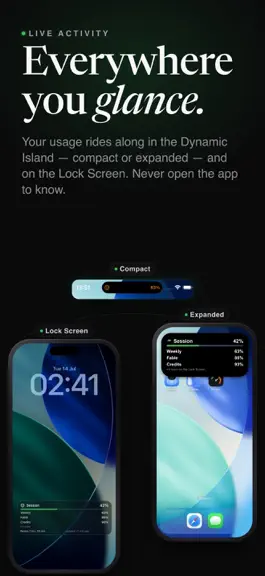
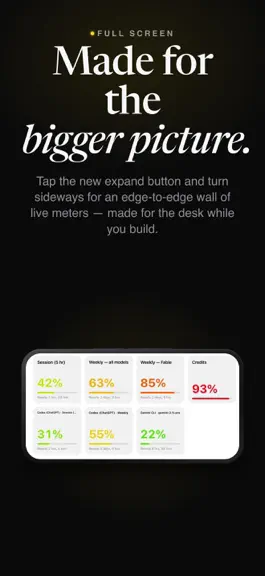
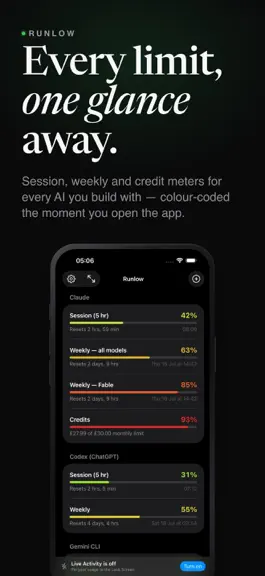
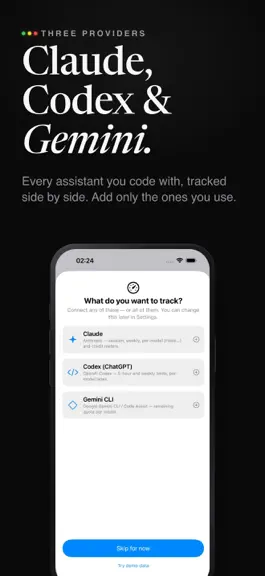
Runlow shows how much of your AI usage you have left, on your Lock Screen, in the Dynamic Island, in widgets, on your watch and in your Mac's menu bar, before you run out. Connect the services you pay for and every limit becomes a colour-coded meter that fills from green to red as you use it, with the time until it resets beside it. WHAT IT TRACKS • Claude: session and weekly limits, per-model l…
Trends & analysis
Chart rank trend
US · categoryWhy it's surfacing
Scout 40Ratings & velocity
★ +1 in windowGeographic reach
best rank · 1 storefrontRevenue & downloads trend
ARPU $1Update history
12+ updates tracked- v2.0.42d ago
ANTIGRAVITY USAGE Runlow now shows Gemini and shared Claude/GPT usage limits for your Antigravity plan. Set it up on your Mac with Google's command-line tool and Runlow's numbered guide. With iCloud sync on, readings can also appear on iPhone and Apple Vision Pro. Fresh readings need Runlow running on an awake Mac. CLEARER GEMINI GUIDANCE The connection screen now explains that personal Google accounts no longer support the Gemini CLI connection and points Antigravity users to its own setup.
- v2.017d ago
Search Settings, a Pinned page, presets you swap with one tap, and your Mac's RAM on your iPhone. YOUR MAC, ON YOUR IPHONE Switch on RAM, storage and GPU in Runlow on your Mac, and your iPhone shows them too, along with any AI models loaded in Ollama, LM Studio or Bionic. SEARCH SETTINGS Tap the search field at the top of Settings. The switch itself comes up, ready to use. PINNED Pin the settings you change most and they sit together on their own page. Touch and hold any search result to pin it. SWAP BETWEEN PRESETS A preset now keeps everything about how Runlow looks and behaves, and two presets swap with one tap. Undo is right there. CHOOSE RUNLOW'S LANGUAGE Settings, then General. Any of ten languages, whatever your iPhone is set to. Translations are still being refined. If anything reads oddly, choose English there. CONNECTING FROM YOUR MAC Codex, Gemini and Copilot connected on your Mac now reach your iPhone, and Sync now in iCloud settings sends and fetches everything straight away. FIXED Numbers in the right order in Japanese, Korean and Chinese, the right amount in the credit calculator, and far less English left in other languages.
- v1.8.719d ago
Runlow now speaks nine languages, and your usage history survives a device. NINE LANGUAGES Every screen, setting and notification is now translated into German, French, Spanish, Japanese, Simplified Chinese, Brazilian Portuguese, Italian, Korean and Dutch. Runlow follows whatever language your device is set to — there is nothing to choose. YOUR HISTORY, KEPT The readings behind the History chart now go to your own iCloud, so a new Mac or a reset iPhone picks up everything your other devices recorded. Syncing only ever adds: no device can shorten another's history, and tidying up old readings on one machine never removes them from anywhere else. You will find "Sync usage history" in Settings under iCloud sync. It is on by default, and turning it off deletes the copy from iCloud and keeps the one on your device. Opening the History screen now fetches straight away instead of waiting for the next refresh, so the chart shows what your other devices recorded the moment you look at it. A SECOND COPY, ON THE DEVICE History and your payments log now keep a rolling previous copy beside them, and Runlow reads it if the main file is ever damaged. Before this, one unreadable file was the end of the series — which is exactly what a corrupt file, a disk error or a crash at the wrong moment could cause. FIXED A reading that arrived with an earlier timestamp than the last sync — after a clock change or a restore — could stay on one device and never reach the cloud. Runlow now notices and sends the whole series again.
- v1.8.620d ago
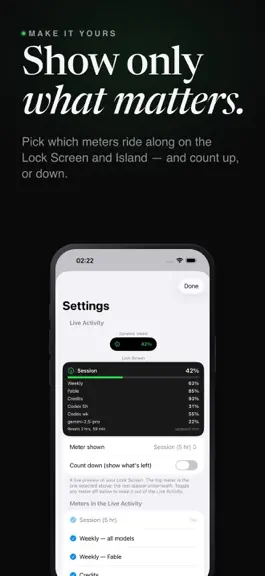
Paste a key once and every device signs back in. Plus a setup wizard, seven themes, and the Lock Screen card exactly how you want it. SIGN IN ONCE, EVERYWHERE When a key expires and you paste a fresh one on any device, your other devices sign back in on their own the next time they refresh — no second paste on the iPad, no third on the Mac, once each has this update. A renewed key is only ever taken up after Runlow has checked that it works, so a device that is signed in never loses a working key to a bad one. WHEN IT KEEPS HAPPENING If the same account is signed out twice in a row, Runlow asks whether this keeps happening and shows you the private-window trick: a key copied from a private window cannot be ended by logging out of your browser later. Keys still expire on their own about once a month. NAMES AND ICONS, YOUR CHOICE A new switch in Settings under iCloud sync. The nickname, colour and icon you give a Claude account follow it to your other devices, or stay on the device you set them on. On by default. SET IT UP IN A MINUTE A new setup wizard walks you through the Lock Screen card one question at a time — which meters, how many and how big, the bars, the typeface, the background, how the numbers read — with your own card in front of you the whole way. Cancel puts everything back. It is in Settings whenever you want it again. THEMES Seven whole looks, one tap each: the bar colours, whether a bar is one piece or blocks, the Lock Screen background and the typeface, following light and dark on their own. Nine typefaces, shown before you pick. BARS, YOUR WAY Chop any bar into blocks like a fuel gauge. Colour bars by the theme, by usage, or by usage as a gradient laid along the bar — green at the start, red only near the end — or give a meter its own colour. Pick a background: glass with a slider, black, light, or any colour you like, and it paints the meter cards in the app too. THE CARD Choose how big the top row is — Stands out, Medium, Large or Uniform — and how many meters fit. Decide whether the account's name sits in front of each meter; the meters stay either way. Reset times can count down live. Put the refresh button and the "updated" stamp where you want them, or on a meter row to win another line. WIDGETS The large widget now holds up to twelve meters, each with its bar, and every widget has the refresh button. Long-press a widget to choose which meters it shows. DYNAMIC ISLAND AND WATCH Pick both Island numbers, hold it for up to six meters, and give the Island its own settings if you want it to differ from the Lock Screen. The watch wears your theme and has its own settings page with a live preview. ON YOUR MAC The Mac app has the themes, the bar shapes, its own setup wizard and a What's New page, and you can right-click any meter to put it in the menu bar or take it out. Settings has an iCloud sync page that shows which device has what. SETTING PRESETS Save the way everything is set up under a name, and get it back later with one tap. Presets sit at the bottom of Settings, above the setup wizard, and they follow you to your other devices. A TIP JAR Entirely optional, at the bottom of Settings. Nothing in the app changes either way. FIXED The refresh button (three separate problems — it now says when a refresh fetched nothing). A Codex token with a space in it stopped sign-in and blamed the token. Disconnect clears your other devices too, and now says so first. Widgets follow light and dark. History counted ten readings after one refresh. And the bottom line no longer drops a meter when the timestamp is turned on. The typeface and the number colour mode now sync with the Mac. A Codex account ID on its own no longer counts as connected. Every device now shows up in the iCloud sync device list without opening it. Setting presets rows draw in the list's own colour, not blue. A lot of this update started as an email. If Runlow is helping you, a quick rating genuinely makes my day — thank you.
- v1.8.025d ago
Fixes you asked for, a roomier Lock Screen, and a couple of new tools. LOCK SCREEN, YOUR WAY Hide the bottom line of the Live Activity to win another row (the refresh button moves up to the top row), or hide the button too if you never use it. Keep the numbers white, or let them follow the colours. The Dynamic Island can show a second meter's number where the icon was. Tap the eye next to a section to keep the live preview on screen while you change things. A bar on every meter now fits five rows, six without the bottom line. The list of meters to also show on the Lock Screen only lets you tick what actually fits, and the icon picker sits back near the top, folded away until you need it. HIDE AND UNHIDE FROM THE DASHBOARD Press and hold any meter to hide it, or an account or service to hide the whole section, and find "Show a hidden meter" in the same menu to bring anything back. Hidden means hidden everywhere: the Lock Screen and notifications follow the dashboard. FORECAST HINTS (OPTIONAL) Turn on Forecast hints in Settings > Appearance and each bar gains a line like "At this pace, tomorrow around 11:14" or "about 75% when it resets", worked out from your own recent readings. It stays quiet unless it has enough to go on, and it never appears on the Lock Screen. CREDIT CALCULATOR Claude only shows a percentage for credits if you set a monthly spend limit, and that limit has to include what you already spent. The calculator, now its own entry in Settings, does the sum after a top-up and can log the top-up in History. COLOUR ANY BAR FROM THE DASHBOARD Press and hold a bar and choose Bar colour and icon. A live preview shows that one meter with the colour you pick, by usage (green to red), or its own gradient with the marks where it changes, and its own icon. Two accounts, two colours, no problem. The same menu can make a meter your focus. One switch carries your colours to the Lock Screen, History and the watch, another keeps the numbers white if you prefer, and Settings now has its own iCloud sync page where your settings can follow you to your other devices through your own iCloud, with a list of what to carry along: colours, number style, icons, meter names, order and hidden meters, dashboard options, Lock Screen layout and the History chart. Everything here is off unless you turn it on. The Live Activity's dark glass can be made as see-through as you like, or swapped for a solid black or light card. CLAUDE SIGN-IN, TWO WAYS Pasting your session key stays the main way in, and any key you paste is accepted. If you would rather sign in on a web page, that option is back in the same sheet, with a plain warning: it has been flaky and does not work for everyone. FIXED, AND FUTURE-PROOFED Cursor works again - Cursor changed the shape of its usage data and Runlow now reads it. From now on, when a service changes something like that, Runlow can pick up the fix by itself without an App Store update. Also fixed: a renamed meter keeps your name on the Lock Screen, iCloud sync can no longer drop an account on one of your devices, hiding a meter updates History straight away, History's date axis no longer repeats the same day on every line, ticking a meter for the Lock Screen works from anywhere on its row, notices from the developer are no longer cut short and now arrive within half an hour, and count-down mode now says what a fresh meter's 100% means. Nothing about your setup changes: your accounts, keys, history and every setting carry over exactly as they were. I am an independent developer and I read every review. If Runlow is helping you, a quick rating genuinely makes my day - thank you. This update also fixes two serious problems: Cursor usage failing to load at all, and iCloud sync dropping one of your accounts when a second device was set up. That is why it has been sent to Apple as a priority update.
Runlow: AI Usage Meter — FAQ
How much money does Runlow: AI Usage Meter make?
According to AppCurrents estimates, Runlow: AI Usage Meter generates approximately $30–$500 per month (medium confidence), modeled from its the App Store chart performance, rating velocity, and monetization signals.
How many downloads does Runlow: AI Usage Meter get?
Runlow: AI Usage Meter sees an estimated 40–200 downloads per month on the App Store, per AppCurrents modeling.
Is Runlow: AI Usage Meter free?
Runlow: AI Usage Meter is a paid app priced at $1.99 on the App Store.
What is Runlow: AI Usage Meter's rating?
Runlow: AI Usage Meter holds a 1.00-star average from 1 ratings on the App Store. It currently ranks #34 on the Developer Tools paid chart.
When was Runlow: AI Usage Meter released?
Runlow: AI Usage Meter launched on the App Store on 28.07.2026. Its latest version shipped 30.09.2026.


