
RainViewer: Live Weather Radar
RainViewer: Live Weather Radar generates an estimated $200–$1k/month in revenue from 13k–53k downloads/month on the App Store, according to AppCurrents estimates (updated 2026-10-02).
| Est. revenue / month | $200–$1k |
|---|---|
| Est. downloads / month | 13k–53k |
| Estimate confidence | low |
| Pricing | Free + IAP |
| Rating | 4.55 ★ (30,775 ratings) |
| Category | Weather |
| Best chart rank | #56 Weather Free |
| Released | 22.07.2015 |
| App last updated | 01.10.2026 |
| Platform | iOS |
Modeled monthly estimate · rating velocity · low confidence




About
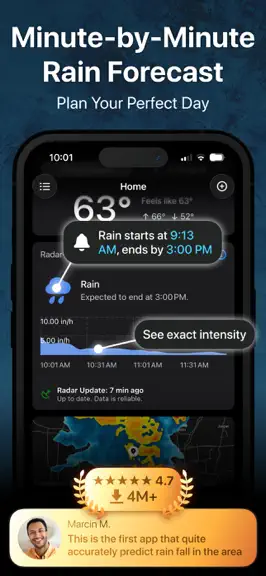
Live weather radar, nowcast and rain alerts, hyperlocal forecast and hurricane tracker, built to help you see, understand, and act on rain before it changes. Tracking a hurricane's path, watching a storm build, or just checking if it's dry enough for a walk? RainViewer shows the actual rain on the map. Data reaches your screen in seconds, direct from the radar source, not a third-party feed. 10 m…
Trends & analysis
Chart rank trend
US · categoryWhy it's surfacing
Scout 32Ratings & velocity
★ 0 in windowRating distribution
88% positive · 30k ratingsGeographic reach
best rank · 1 storefrontRevenue & downloads trend
ARPU $0In-app purchases
9 tiersUpdate history
12+ updates tracked- v8.2today
DATA TIME ON EVERY LAYER The time on the player is the time of the frame, not the time of the data. A forecast model can be hours old, and a satellite image can be older than its frame. · With Premium, tap any point on any layer to see when the data at that point was measured or calculated · The details stay open when you move the map, zoom or switch layers, so you can compare values at one point · To close the details, tap the details or an empty spot on the map · Outside radar coverage, the details show "No coverage", and all text appears in your language GLASS ON THE MAP · The player, the speed and interval controls and the bottom menu now use the same glass · The selected option is clear in the dark theme, and long radar names fit in the radar menu · Close buttons and onboarding buttons match the current iOS design SHARE BUTTON · The "Share" button is back under the current location button, with the same radar video and GIF sharing as before. Fullscreen mode stays PLAYER · The collapsed player shows the date when the frame is not from today · Rain direction arrows no longer freeze during playback at 4x and 6x FIXES AND IMPROVEMENTS · Map animation is smooth again: rain and clouds move between frames instead of jumping · The satellite layer is cleaner and sharper across the whole world, and clouds now show relief · Switching the AI toggle back to the regular forecast no longer closes the app · The tab bar no longer disappears when you open the app from a Live Activity or a notification in fullscreen mode · The map no longer flashes bright colors when you switch from satellite to radar · The last search results are no longer hidden behind the keyboard · RainViewer complications now appear on watch faces added from the app · Layout fixes for the "Edit Name" dialog, the plan cards and the "i" button with large system text Enjoying RainViewer? A quick review helps more people find it.
- v8.110d ago
FEATURES GUIDE Many subscribers never open the features they pay for. The new "Features Guide" shows every Premium feature on its own page and opens it in the app with one tap. The guide appears after a purchase or a trial start, and is always available in Settings > "Features Guide" - for free users too. PLAYER · The radar update interval switch is back on the player: "5 min" standard, or "2 min" with Premium for a smoother animation · Archive playback at 4x and 6x over 24-48 hours no longer stops to buffer - frames load once and the loop runs without pauses FIXES · The alerts layer no longer enables itself when you tap or dismiss an alert notification, and alert areas no longer get darker as you pan · Widgets no longer show "Location no longer available" after a reinstall · Fixed two top crashes: opening a location from a notification or a widget, and the watch face widget on watchOS 10 · Premium features and settings update right after a purchase · The "i" button on the map is no longer cut off Have a question or suggestion? Contact us via the app Settings > Send Feedback.
- v8.023d ago
MORE MAP, LESS INTERFACE You open RainViewer to answer one question - where is the rain right now, and where is it going. The map screen is rebuilt around that answer: the most accurate radar, the fastest updates, and very little else on the screen. · The redesigned layer button shows which layer you are viewing - "Radar" or "Satellite" is always visible, and the full layer menu is one tap away · A new fullscreen button gives the map the whole screen - the simplest way to capture the radar and share it as a screenshot or a screen recording · Map buttons that few people used are removed, so the map stays clear · The player is more compact, and the arrow button opens playback options in one place: past and forecast intervals, animation speed and more GLASS DESIGN ON IPHONE AND IPAD The player, the tab bar and fullscreen mode use the glass style of the latest iOS, so the map stays visible through the controls. · iPad has its own layout, new navigation and the same glass design · On iPad the map stays correct at any window size APPLE WATCH APP · The watch app was rebuilt in the previous update, with a radar complication on the watch face and an hourly forecast for the next 12 hours - 24 hours with Premium. If you have an Apple Watch, give it a try Enjoying RainViewer? A quick review helps more people find it.
- v7.2628d ago
APPLE WATCH APP, REBUILT Rain is easiest to dodge when the answer is already on your wrist. The watch app keeps the design you know, rebuilt inside to be the best companion to the iPhone app - it opens instantly, runs faster, and is ready for iOS 27. · New watch face complication shows the real radar around you, with up to 3 forecast frames marked "+N min" · The hourly forecast now scrolls through the next 12 hours, or 24 hours with Premium, and shows every metric from the iPhone app, including wind · New radar preview on the forecast screen shows the radar around that location · The new radar map uses the RainViewer style and shows precipitation direction arrows with Premium RADAR WIDGETS · Every radar widget now shows the time of the radar frame it displays · Widgets carry forecast frames marked "+N min", so a widget keeps showing where the rain is heading between updates Enjoying RainViewer? A quick review helps more people find it.
- v7.251mo ago
LIVE ACTIVITY REDESIGN A rain alert is only useful if you can read it in one glance - on the Lock Screen, in the Dynamic Island, or on your wrist. The Live Activity is redesigned around that moment. · Apple Watch now shows a readable, uncropped rain timeline · The Dynamic Island shows rain status in compact and expanded views · When precipitation ends, the card says what ended and where · An "Outdated" label appears when the data is older than 15 minutes IMPROVEMENTS · The interface now matches the system style on iOS 18 - headers, menus, and settings screens look native again · iPad settings screens use comfortable margins in landscape · The trial reminder notification now opens your subscription details - plan, price, next charge date, and a direct way to manage or cancel FIXES · A single radar image no longer stays on the map after you exit single radar mode · The coverage overlay now disappears from the map when you turn it off Have a question or suggestion? Contact us via the app Settings > Send Feedback.
RainViewer: Live Weather Radar — FAQ
How much money does RainViewer: Live Weather Radar make?
According to AppCurrents estimates, RainViewer: Live Weather Radar generates approximately $200–$1k per month (low confidence), modeled from its the App Store chart performance, rating velocity, and monetization signals.
How many downloads does RainViewer: Live Weather Radar get?
RainViewer: Live Weather Radar sees an estimated 13k–53k downloads per month on the App Store, per AppCurrents modeling.
Is RainViewer: Live Weather Radar free?
RainViewer: Live Weather Radar is free to download on the App Store, monetizing through in-app purchases.
What is RainViewer: Live Weather Radar's rating?
RainViewer: Live Weather Radar holds a 4.55-star average from 30,775 ratings on the App Store. It currently ranks #56 on the Weather free chart.
When was RainViewer: Live Weather Radar released?
RainViewer: Live Weather Radar launched on the App Store on 22.07.2015. Its latest version shipped 01.10.2026.
Apps like RainViewer: Live Weather Radar
See all alternatives → WeatherBug EliteWeather · $270k–$4.4M/mo
 The Weather Channel - RadarWeather · $78k–$490k/mo
 Clime: NOAA Weather Radar LiveWeather · $78k–$490k/mo
 MyRadar Accurate Weather RadarWeather · $78k–$490k/mo
 AccuWeather: Weather ForecastWeather · $78k–$490k/mo
 Surfline: Wave & Surf ReportsWeather · $78k–$490k/mo