RadarAll Speed Camera Detector
RadarAll Speed Camera Detector generates an estimated $200–$1k/month in revenue from 500–2k downloads/month on the App Store, according to AppCurrents estimates (updated 2026-08-02).
| Est. revenue / month | $200–$1k |
|---|---|
| Est. downloads / month | 500–2k |
| Estimate confidence | low |
| Pricing | Free + IAP |
| Rating | 4.43 ★ (653 ratings) |
| Category | Navigation |
| Released | 06.06.2021 |
| App last updated | 22.07.2026 |
| Platform | iOS |
Modeled monthly estimate · rating velocity · low confidence
About
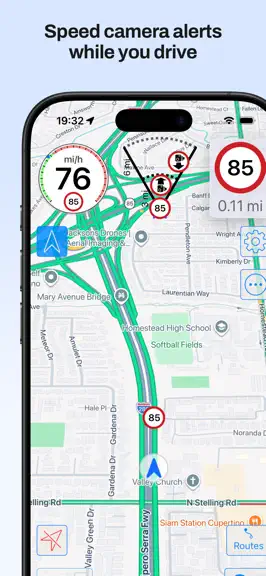
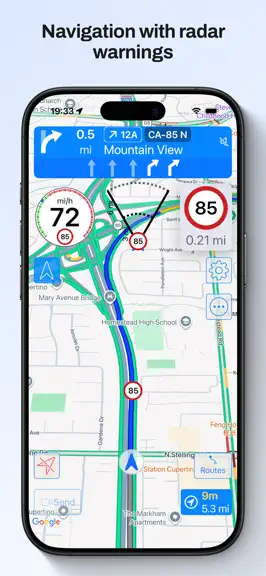
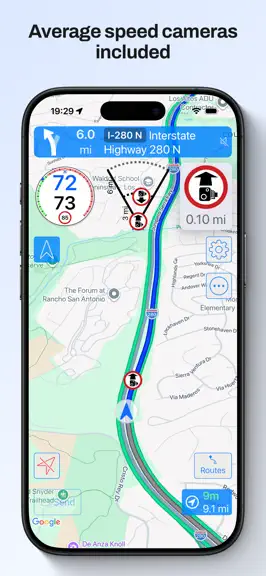
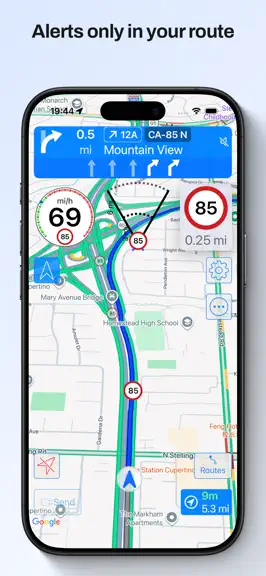
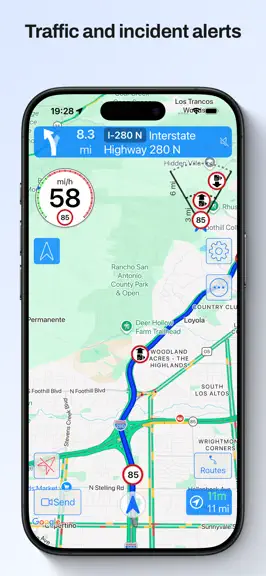
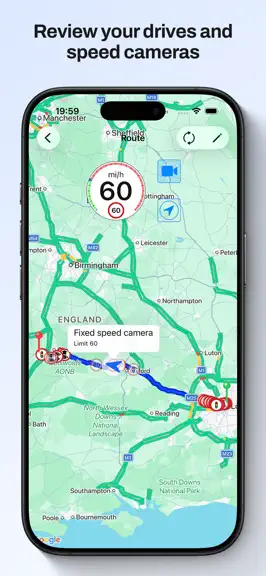
Enjoy driving with the best navigator, speed camera detector and real-time traffic information. Forget about fines and drive with peace of mind. MAIN FEATURES - 100% legal speed camera detector - Turn by turn GPS navigation, with lane guidance, spoken instructions, speed limits, and the speed camera detector fully integrated into the navigation - Automatic route recorder. Shows the total distance…
Trends & analysis
Chart rank trend
US · overallWhy it's surfacing
Scout 10Ratings & velocity
★ -0.01 in windowRating distribution
84% positive · 640 ratingsGeographic reach
best rank · 6 storefrontsRevenue & downloads trend
ARPU $0In-app purchases
10 tiersUpdate history
3 updates tracked- v8.5.013d ago
- Many fixes and improvements - CarPlay options menu on iPhone, you can change the CarPlay options also from there - Route recording export option to several file formats In previous versions: - CarPlay with map in Ultra version - Support for CarPlay metadata (maneuvers, lane guidance and more information) in the instrument cluster or in the HUD in units which support these features - All CarPlay scenes available: standard, dashboard and instrument cluster with metadata - Upcoming maneuvers in CarPlay displayed, as many as your units supports - Navigation alerts in CarPlay for warnings in your way (configured by default to be shown when the app is in background in CarPlay, only in Ultra version) - Support for iOS 26 - New gestures for CarPlay in iOS 26 and in units which support gestures New shortcuts for your automations: - Navigate to a favorite location - Navigate a route from your location going through its waypoints - Navigate to an address you provide - Open the detector in background - Activate / silence the navigation voice - Activate / silence the detector voice and sounds Route recorder: - When the app is started it records your path with the speed you have - You can check the speed you had when going through a speed camera or in any point - Distande and duration of each route - You can configure for how many days the routes are kept, and the minimum distance and duration to save them - You can disable the recording completely - This data is kept in your device, it is not sent anywhere Route planner: - You can plan a route, with intermediate waypoints, to check the speed cameras you will find in it taking into account the direction in which you shall pass them - Speed limits of the route - You can launch the navigation from the route, the best option will be calculted acoording to the current conditions of traffic and taking into account the waypoints it has Navigation: - Navigation integrated with speed camera warnings and traffic map. All in the same screen, no need to use several apps - Warnings of only the speed cameras with are in your route (configurable). Avoid false positives from nearby roads - Speed limits when navigating - Indication of the lanes to follow - Spoken instructions together with speed camera warnings - Navigation instructions in the Watch with indication of the lanes to follow - Notifications for the navigation instructions Others: - CarPlay with map in Ultra version - CarPlay with a list of the following warnings in pro version - You can choose the voice for the warnings and navigation according to the voices you have downloaded in your device - Shortcut to stop the detector - Shortcuts for the Watch app
- v8.4.21mo ago
- Many fixes and improvements - CarPlay options menu on iPhone, you can change the CarPlay options also from there - Route recording export option to several file formats In previous versions: - CarPlay with map in Ultra version - Support for CarPlay metadata (maneuvers, lane guidance and more information) in the instrument cluster or in the HUD in units which support these features - All CarPlay scenes available: standard, dashboard and instrument cluster with metadata - Upcoming maneuvers in CarPlay displayed, as many as your units supports - Navigation alerts in CarPlay for warnings in your way (configured by default to be shown when the app is in background in CarPlay, only in Ultra version) - Support for iOS 26 - New gestures for CarPlay in iOS 26 and in units which support gestures New shortcuts for your automations: - Navigate to a favorite location - Navigate a route from your location going through its waypoints - Navigate to an address you provide - Open the detector in background - Activate / silence the navigation voice - Activate / silence the detector voice and sounds Route recorder: - When the app is started it records your path with the speed you have - You can check the speed you had when going through a speed camera or in any point - Distande and duration of each route - You can configure for how many days the routes are kept, and the minimum distance and duration to save them - You can disable the recording completely - This data is kept in your device, it is not sent anywhere Route planner: - You can plan a route, with intermediate waypoints, to check the speed cameras you will find in it taking into account the direction in which you shall pass them - Speed limits of the route - You can launch the navigation from the route, the best option will be calculted acoording to the current conditions of traffic and taking into account the waypoints it has Navigation: - Navigation integrated with speed camera warnings and traffic map. All in the same screen, no need to use several apps - Warnings of only the speed cameras with are in your route (configurable). Avoid false positives from nearby roads - Speed limits when navigating - Indication of the lanes to follow - Spoken instructions together with speed camera warnings - Navigation instructions in the Watch with indication of the lanes to follow - Notifications for the navigation instructions Others: - CarPlay with map in Ultra version - CarPlay with a list of the following warnings in pro version - You can choose the voice for the warnings and navigation according to the voices you have downloaded in your device - Shortcut to stop the detector - Shortcuts for the Watch app
- v8.4.12mo ago
- Many fixes and improvements - CarPlay options menu on iPhone, you can change the CarPlay options also from there - Route recording export option to several file formats In previous versions: - CarPlay with map in Ultra version - Support for CarPlay metadata (maneuvers, lane guidance and more information) in the instrument cluster or in the HUD in units which support these features - All CarPlay scenes available: standard, dashboard and instrument cluster with metadata - Upcoming maneuvers in CarPlay displayed, as many as your units supports - Navigation alerts in CarPlay for warnings in your way (configured by default to be shown when the app is in background in CarPlay, only in Ultra version) - Support for iOS 26 - New gestures for CarPlay in iOS 26 and in units which support gestures New shortcuts for your automations: - Navigate to a favorite location - Navigate a route from your location going through its waypoints - Navigate to an address you provide - Open the detector in background - Activate / silence the navigation voice - Activate / silence the detector voice and sounds Route recorder: - When the app is started it records your path with the speed you have - You can check the speed you had when going through a speed camera or in any point - Distande and duration of each route - You can configure for how many days the routes are kept, and the minimum distance and duration to save them - You can disable the recording completely - This data is kept in your device, it is not sent anywhere Route planner: - You can plan a route, with intermediate waypoints, to check the speed cameras you will find in it taking into account the direction in which you shall pass them - Speed limits of the route - You can launch the navigation from the route, the best option will be calculted acoording to the current conditions of traffic and taking into account the waypoints it has Navigation: - Navigation integrated with speed camera warnings and traffic map. All in the same screen, no need to use several apps - Warnings of only the speed cameras with are in your route (configurable). Avoid false positives from nearby roads - Speed limits when navigating - Indication of the lanes to follow - Spoken instructions together with speed camera warnings - Navigation instructions in the Watch with indication of the lanes to follow - Notifications for the navigation instructions Others: - CarPlay with map in Ultra version - CarPlay with a list of the following warnings in pro version - You can choose the voice for the warnings and navigation according to the voices you have downloaded in your device - Shortcut to stop the detector - Shortcuts for the Watch app
RadarAll Speed Camera Detector — FAQ
How much money does RadarAll Speed Camera Detector make?
According to AppCurrents estimates, RadarAll Speed Camera Detector generates approximately $200–$1k per month (low confidence), modeled from its the App Store chart performance, rating velocity, and monetization signals.
How many downloads does RadarAll Speed Camera Detector get?
RadarAll Speed Camera Detector sees an estimated 500–2k downloads per month on the App Store, per AppCurrents modeling.
Is RadarAll Speed Camera Detector free?
RadarAll Speed Camera Detector is free to download on the App Store, monetizing through in-app purchases.
What is RadarAll Speed Camera Detector's rating?
RadarAll Speed Camera Detector holds a 4.43-star average from 653 ratings on the App Store.
When was RadarAll Speed Camera Detector released?
RadarAll Speed Camera Detector launched on the App Store on 06.06.2021. Its latest version shipped 22.07.2026.


