
PostHog Analytics - Hogly
PostHog Analytics - Hogly generates an estimated $6–$40/month in revenue from 20–90 downloads/month on the App Store, according to AppCurrents estimates (updated 2026-09-08).
| Est. revenue / month | $6–$40 |
|---|---|
| Est. downloads / month | 20–90 |
| Estimate confidence | low |
| Pricing | Free + IAP |
| Rating | 3.67 ★ (3 ratings) |
| Category | Developer Tools |
| Best chart rank | #86 Developer Tools Grossing |
| Released | 24.06.2026 |
| App last updated | 05.09.2026 |
| Platform | iOS |
Modeled monthly estimate · rating velocity · low confidence
About
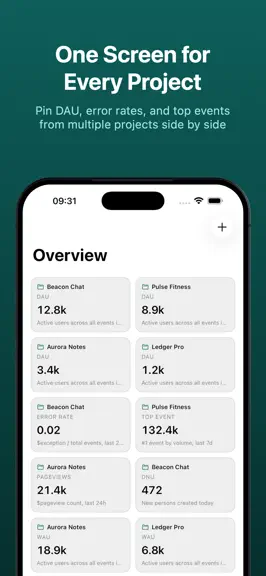
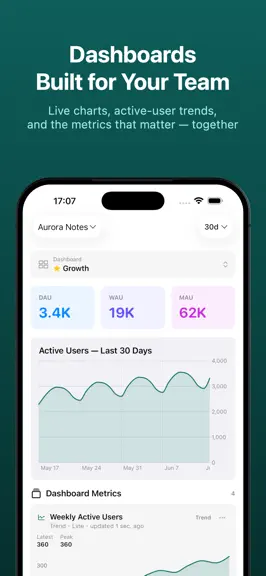
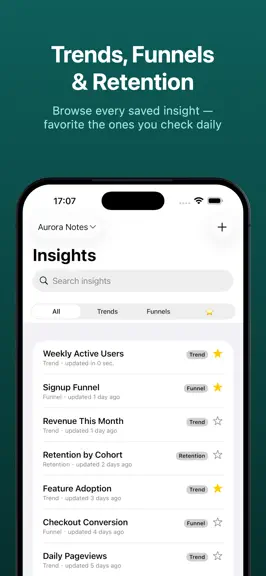
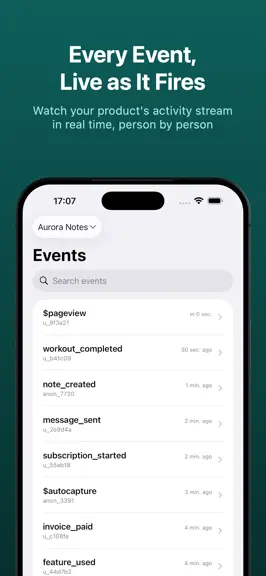
PostHog in your pocket. Hogly is a native product analytics dashboard and mobile command center for PostHog on iPhone and iPad. Monitor products, investigate behavior and errors, and reply to customer feedback away from your desk. PRODUCT ANALYTICS & DASHBOARDS • Bring key metrics from your PostHog projects together in Overview. • Browse dashboards and saved Insights as responsive native charts.…
Trends & analysis
Chart rank trend
US · categoryWhy it's surfacing
Scout 52Ratings & velocity
★ +3.67 in windowGeographic reach
best rank · 7 storefrontsRevenue & downloads trend
ARPU $0In-app purchases
2 tiersUpdate history
12+ updates tracked- v1.1.52d ago
NEW • Redeem App Store offer codes from the Pro screen. • See unread blog updates in Settings. IMPROVED • Follow a clearer guided tour with a refreshed replay demo, better navigation, and recovery if a step is interrupted. • Keep track of Support activity across projects and read replies with richer Markdown formatting. • See more accurate Last seen times and fresher customer details on Person profiles. • Enjoy clearer Settings and Pro screens with refreshed typography. • Find Hogly on the App Store under its new name: PostHog Analytics - Hogly.
- v1.1.47d ago
IMPROVED • Support ticket lists now clean Markdown punctuation escapes in previews, so replies show version numbers and punctuation normally. • Person detail can now surface past PostHog Support feedback alongside the customer context you already use in Hogly. • Trend formula cards now keep the selected series stable while metrics refresh.
- v1.1.38d ago
NEW • Hogly is now localized for German, Spanish, French, Portuguese, and regional English storefronts. • The Pro paywall can now support a hard-paywall experiment for connected PostHog workspaces, so upgrade decisions can be tested more clearly. IMPROVED • Active Users now uses the same person-aware counting across Overview and Project Detail, with clearer metric help on the card. • AI notebook links open more reliably, Support replies display cleaner punctuation, and the Rate Us prompt explains how ratings help Hogly. • App Store listing text and media now match Hogly's current product positioning across the supported locales. • Required Pro screens now return after relaunch when needed, and every Pro entry point shows the full unlock list with the most relevant benefit first. • Lock Screen widgets now refresh Overview metrics directly from their widget timeline instead of waiting for the main app cache.
- v1.1.214d ago
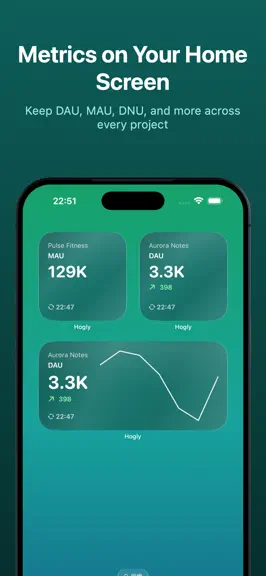
NEW • Add Home Screen widgets for saved Insights and Overview metrics, including Trends, Funnels, Stickiness, Lifecycle, Retention, and Pie charts. • Lock Screen widgets now turn each metric into a compact, truthful mini insight, with chart-specific presentations for trends, bars, funnels, percentages, and lifecycle states. • Daily Brief is now fully free, with richer morning notifications and a redesigned report for active users, new users, pageviews, and top events across every project. IMPROVED • Widget setup previews now match the source analytics card more closely, with complete insight choices, clearer values, project icons, themes, and timestamps across Small, Medium, and Large. • Larger breakdowns remain readable, while dark-mode icons and Pro-locked previews have been refined. • RevenueCat customer links stay available even when a Person has no attribution, and Support participant avatars are preserved more reliably. • The iOS feature hub is now Console, with clearer navigation and the same customizable shortcuts. • Premium boundaries are clearer: Support stays ready to compose until Send, Natural time ranges are consistently marked Pro, and Replay keeps playback focused in Hogly. • Project Summary widgets refresh their own data more reliably, and Widget Gallery previews now use Hogly's current teal theme. • Total Events and Sessions details are cleaner and keep the focus on the metrics that matter. • Project Summary DNU now opens New Users for the last 24 hours, and Person metadata rows stay stable while details load.
- v1.1.120d ago
NEW • Overview refreshes now keep your current metrics visible while each card shows its own progress, completion, or timeout state. Timed-out cards can be retried independently. • Support conversations now surface a customer's reported session and recent Replays, with the reported session first and existing Replay permissions and Pro playback rules preserved. • Person profiles now separate web first touch, native install evidence, and RevenueCat linkage, so unknown attribution stays honest. • Replay Vision turns captured Replays into clear intent, outcome, friction, and timestamp evidence you can act on. • Support conversations now let you send image attachments alongside text replies. IMPROVED • Unread creator replies now show a red dot on the Settings tab and DM the Creator, even when push notifications are off. • Support replies now preserve PostHog author names and show project-aware User/Me identities with participant avatars. • A one-time Settings hint now guides you to alternate App Icons and disappears after you open the gallery. • Clearer refresh completion messages when only some projects update. • RevenueCat customer links now open the correct project, while related project settings stay in sync across your devices. • Person lists now respect your selected time range, and analytics start with a focused seven-day view. • New connections now begin with helpful project summary cards and more reliable navigation throughout the app. • Person profiles now open retained Replays directly, and Support customer headers make navigation clearer. • Replay analysis now has one focused Replay Vision experience instead of duplicate summary controls. • Overview completion feedback now appears only once when multiple refreshes overlap. • OAuth access is now managed at the account level, making authorization and recovery consistent across every connected organization and project. • Every Trends series now uses the same searchable event picker when creating or editing an insight. • Native search now finds people, projects, and cards across Overview and project pages, with more reliable dismissal and reopening. • RevenueCat customer links open the matching Hogly Person and project, while Dashboard and Person detail pages use tighter, clearer layouts. • Replay Vision and Support now show background analysis and delivery progress more clearly. • The new connection screen explains the direct PostHog data path, adds a playful mascot handoff, and links to Hogly’s privacy guide and Blog. • What’s New now shows the date of the installed app build. • General reliability improvements.
PostHog Analytics - Hogly — FAQ
How much money does PostHog Analytics - Hogly make?
According to AppCurrents estimates, PostHog Analytics - Hogly generates approximately $6–$40 per month (low confidence), modeled from its the App Store chart performance, rating velocity, and monetization signals.
How many downloads does PostHog Analytics - Hogly get?
PostHog Analytics - Hogly sees an estimated 20–90 downloads per month on the App Store, per AppCurrents modeling.
Is PostHog Analytics - Hogly free?
PostHog Analytics - Hogly is free to download on the App Store, monetizing through in-app purchases.
What is PostHog Analytics - Hogly's rating?
PostHog Analytics - Hogly holds a 3.67-star average from 3 ratings on the App Store. It currently ranks #86 on the Developer Tools grossing chart.
When was PostHog Analytics - Hogly released?
PostHog Analytics - Hogly launched on the App Store on 24.06.2026. Its latest version shipped 05.09.2026.


