
Planning Center Services
Planning Center Services generates an estimated $0/month in revenue from 700–3k downloads/month on the App Store, according to AppCurrents estimates (updated 2026-10-02).
| Est. revenue / month | $0 |
|---|---|
| Est. downloads / month | 700–3k |
| Estimate confidence | high |
| Pricing | Free |
| Rating | 3.74 ★ (2,187 ratings) |
| Category | Business |
| Best chart rank | #94 Business Free |
| Released | 26.08.2009 |
| App last updated | 21.09.2026 |
| Platform | iOS |
Modeled monthly estimate · rating velocity · high confidence


About
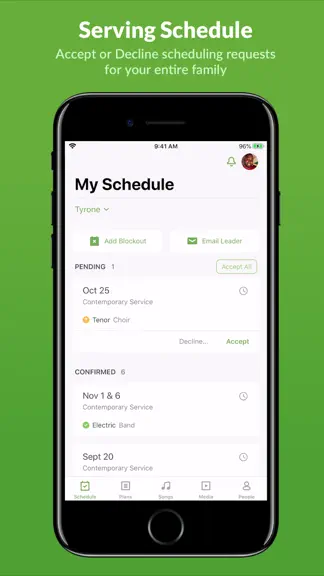
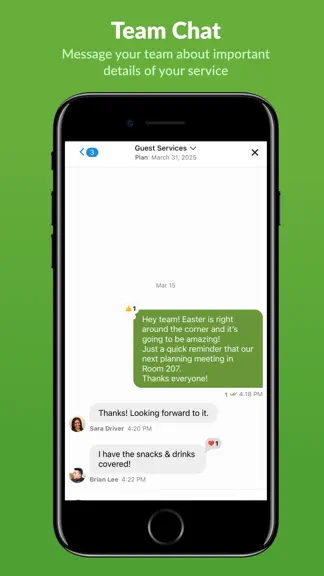
You must already have an account at Planning Center to use this mobile app. The Planning Center Services app is the best way to access your Planning Center Services account on your iOS device. Planning Center Services is an online scheduling and worship planning application to keep your staff and volunteers connected. With our native app, you get an optimized Planning Center experience wherever y…
Trends & analysis
Chart rank trend
US · categoryWhy it's surfacing
Scout 10Ratings & velocity
★ 0 in windowRating distribution
64% positive · 2k ratingsGeographic reach
best rank · 1 storefrontRevenue & downloads trend
ARPU $0Update history
12+ updates tracked- v6.11.211d ago
New - Account Settings: You can now manage your account settings right from the app. No more bouncing over to a browser to get it done. Improved - Fresh App Icon: Your app icon got a little shine to match Apple's new Liquid Glass look. - Interface Polish: Cleaned up filter chips, icons, colors, and spacing in a bunch of small spots across the app. Nothing dramatic, just tidier. Fixed - Teams Tab on iPad: Scheduled Viewers can now see the Teams tab and use Split View on their scheduled plans. It was only working on iPhone before. Reined in. - Team Options Menu: Tapping the team options menu now actually opens it. No more holding it down like you're waiting for a jump scare. - Chat Video and Keyboard Hiccups: Videos no longer restart themselves after you've already watched or closed them, and the keyboard behaves when it loses focus in chat.
- v6.11.121d ago
We gave the app a shine with Liquid Glass and squashed a couple of pesky bugs along the way. New: - Liquid Glass design: Services iOS now sports Apple's Liquid Glass look, with refreshed menus, buttons, and sheets throughout the app. Fresh coat of paint, same great scheduling. Improved: - Smarter menus: Menus across Plan, Teams, and Songs now use Apple's native menu style for a more consistent, familiar feel. Tap away. - Relaunch to last plan: Opening the app now takes you right back to the plan you were last viewing. No more digging. Fixed: - Team options menu: The team options menu in Plan > Teams now opens like it should. No more dead taps. - Song filter stacking: You can apply a second filter after filtering songs by text now. Filter away.
- v6.11.024d ago
We gave the app a shine with Liquid Glass and squashed a couple of pesky bugs along the way. New: - Liquid Glass design: Services iOS now sports Apple's Liquid Glass look, with refreshed menus, buttons, and sheets throughout the app. Fresh coat of paint, same great scheduling. Improved: - Smarter menus: Menus across Plan, Teams, and Songs now use Apple's native menu style for a more consistent, familiar feel. Tap away. - Relaunch to last plan: Opening the app now takes you right back to the plan you were last viewing. No more digging. Fixed: - Team options menu: The team options menu in Plan > Teams now opens like it should. No more dead taps. - Song filter stacking: You can apply a second filter after filtering songs by text now. Filter away.
- v6.10.51mo ago
A couple of small fixes and some chat tune-ups behind the scenes. - Improved Chat reliability: Updated some of the technology behind chat to keep messages syncing smoothly. You probably won't notice, and that's the point. - Fixed Plan screen title glitch: The Plan screen was showing an oversized title that didn't belong. Sized it back down. Widget date display: Your home screen widget was showing dates like "Mon 3th" instead of "Mon 3rd." Grammar gremlins evicted.
- v6.10.41mo ago
A couple of small fixes and some chat tune-ups behind the scenes. - Improved Chat reliability: Updated some of the technology behind chat to keep messages syncing smoothly. You probably won't notice, and that's the point. - Fixed Plan screen title glitch: The Plan screen was showing an oversized title that didn't belong. Sized it back down. Widget date display: Your home screen widget was showing dates like "Mon 3th" instead of "Mon 3rd." Grammar gremlins evicted.
Planning Center Services — FAQ
How many downloads does Planning Center Services get?
Planning Center Services sees an estimated 700–3k downloads per month on the App Store, per AppCurrents modeling.
Is Planning Center Services free?
Planning Center Services is free to download on the App Store, with no in-app purchases detected.
What is Planning Center Services's rating?
Planning Center Services holds a 3.74-star average from 2,187 ratings on the App Store. It currently ranks #94 on the Business free chart.
When was Planning Center Services released?
Planning Center Services launched on the App Store on 26.08.2009. Its latest version shipped 21.09.2026.


