
Paint by Code
Paint by Code generates an estimated $700–$12k/month in revenue from 500–2k downloads/month on the App Store, according to AppCurrents estimates (updated 2026-10-02).
| Est. revenue / month | $700–$12k |
|---|---|
| Est. downloads / month | 500–2k |
| Estimate confidence | medium |
| Pricing | Paid $3.99 |
| Rating | 0.00 ★ (0 ratings) |
| Category | Graphics & Design |
| Best chart rank | #53 Graphics & Design Paid |
| Released | 16.07.2026 |
| App last updated | 10.09.2026 |
| Platform | iOS |
Modeled monthly estimate · rating velocity · medium confidence
About
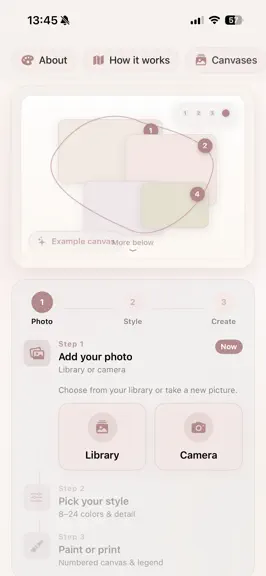
Paint by Code turns your favorite photos into beautiful paint-by-numbers canvases — ready to color in the app or print at home. HOW IT WORKS 1. Add a photo from your library or camera 2. Choose your style — 8 to 24 colors, detail level, and canvas format 3. Generate your numbered canvas with a matching color legend 4. Paint in the app with Apple Pencil, or export to print FEATURES • Smart region…
Trends & analysis
Chart rank trend
US · categoryWhy it's surfacing
Scout 42Ratings & velocity
Geographic reach
best rank · 1 storefrontRevenue & downloads trend
ARPU $3Update history
1 update tracked- v1.322d ago
This 1.3 update is again insane : Added : Tab bar — Create, Canvases, and Settings as first-class homes (Paint Studio / result stay fullscreen) Language — System / English / Nederlands, with a full Dutch string catalog across Create, Customize, Processing, Gallery, Settings, Paint Studio, and export Look presets on Customize — Poster, Soft watercolor, Bold comic (one-tap colors, smoothing, region size, and line style) Before ↔ After compare slider on Your Canvas — drag to compare quantized photo vs painted result Stats — quiet paint-time tracking (today, this week, active days, average, busiest day, week chart, library counts); no streaks or badges App Settings — default pencil brand, Paint Studio defaults, new-canvas defaults, Resume tile, haptics, keep screen awake, preferred look, Rate, Send feedback Firebase feedback — Settings → Send feedback writes to my Paint by Code Firestore project Gallery folders — create, rename, delete folders; filter chips; move canvases into folders Gallery multi-select — select many canvases, then Move or Delete Gallery swipe-to-delete with confirmation Clear selected photo on Create — dismiss preview and return to pick Library / Camera Resume last canvas on Create — shows last opened (relative time) under the wizard Collapsible Settings sections with live summaries when closed About & how it works as one Settings row (was separate Create toolbar actions) Changed Create wizard redesigned — cleaner step flow, richer Library/Camera rows, look chips after photo pick, clearer Continue to Customize; iPad side-by-side layout Create copy emphasizes digital coloring (not only print) Create tab label in Dutch: Nieuw (instead of “Maken”) Customize: step 3 of 3 header; photo preview removed so controls use full width Paint Studio: pinch to zoom while drawing (1 finger / Pencil draws; pinch zooms; 2 fingers pan) — Zoom mode optional for one-finger pan Gallery list layout — wider thumbnails, denser rows, horizontal header Opening a saved canvas no longer freezes the UI (background load + “Opening canvas…”) Export options sheet opens larger by default Settings collapse animation stays inside its own card (no content flying over neighbors) Localization uses the active in-app language reliably (Paint Studio status tips, gallery counts, export titles, resume dates) Fixed Language switch no longer remounts the whole app (avoids SIGKILL / jetsam on device) Dutch UI still showing English in Settings summaries, Create copy, resume dates, and Paint Studio status (“Draw with finger or Apple Pencil”) Rate / review button: clearer behavior in Simulator vs live App Store review link Canvas open felt stuck — heavy decode work moved off the main thread; gallery no longer decodes huge segmentation JSON just to list items Removed Example / teaser canvas on Create (tabs replace the old home chrome) Separate Create toolbar for About / How it works Tip strip under Create after Resume moved into the wizard flow
Paint by Code — FAQ
How much money does Paint by Code make?
According to AppCurrents estimates, Paint by Code generates approximately $700–$12k per month (medium confidence), modeled from its the App Store chart performance, rating velocity, and monetization signals.
How many downloads does Paint by Code get?
Paint by Code sees an estimated 500–2k downloads per month on the App Store, per AppCurrents modeling.
Is Paint by Code free?
Paint by Code is a paid app priced at $3.99 on the App Store.
When was Paint by Code released?
Paint by Code launched on the App Store on 16.07.2026. Its latest version shipped 10.09.2026.
Apps like Paint by Code
See all alternatives → ProcreateGraphics & Design · $300k–$5.0M/mo
 Reface: AI Face Swap & EditorGraphics & Design · $270k–$1.5M/mo
 AI Maker: Photo Video FiltersGraphics & Design · $240k–$1.3M/mo
 Nomad SculptGraphics & Design · $100k–$1.7M/mo
 ThemePack: Widgets & WallpaperGraphics & Design · $160k–$850k/mo
 Artmate: Drawing TogetherGraphics & Design · $140k–$790k/mo