
Open Relay - Open WebUI Client
Open Relay - Open WebUI Client generates an estimated $2k–$32k/month in revenue from 500–2k downloads/month on the App Store, according to AppCurrents estimates (updated 2026-10-02).
| Est. revenue / month | $2k–$32k |
|---|---|
| Est. downloads / month | 500–2k |
| Estimate confidence | medium |
| Pricing | Paid $9.99 |
| Rating | 4.97 ★ (32 ratings) |
| Category | Productivity |
| Best chart rank | #86 Productivity Paid |
| Released | 11.03.2026 |
| App last updated | 02.10.2026 |
| Platform | iOS |
Modeled monthly estimate · rating velocity · medium confidence

About
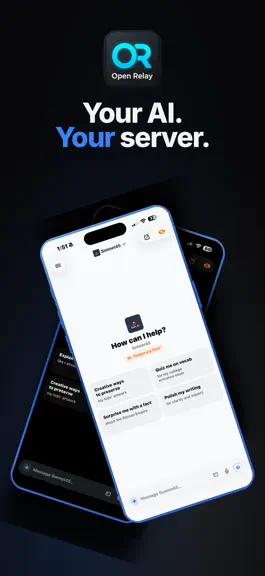
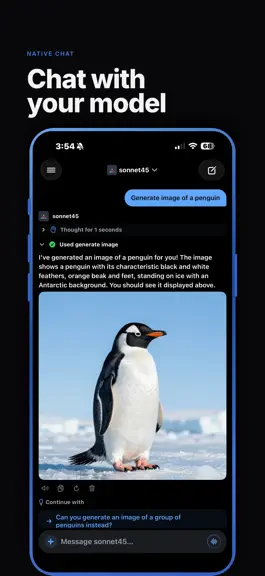
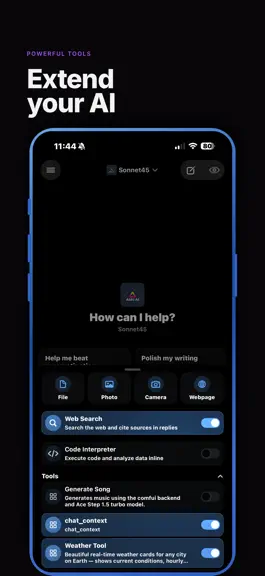
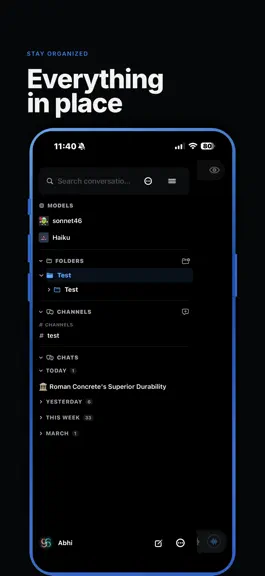
Your AI. Your server. Your pocket. Open Relay is a 100% native iOS & iPadOS client for Open WebUI. Chat with any model on your server, right from your iPhone or iPad, with a fast, polished experience that feels native. — STREAMING CHAT WITH RICH MARKDOWN — Watch responses flow in word by word with full markdown rendering — syntax-highlighted code blocks, tables, math equations, Mermaid diagrams…
Trends & analysis
Chart rank trend
US · categoryWhy it's surfacing
Scout 27Ratings & velocity
★ -0.03 in windowRating distribution
100% positive · 18 ratingsGeographic reach
best rank · 1 storefrontRevenue & downloads trend
ARPU $7Update history
12+ updates tracked- v6.1.1today
IMPROVEMENTS • The chat top bar now hides and reappears smoothly in step with your scrolling. BUG FIXES • Fixed chats jumping around when scrolling quickly, and short conversations shifting as soon as you scroll. • Fixed extra blank space below dictated text in the message box.
- v6.12d ago
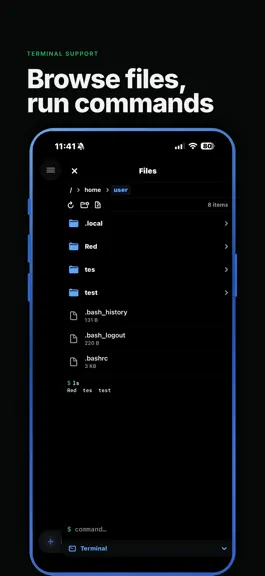
WHAT'S NEW • Redesigned channels with Liquid Glass on iOS 26 — glass nav bar and message box, quick reactions, cleaner bubbles, date labels, thread badges, and a floating "is typing" bubble. • Tap an avatar in a channel to see a profile card and start a DM. • Reply inside threads. On iPad, threads open in a side panel. • Channel webhooks — create, rename, set an avatar, copy the URL, or delete. • / prompt shortcuts and voice dictation in channel and thread message boxes. • Model replies in channels now show reasoning and tool calls. • Redesigned terminal file browser — search, sort, hidden files, multi-select, move, ZIP download, drag and drop, and new files. • Open and edit files right in the terminal panel — code, Markdown, JSON, CSV, HTML, images, PDFs, video and audio — and compare two files side by side. • Upload folders and photos to the terminal, and download any folder as a ZIP. • See running ports and preview them in the app or Safari. • Commands the model runs appear as live tabs next to your shell. • Edit calendar events (including repeating series), set custom repeats, respond to invitations, and manage calendars. • Chat about a note, share notes with people or groups, and keep attachments and voice recordings with your notes. • Chat Controls show context usage, with a Compact Context button. • Models with chat variables ask for them before your first message. • Connect tools that need sign-in right from the tools menu. • Client certificate (mTLS) support for servers behind certificate-protected proxies. IMPROVEMENTS • Channel members, pinned messages and @mentions now search the whole server, load more as you scroll, and are easier to manage. • Channels show edited labels, highlight replies to you, confirm deletes, and have a smarter scroll-to-bottom button. • Swipe-to-reply follows the bubble direction, and sidebar channel rows have a cleaner look with DM statuses. • The terminal matches your theme, supports pinch-to-zoom, is resizable, and has a new key bar with Esc, Tab, Ctrl/Alt and arrows. • The file browser follows the model's working folder and refreshes automatically, with progress for uploads and downloads. • Faster Read Aloud and voice call replies. • Consistent native toolbar and close buttons across the app. BUG FIXES • Fixed the app crashing on launch on iOS 18. • Voice calls: better audio routing, more natural interruptions, your chosen voice returns after the background, and settings apply instantly. • Fixed user pickers and @mentions only showing the first 30 users. • Fixed many channel issues — reactions, thread typing indicators, deleted messages, admin edits, group manager permissions, webhook avatars, stuck bot replies, and unread counts. • Fixed tool confirmations, input requests, sign-in states, web search confirmation, and live previews. • Fixed responses hanging on unsupported server requests and filtered replies showing original text. • PDF chat export now works on newer servers. • Fixed task list status changes that weren't saved. • Fixed many terminal issues — per-chat workspaces, connection status, reconnecting, custom home folders, renaming, and duplicate download names. • Notes: unsaved edits are kept if a save fails, and fixed renaming, pinning, read-only sharing and server search. • Fixed calendar loading, "None" reminders, and default calendar selection. • Fixed automations with terminals, and edits resetting their settings. • Fixed ComfyUI connection verification and model editor custom parameters.
- v6.03d ago
WHAT'S NEW • Introducing Apple Watch companion app — talk to your assistant without lifting your phone directly from your watch! Read and reply to your chats and channels, Ask with Siri ("Ask Open Relay…"), the Action button or Control Center, add Talk or your latest chat to your watch face and Smart Stack, get notified when a reply is ready, and hand off any chat to your iPhone. Check status in Settings → Apple Watch. • Sign in with passkeys through the system browser on self-hosted identity providers like Keycloak or Authentik (optional, under Advanced; requires server setup). • Reply to chat and channel notifications right from the notification, on iPhone or Apple Watch. • Files shown by terminal tools (videos, audio, images, documents) now appear as cards you can play, open, or save — nothing downloads until you tap. • Search your files and knowledge bases on the server when attaching, browse documents inside a knowledge base, and choose Focused Retrieval or Entire Document per attachment (with a default in Settings → Chat Behavior). • Added a Files filter to Library Search — find uploaded files by name and text inside Knowledge documents, then preview, save, or share them. IMPROVEMENTS • Smoother, lighter chats: less CPU while showing thinking, lower memory use in long conversations, faster chat loading, and images that download once and are reused. • The Models section in the sidebar can now be collapsed like the other sections, and remembers your choice. • Replies now stream in as a smooth, steady flow on iPhone and iPad — no slow start, no bursts of text, and the chat glides along with new text instead of jumping line by line. Scrolling through chats is also smoother on 120Hz screens. BUG FIXES • Fixed the model editor (Workspace and Admin) missing options that Open WebUI has: a Terminal picker to choose which terminal new chats start with, the Memory capability, and the Ask User built-in tool. Sections now show or hide based on the capabilities you've turned on, just like the web. • Fixed saving a model from the app erasing settings made on the web (translations, default terminal and more), and the model's TTS voice not being saved in a way the server could use. • Fixed the "auto-scroll while streaming" setting being ignored — replies no longer follow to the bottom when it's turned off. • Fixed paragraphs in long replies sometimes running together with no space between them. • Fixed a glitchy animation when tapping a suggested follow-up or sending a new message. • Fixed a large blank space below finished replies in longer chats. • Fixed the read-aloud player covering the model selector — it now sits below the chat header. • Fixed the sidebar buttons sitting lower than the chat toolbar buttons. • Fixed long dictations showing the start of the text instead of where you left off. • Fixed the @, #, / and $ pickers sometimes staying open after typing a space. • Fixed attached files and knowledge being forgotten or coming back after removal in follow-up messages, and folder knowledge not being used.
- v5.95d ago
WHAT'S NEW • All-new voice calls — faster, smarter conversations that feel natural: – Talk over the AI to interrupt it naturally. – Keeps working when you lock your phone or switch apps (server tts required). – Shows in the Dynamic Island and on the Lock Screen with Mute and End buttons, and no longer fills your phone's Recents. – Starts replying as soon as the first sentence is ready. – Uses Apple's new speech recognition on iOS 26, or on-device Parakeet / Qwen3. • New Voice settings (Settings → Voice) — the assistant's voice, your language, dictation, voice calls and downloaded models, all in one place. Includes advanced tuning and live diagnostics for voice calls. • Dictation can stop automatically after a short silence. • Full-screen library search — find chats, folders, knowledge bases and text inside documents, with the matching part highlighted. Tap the magnifying glass in the sidebar. • Hide the suggested prompts on new chats (Settings → Chat Behavior → New Chats). • Hide the voice-mode button in the message box (Settings → Chat Behavior → Composer). IMPROVEMENTS • Thinking streams live as the AI reasons, and replies type out smoothly. • Swipe right anywhere on a chat to open the sidebar. • Subtler blur behind the status bar. • The top bar now hides and reappears instantly as you scroll. • Close buttons across the app now use the standard iOS style. • Dictation recordings are no longer lost when transcription fails — retry, transcribe on device, save/share the audio, or discard it. BUG FIXES • Fixed tool results briefly showing as garbled text while a reply loads. • Fixed starting prompts sometimes missing on the welcome screen. • Fixed dictation sometimes using the wrong speech engine. • Fixed extra divider lines in the sidebar when Channels is turned off. • Fixed long dictated messages being cut off and impossible to scroll through in the message box.
- v5.88d ago
WHAT'S NEW • Added custom Shortcut message actions — create buttons in Settings → Chat Behavior → Message Actions that send any AI response directly to an Apple Shortcut as text input. • When offline with cached chats available, the app now shows a slim dismissible banner instead of a blocking overlay — you can browse saved conversations and tap any previously opened chat to read it without a connection. IMPROVEMENTS • Expanding long reasoning/thinking blocks is now ~70× faster and no longer blocks scrolling • Sidebar now loads from a local cache instantly, then only re-fetches what changed — first open after launch is noticeably faster. • Recent chats reopen without a network round-trip and recheck in the background (Settings → Storage → Conversation Cache to configure). • On iOS 26, the chat toolbar background can now be made transparent in Settings → Appearance → Chat Appearance (off by default — existing look is preserved). • Sidebar and terminal file browser slide in/out without shrinking the main view and causing visual glitch. • Chat input field now gives text its own full-width row when typing or keyboard is visible, with consistent left alignment and better-spaced internal padding • Reduced unnecessary network activity — opening a chat respects the last successful sync timestamp instead of always hitting the server again. • Models, starter prompts, channels, and feature flags now reload automatically when internet comes back after the app was started offline — no restart needed. BUG FIXES • Fixed main view showing black/stuck-offset when returning to the app after backgrounding with the sidebar or file browser open • Fixed terminal file browser closing when returning from background (e.g. after a script prompted to run in background) — it now stays open so you can continue working in the terminal • Fixed fabs only responding to taps on the left edge — the full button area is now tappable. • Fixed hidden background chats unnecessarily syncing with the server when the app returns to the foreground. • Fixed duplicate conversation and folder list refreshes occurring on every socket reconnect.
Open Relay - Open WebUI Client — FAQ
How much money does Open Relay - Open WebUI Client make?
According to AppCurrents estimates, Open Relay - Open WebUI Client generates approximately $2k–$32k per month (medium confidence), modeled from its the App Store chart performance, rating velocity, and monetization signals.
How many downloads does Open Relay - Open WebUI Client get?
Open Relay - Open WebUI Client sees an estimated 500–2k downloads per month on the App Store, per AppCurrents modeling.
Is Open Relay - Open WebUI Client free?
Open Relay - Open WebUI Client is a paid app priced at $9.99 on the App Store.
What is Open Relay - Open WebUI Client's rating?
Open Relay - Open WebUI Client holds a 4.97-star average from 32 ratings on the App Store. It currently ranks #86 on the Productivity paid chart.
When was Open Relay - Open WebUI Client released?
Open Relay - Open WebUI Client launched on the App Store on 11.03.2026. Its latest version shipped 02.10.2026.


