
NutriSnap: Calorie Counter
NutriSnap: Calorie Counter generates an estimated $500–$3k/month in revenue from 100–700 downloads/month on the App Store, according to AppCurrents estimates (updated 2026-09-01).
| Est. revenue / month | $500–$3k |
|---|---|
| Est. downloads / month | 100–700 |
| Estimate confidence | low |
| Pricing | Free + IAP |
| Rating | 5.00 ★ (5 ratings) |
| Category | Health & Fitness |
| Released | 10.07.2026 |
| App last updated | 04.08.2026 |
| Platform | iOS |
Modeled monthly estimate · rating velocity · low confidence
About
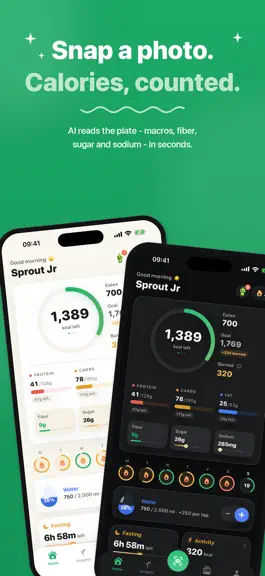
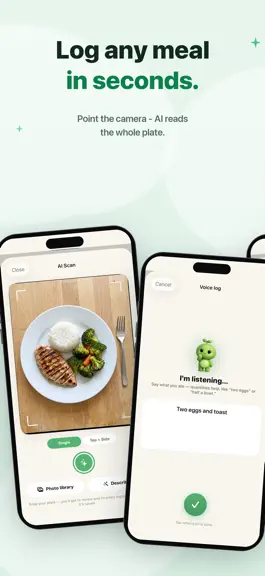
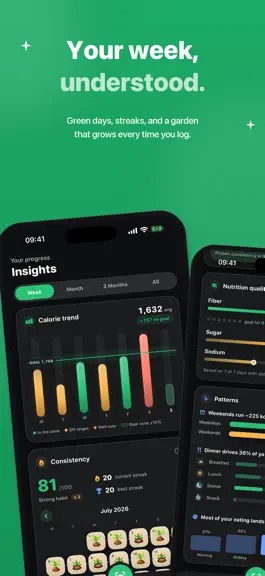
Point your camera at your plate and know what's on it — calories, protein, carbs, and fat, estimated in seconds by AI. And NutriSnap shows its work: see every ingredient it found, adjust portions, and fix anything before it's saved. PRIVATE BY DESIGN No ads. No selling your data. Your food log stays yours. Top + Side scan reads two angles for thickness and depth. Rename ingredients, tweak amount…
Trends & analysis
Chart rank trend
US · overallWhy it's surfacing
Scout 34Ratings & velocity
★ 0 in windowRating distribution
100% positive · 3 ratingsGeographic reach
best rank · 0 storefrontsRevenue & downloads trend
ARPU $4In-app purchases
4 tiersUpdate history
2 updates tracked- v1.71mo ago
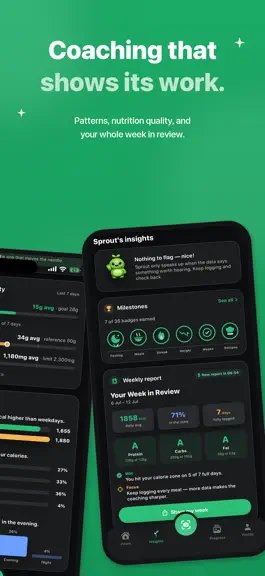
ACTIVITY, IN ONE PLACE Tap Activity on your home screen and the whole picture opens up: this week at a glance, today's sessions, and two weeks of history. Your Apple Watch workouts arrive on their own — Running, Cycling, Strength, and the rest — right beside the ones you log by hand. COUNTED ONCE Apple Health's active energy already includes your Watch workouts, so NutriSnap no longer adds them a second time. A run your Watch recorded and you also logged is one run now. A gym session your Watch never saw still counts in full. One heads-up: if you sync Apple Health, log workouts by hand, and have "add burned calories to budget" turned on, your daily budget may read a little lower than it used to. The old number was counting the same workout twice. REVIEW & FIX, REBUILT The screen you see after every scan finally got the attention it deserved. The photo, the meal name and the totals now live in one card, ingredients read as a clean list, and the full nutrient panel — saturated fat, added sugars, cholesterol, potassium, calcium, iron and vitamin D — shows up where you can actually see it. Editing a saved meal no longer quietly drops those values. We softened the language too. Portions are an estimate and always were; that's why they're editable. It didn't need saying five times on one screen. SMALLER THINGS • Trends, Nutrition and Milestones are a proper segmented control now, so it's obvious you can switch between them • Slimmer meal headers in Today's diary — a real difference in dark mode • The ingredient and portion pickers open and close smoothly instead of snapping shut • The meal picker is easier to read in dark mode
- v1.41mo ago
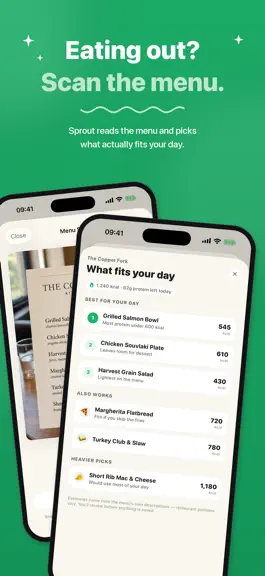
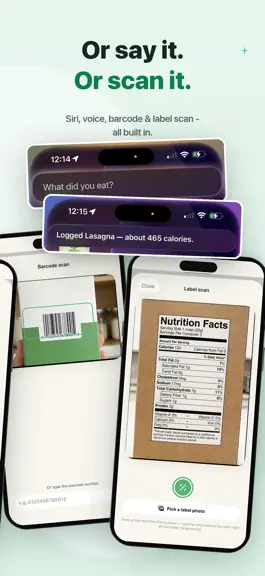
NutriSnap 1.4 is our biggest release yet: • Menu Scan — point your camera at a restaurant menu and NutriSnap reads it, then ranks the dishes that fit what's left of your day: calories, protein, all of it. Ordering out just got easy. • Your plan, made personal — new setup questions that actually change your targets: how you want to lose it (keep your muscle, or trade fat for muscle), weekend flex (eat more on weekends, weekly total unchanged), day type, dieting history, meal rhythm, and cycle-aware weigh-ins. Already set up? Answer anytime in Profile → "Have things changed?" • Dark mode — the whole app, hand-tuned to feel calm and premium at night. Follow your system setting or pin it in Profile → Appearance. • Fix it with AI — scan result slightly off? Tell Sprout what the camera missed and Sprout corrects the estimate. Free, on every AI scan. • Bring your history — import food-diary and weight CSVs from MyFitnessPal, Lose It, and similar trackers. Re-imports never duplicate. • Widgets, rebuilt — a proper dark mode plus quick actions: scan a meal, scan a menu, or log a glass of water straight from your Home Screen. • Your week at a glance — a new strip on Home shows every day's ring and streak flame. • Charts, redesigned — your calorie trend drawn honestly with a goal-zone band and over days that rise past the track, plus a new weight chart with a smoother curve and cleaner range switching. • Steps on your Activity card via Apple Health. • Plus: better barcode coverage for store brands, a tighter Home layout, a more delightful plan reveal, deeper day details, smarter sugar & sodium meters, a proper welcome when you go Pro, and dozens of polish fixes. Private by design: no ads, no selling your data — your food log stays yours.
NutriSnap: Calorie Counter — FAQ
How much money does NutriSnap: Calorie Counter make?
According to AppCurrents estimates, NutriSnap: Calorie Counter generates approximately $500–$3k per month (low confidence), modeled from its the App Store chart performance, rating velocity, and monetization signals.
How many downloads does NutriSnap: Calorie Counter get?
NutriSnap: Calorie Counter sees an estimated 100–700 downloads per month on the App Store, per AppCurrents modeling.
Is NutriSnap: Calorie Counter free?
NutriSnap: Calorie Counter is free to download on the App Store, monetizing through in-app purchases.
What is NutriSnap: Calorie Counter's rating?
NutriSnap: Calorie Counter holds a 5.00-star average from 5 ratings on the App Store.
When was NutriSnap: Calorie Counter released?
NutriSnap: Calorie Counter launched on the App Store on 10.07.2026. Its latest version shipped 04.08.2026.
Apps like NutriSnap: Calorie Counter
See all alternatives → Planet FitnessHealth & Fitness · $4.5M–$25M/mo
 Flo Cycle & Period TrackerHealth & Fitness · $4.5M–$24M/mo
 Strava: Run, Bike, WalkHealth & Fitness · $2.5M–$8.4M/mo
 StepUp Pedometer Step CounterHealth & Fitness · $1.3M–$7.1M/mo
 Me+ Lifestyle RoutineHealth & Fitness · $960k–$5.1M/mo
 MyFitnessPal: Calorie CounterHealth & Fitness · $1.1M–$3.9M/mo