
Notes — Markdown Editor
Notes — Markdown Editor generates an estimated $0/month in revenue from 0 downloads/month on the App Store, according to AppCurrents estimates (updated 2026-08-02).
| Est. revenue / month | $0 |
|---|---|
| Est. downloads / month | 0 |
| Estimate confidence | low |
| Pricing | Paid $9.99 |
| Rating | 0.00 ★ (0 ratings) |
| Category | Productivity |
| Released | 03.04.2026 |
| App last updated | 28.07.2026 |
| Platform | iOS |
Modeled monthly estimate · rating velocity · low confidence

About
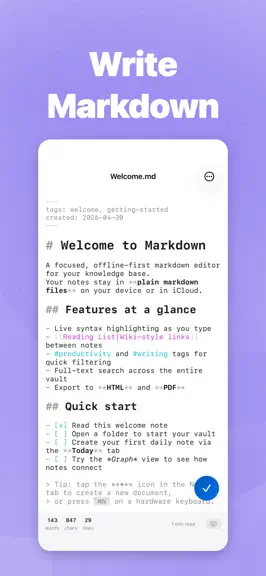
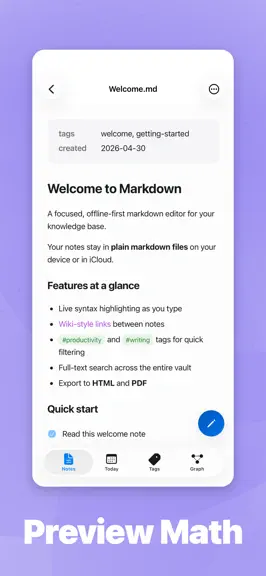
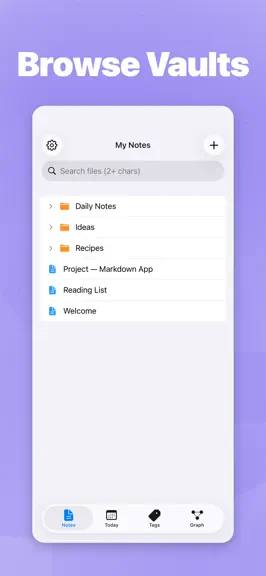
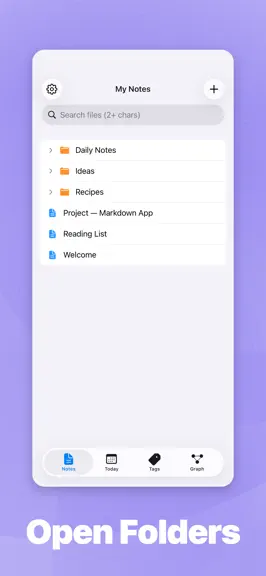
Markdown is a fast, native iOS editor for plain‑text .md notes. Point it at a folder you already use — in the Files app, iCloud Drive, or any provider that shows up in Files (Dropbox, Google Drive, OneDrive, Working Copy) — and start writing. No account. No proprietary database. Your notes stay as plain Markdown files on your own drive. WHY THIS APP • Local‑first by design. Files live where you…
Trends & analysis
Chart rank trend
US · overallWhy it's surfacing
Scout 28Ratings & velocity
★ 0 in windowGeographic reach
best rank · 2 storefrontsRevenue & downloads trend
monthly estimateUpdate history
5 updates tracked- v1.10.07d ago
v1.10.0 - Open bookmarked notes from a dedicated Bookmarks tab — pin favorites and jump back in one tap. - Add H4–H6 heading buttons when you customize the formatting toolbar. - The formatting bar appears only while the keyboard is up, so preview stays clear.
- v1.7.018d ago
v1.7.0 - Start writing right away — new notes take their title from the first line, so you name as you go. - Rename a note from the editor without hunting through the file browser. - Large vaults on iCloud Drive stay snappy while files catch up in the background.
- v1.6.018d ago
v1.6.0 - Focus and typewriter modes keep you in the flow; folds, find & replace, and smarter list editing land in the live editor. - Drag images straight into a note, keep a comfortable reading width, and jump to raw source when you need it. - Cursor, scroll, and undo now stick with each note — pick up exactly where you left off.
- v1.5.01mo ago
Live Preview, all grown up. The editor now renders your note as you write it — no flipping to a separate preview to see how it looks: • Math, inline and block. Type $E=mc^2$ or a $$display$$ equation and it renders in place (LaTeX/KaTeX). • Diagrams. mermaid flowcharts, sequence diagrams, and more draw inline. • Embedded notes. ![[Another note]] — and #headings or ^blocks — show their content inline; ![[image.png]] shows the image. • Code blocks with real syntax highlighting across ~40 languages — Swift, JS, Python, Rust, and the rest. • Tables you can actually edit in place — tap a cell to type, add or delete rows and columns, set column alignment. Power-editing in the live view too: Vim mode, find & replace, and autocomplete for [[links]], #tags, and / commands. Plus a round of polish: a brighter, easier-to-spot cursor, a fix for the cursor occasionally jumping while typing, and editor styling that now matches the reading view — tinted code blocks, inline-code chips, cleaner tables, and proper bullet points. Enjoy.
- v1.4.02mo ago
Two big improvements for daily use: Faster file finding in vaults with lots of notes. The search bar now lives at the top of every vault and stays there as you scroll. Type any 2–3 letters from a filename — "rmt" finds "remote-config.md" — and your file appears instantly. Switch to Content mode when you need full-text search. Recently opened files now show at the very top of the vault too, so getting back to whatever you were just in is a single tap. Japanese IME fix. Kanji conversion and IME suggestions used to get cut off mid-composition while syntax highlighting refreshed in the background. The candidate bar now stays open until you commit. Sorry about that — and thanks to everyone who reported it. Plus general performance cleanup throughout. Enjoy.
Notes — Markdown Editor — FAQ
How many downloads does Notes — Markdown Editor get?
Notes — Markdown Editor sees an estimated 0 downloads per month on the App Store, per AppCurrents modeling.
Is Notes — Markdown Editor free?
Notes — Markdown Editor is a paid app priced at $9.99 on the App Store.
When was Notes — Markdown Editor released?
Notes — Markdown Editor launched on the App Store on 03.04.2026. Its latest version shipped 28.07.2026.


