
notePad++++:Lightweight editor
notePad++++:Lightweight editor generates an estimated $0/month in revenue from 0 downloads/month on the App Store, according to AppCurrents estimates (updated 2026-08-02).
| Est. revenue / month | $0 |
|---|---|
| Est. downloads / month | 0 |
| Estimate confidence | low |
| Pricing | Free + IAP |
| Rating | 0.00 ★ (0 ratings) |
| Category | Productivity |
| Released | 25.02.2026 |
| App last updated | 23.07.2026 |
| Platform | iOS |
Modeled monthly estimate · rating velocity · low confidence
About
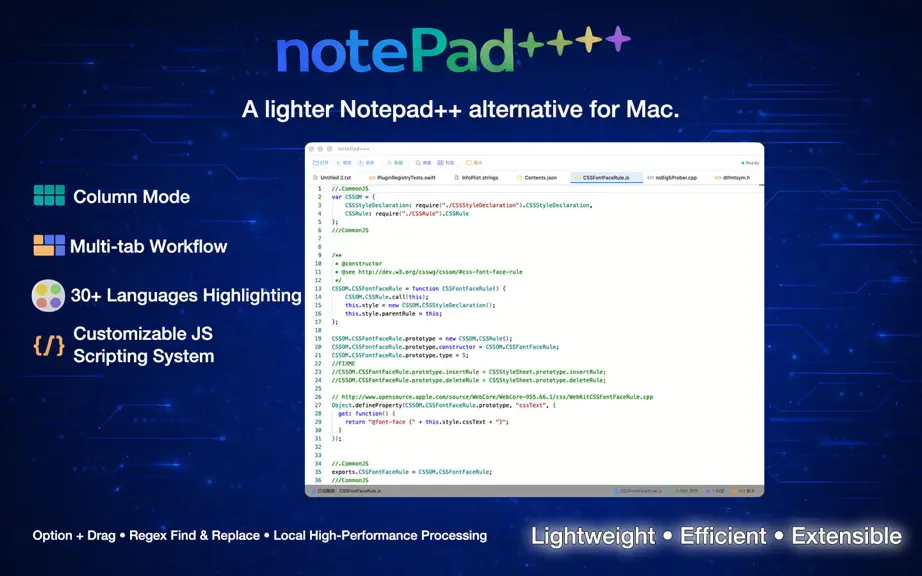
notePad++++ is a lightweight plain-text editor built for macOS, designed for everyday text cleanup, code snippet editing, and batch text processing. Key Features: • Multi-tab editing: open and switch between multiple files quickly • Drag-and-drop open: drop files directly into the window to edit • Syntax highlighting: automatic language highlighting based on file extension • Find & Replace: sup…
Trends & analysis
Chart rank trend
US · overallWhy it's surfacing
Scout 21Ratings & velocity
★ 0 in windowGeographic reach
best rank · 0 storefrontsRevenue & downloads trend
monthly estimateIn-app purchases
2 tiersUpdate history
4 updates tracked- v2412d ago
Updated AI model compatibility and connectivity tests. Added comprehensive Markdown checking functionality.
- v221mo ago
add: Enhanced Markdown quick editing, preview sync, code block copy, and task list interaction. add: Added PicGo image hosting upload, batch upload, and Markdown image link insertion. add: Added native Clau API support and improved AI settings. add: Added missing localization content across supported languages. fix: Fixed column mode paste and Alt-drag column cursor paste behavior. fix: Fixed macOS 12 compatibility and window opening stability. fix: Fixed Markdown preview line breaks, image editing, and hosted image migration issues.
- v211mo ago
What's New: - Improved the Markdown editing experience with new tools for links, code blocks, dividers, and tables. - Improved DOCX export, including better handling for links, code block formatting, and file save permissions. - *Fixed macOS Option + Arrow keyboard shortcuts for word-by-word cursor movement and selection. - *Fixed an issue where Settings categories could fail to scroll or switch on macOS Sequoia in some languages. - Added title bar file navigation with Back, Forward, and Quick Open controls for faster switching between files.
- v201mo ago
A smoother, more reliable editing experience: - Current file highlighting: The sidebar now highlights the file you're editing, so it's easy to stay oriented across multiple open files. - Full path on tabs: Hover any tab to see its full file path — no more confusing files with the same name. - More reliable saving: Saving has been hardened so that a hiccup in local version backups will never block your file from being saved. - Various refinements and stability improvements.
notePad++++:Lightweight editor — FAQ
How many downloads does notePad++++:Lightweight editor get?
notePad++++:Lightweight editor sees an estimated 0 downloads per month on the App Store, per AppCurrents modeling.
Is notePad++++:Lightweight editor free?
notePad++++:Lightweight editor is free to download on the App Store, monetizing through in-app purchases.
When was notePad++++:Lightweight editor released?
notePad++++:Lightweight editor launched on the App Store on 25.02.2026. Its latest version shipped 23.07.2026.


