
Nom-Nom generates an estimated $0/month in revenue from 0 downloads/month on the App Store, according to AppCurrents estimates (updated 2026-08-02).
| Est. revenue / month | $0 |
|---|---|
| Est. downloads / month | 0 |
| Estimate confidence | low |
| Pricing | Free |
| Rating | 0.00 ★ (0 ratings) |
| Category | Business |
| Released | 13.05.2026 |
| App last updated | 14.07.2026 |
| Platform | iOS |
Modeled monthly estimate · rating velocity · low confidence


About
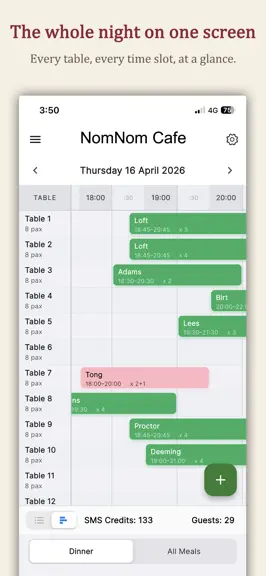
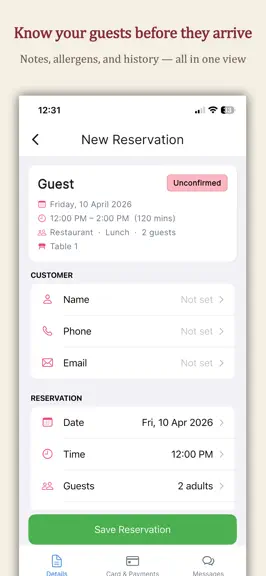
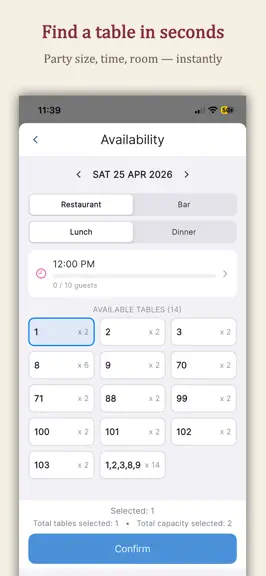
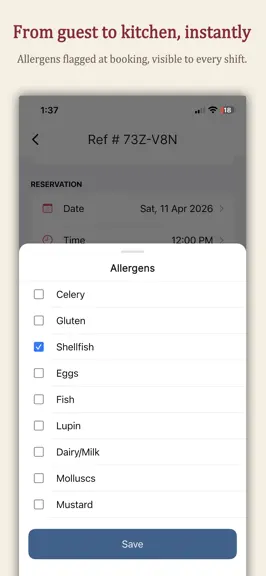
Run your restaurant's front of house from the palm of your hand. NomNom is the all-in-one reservation management app built for busy hospitality teams who need to move fast without dropping a booking. Whether you're taking a walk-in on a packed Saturday night, confirming a VIP for Sunday lunch, or juggling multiple dining rooms across several locations, NomNom keeps your diary, your tables, and yo…
Trends & analysis
Chart rank trend
US · overallWhy it's surfacing
Scout 29Ratings & velocity
★ 0 in windowGeographic reach
best rank · 0 storefrontsRevenue & downloads trend
monthly estimateUpdate history
4 updates tracked- v1.0.8.16121d ago
Optimise your floor plan and more: • Optimise Tables — NomNom looks over the whole day and suggests a neater table plan, gently rearranging a few bookings to free up space so you can fit more parties in. You'll see a clear preview of every move first, and nothing changes until you tap Apply. Guests who've already arrived or been seated stay put, and any table a guest specifically requested is always left untouched. • Requested tables — tick "Requested table" on a booking and a small padlock appears wherever it's shown, so the table can't be moved or swapped by accident during a busy service. • Duplicate an event — tap any event to Duplicate, Edit or Delete it. Duplicate starts a fresh event pre-filled from the original, card and deposit settings and all, ready to rename and re-date. • Copy opening times into a new season — when you add a season, seed it from your Default times or another season, then just tweak what differs. • Tidier closures — once you pick a date (or range), the meal list only offers the events that actually fall then. • Events stand out online — each one now wears an "Event" tag on your booking page, with a cleaner card look. Fixes: • Events now remember the time you set instead of springing back to 7:00pm. • Two one-off events sharing the same name on the same day no longer overwrite each other's times.
- v1.0.6.1511mo ago
Bookings & payments Require a deposit or card on selected days only — set it per meal, so quieter days can stay deposit-free Apple Pay and Google Pay switched on by default on your online booking page See each dog's size and notes on a booking when guests share their dog details online Customers Mark a customer as a VIP — a gold star appears on all their bookings so your team spot regulars at a glance Keep persistent notes against a customer (e.g. favourite table, dietary need) — separate from notes on individual bookings Your team Record who took a booking — pick the team member from your venue's people list directly on a reservation Cancellations & no-shows Cancel and Restore are now their own buttons with a clear confirmation Cancelling or marking a no-show now frees up the table automatically Cancelled and no-show bookings no longer count towards the guest total Settings Search your settings — start typing to jump straight to any option Preview your online booking page from inside the app via Actions in Settings Opening times New tap-the-clock time picker for opening times and booking cut-offs Floor plan Smoother room and area reordering Add a description to a room or area — shown on your online booking page so guests know what to expect Choose which days of the week each table is available Mark individual tables as dog-friendly — only those tables are offered when a guest says they're bringing a dog Tidier table details panel with the delete button moved to the title bar Everyday use Loading overlay when switching date, room or meal so it's clear fresh bookings are on their way On phones with many rooms or meals, selectors now open a pop-up list — easier to tap Better support for larger text sizes across search, meal settings, and switches Fixes Renaming a room no longer briefly empties the meal or room tabs Bottom tabs now sit clear of the home indicator and gesture area on newer phones
- v1.0.5.1451mo ago
• New biometric app lock (Face ID / Touch ID / device passcode) replaces the PIN, with a dedicated Unlock settings screen and a choice of locking on startup or every time you return. • Quick-move sheet now lets you allocate multiple tables at once and move a booking to a different room. • More reliable payments: safeguards against double charges/refunds on poor connections, clearer errors, and pull-to-refresh. • Meal picker hides unavailable sittings; meal name now shows in confirmation emails.
- v1.0.4.1381mo ago
• New Customers tab in Search — find a customer by name, phone or email, then start a new booking pre-filled with their details • Reservation search now also matches booking references and email addresses • Set table priority (1–5), individually or in bulk — higher-priority tables are allocated first when searching availability • The meal selector now hides meals that are closed on the selected date, while keeping any with existing bookings • Switching location now refreshes every screen instantly — no more stale data from the previous venue • Fixed duplicate room tabs appearing for imported bookings with differently-cased room names • Room tabs now sit below the meal selector for easier filtering • More reliable startup on poor network connections
Nom-Nom — FAQ
How many downloads does Nom-Nom get?
Nom-Nom sees an estimated 0 downloads per month on the App Store, per AppCurrents modeling.
Is Nom-Nom free?
Nom-Nom is free to download on the App Store, with no in-app purchases detected.
When was Nom-Nom released?
Nom-Nom launched on the App Store on 13.05.2026. Its latest version shipped 14.07.2026.


