
NipaPlay generates an estimated $0/month in revenue from 10–70 downloads/month on the App Store, according to AppCurrents estimates (updated 2026-08-02).
| Est. revenue / month | $0 |
|---|---|
| Est. downloads / month | 10–70 |
| Estimate confidence | medium |
| Pricing | Free |
| Rating | 4.33 ★ (6 ratings) |
| Category | Entertainment |
| Released | 17.10.2025 |
| App last updated | 04.08.2026 |
| Platform | iOS |
Modeled monthly estimate · rating velocity · medium confidence
About
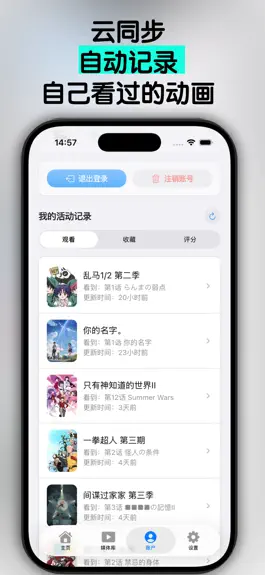
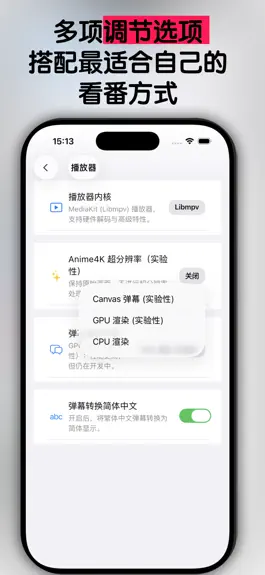
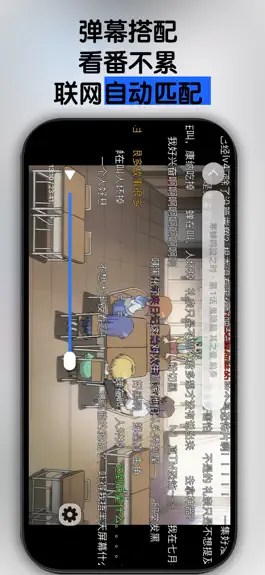
NipaPlay is a modern, open-source video player built for your local media collection. Enjoy an immersive and flexible viewing experience, whether you're watching offline files or connecting to your personal media server. Key Features: Your Media, Your Way: Flawlessly play your local video files with support for multiple subtitle (ASS, SRT) and audio tracks. Emby & Jellyfin Integration: Connect…
Trends & analysis
Chart rank trend
US · overallWhy it's surfacing
Scout 16Ratings & velocity
★ 0 in windowRating distribution
83% positive · 6 ratingsGeographic reach
best rank · 0 storefrontsRevenue & downloads trend
ARPU $0Update history
5 updates tracked- v1.11.32d ago
NipaPlay is now available on two new platforms and includes a wide range of improvements and fixes across all supported platforms. New Platforms • HarmonyOS is now officially supported. NipaPlay runs on HarmonyOS devices with hardware video decoding, Surface rendering, and OHAudio output. Local settings, SQLite, file and photo pickers, screen brightness, volume control, and wake lock are all integrated. JavaScript plugins and torrent functionality are supported as well. • Apple TV (tvOS) is now officially supported. The full app experience — media library, anime browsing, account, settings, plugins, search, and playback — has been adapted for the TV remote and large-screen navigation. You can enter text by scanning a QR code from a phone or browser. Playback uses the Erika engine with a dark theme by default. New Features and Improvements • A trending rankings section has been added to the home screen, with three sorting options: overall hot, rising, and new-season hot. The rankings include automatic retry and caching so occasional network errors have less impact. On mobile, the full list appears in a pull-up sheet; on desktop, it opens in a separate window with a frosted-glass effect. • The desktop rankings window has been redesigned with a sort dropdown, highlighted top-three entries, and a poster grid layout. Spacing, card text, and accent colors have been refined. Tablet users will no longer see desktop-only entries such as external call shortcuts, keyboard shortcut settings, and the open-log-path option. • WebDAV and SMB remote media paths now use a new Base URL format, fixing an issue where changing server settings caused all media matches to stop working. The plugin system API has been extended to allow launching external executables. • Danmaku (comment overlay) rendering has been improved: emoji font metrics are fixed so emoji and plain text no longer collide incorrectly; sending a danmaku comment no longer reloads the full list or drops emoji; your own comments are now highlighted with a green outline; and spacing for certain monospace narrow characters has been corrected. Bug Fixes • Fixed crashes, corrupted frames, flickering, and a blue-screen issue with libmpv on Linux systems using NVIDIA GPUs. Danmaku rendering avoids the Next2 engine on Linux/NVIDIA to prevent driver-level crashes. CUDA/NVDEC is now preferred over VAAPI/VDPAU when an NVIDIA GPU is actively rendering. • Fixed an issue in the Erika player where resuming playback could start before a seek completed, leaving the video frame blank until the user manually scrubbed. Danmaku shadow style changes now sync to Erika in real time. The video background in windowed mode no longer turns solid black. • Fixed a leftover Erika native overlay that remained on screen after exiting the player, causing the home screen to appear broken. Overlay state is now correctly managed during full-screen transitions and playback resume. • Fixed WebDAV and SMB playlists and auto-play-next failing after the Base URL format change introduced in a previous update. • Fixed an issue on Windows where certain dialogs appeared to freeze the app after a Flutter update caused them to be promoted to hidden native windows. Media library sort, Emby/Jellyfin sort, and manual match dialogs now stay within the main Flutter view. Emby/Jellyfin sort highlighting, checkmarks, focus, and auto-scroll position have been restored. • Fixed the iOS file picker failing when using the backup feature. • Fixed a timing issue on Windows with the libmpv engine that caused audio volume to be lower than expected. • Added in-process caching for WebDAV and SMB media library management to improve loading speed. • Fixed the iOS system file picker failing when triggered from the player. • Fixed clearing match information causing playback history to be lost.
- v1.11.117d ago
What's New in NipaPlay v1.11.1 New Features Android now supports native hardware-accelerated video playback with SDR and extended linear HDR output, plus real-time diagnostics for decoder, audio, and output. You can also open video files directly from other apps via the system file picker without copying media first. The Danmaku Console (Linux + mpv) gains progress bar scrubbing, duration and pause state display, danmaku outline toggle, and a live danmaku list that highlights on-screen comments with color and timestamps. Play/pause controls, precise timestamp seeking, and danmaku filtering by sender ID, keyword, or regular expression are also included. Opacity and outline changes regenerate the ASS file and hot-reload in mpv instantly. A new Series Details entry appears in the player context menu when the current video matches a known series, with correct source context for local files, WebDAV, Emby, Jellyfin, and more. Quick Start Playback begins playing as soon as the video is ready, with series recognition and danmaku loading continuing in the background. The home screen restores the poster bloom effect, now toggleable in Appearance settings. Key functions including danmaku conversion, subtitle matching, and media parsing have been rewritten in Rust for better performance, with automatic fallback if the Rust bridge fails to load. Improvements The settings sidebar now scales only the icon and label on hover, keeping the background and tap target stable. The About page sponsor names have a cleaner look, and the Check for Updates button transitions smoothly to the accent color on hover. Player submenus now share a consistent container height, eliminating layout jumps when switching panels. Bug Fixes Fixed frame drops and stuttering in the DFM+ danmaku engine on Android. Characters are now pre-rasterized asynchronously, the MSDF worker pool runs 4 threads in parallel, and the atlas size has increased from 4096 to 8192 to reduce evictions. Android now requests the highest available refresh rate at launch; iPad Pro ProMotion runs at a stable 120 FPS. Fixed folder import failing on Android, playback failure when filenames contained Chinese characters or the percent symbol, and library loading failure on Emby servers returning HTML error responses from reverse-proxy or Cloudflare setups. Fixed the Liquid Glass tab bar being obscured under Android three-button and iOS gesture navigation. Fixed the Liquid Glass fallback renderer misidentifying shapes on Android Release builds due to code obfuscation. Fixed stuttering during series detail page transitions caused by per-frame layer reallocation.
- v1.10.121mo ago
NipaPlay v1.10.12 Changelog New Features & Experience Improvements Moved bullet screen display settings to the player menu (#702) Frequently used playback controls for bullet screens—including transparency, font size, font files, stroke, shadow, scrolling speed, display area, duplicate merging, and bullet type filtering—can now be adjusted directly in the NipaPlay and Cupertino player menus. The random color entry has also been restored on the Cupertino bullet screen settings page, and the display hierarchy of the filter word input box in NipaPlay has been streamlined for a cleaner interface. Bug Fixes & Optimizations Adapted bullet screen rendering surface for Erika on iOS (#700) On iOS, the Erika platform’s rendering surface defaults to full-screen dimensions, allowing bullet screens to cover letterbox black bars. The original AspectRatio wrapping method can still be enabled as a debug or rollback switch via the environment variable NIPAPLAY_IOS_ERIKA_ASPECT_SURFACE=1. Maintenance & Release Pipeline Switched Erika CI to prebuilt C APIs (#701) Builds for macOS, iOS, and Windows now utilize prebuilt artifacts of Erika v0.1.1. A Windows source code build path is retained as a fallback for mandatory builds or scenarios where prebuilt artifacts are disabled. Fixed fallback download for Windows mdk-sdk (#703) The GitHub fallback download for mdk-sdk in Windows builds now dynamically locates the latest release assets, supporting new naming conventions such as mdk-sdk-windows-x64-vs2026.7z. This prevents build failures caused by accidental 404 errors during fallback downloads. Corrected Android release build paths (#699) Removed redundant duplicate build/symbols-android-*/ symbol paths from the release workflow to resolve packaging errors stemming from bloated Android build output directories. Separate symbol file upload functionality remains intact. Strengthened release permissions (#698) The release workflow prioritizes the dedicated RELEASE_GITHUB_TOKEN, falling back to github.token only if the dedicated token is missing. This mitigates permission issues when querying release notes via the API and uploading build artifacts. Contributors @FurudeRika123, @MCDFsteve, @Shinokawa, @makabaka11
- v1.10.101mo ago
# NipaPlay v1.10.10 Changelog ## New Features 1. **ART-CNN Video Super Resolution (#634)** Erika Metal engine powered real-time super resolution with Speed (C4F16) / Quality (C4F32) modes. Settings auto-save; playback panel shows backend runtime stats. 2. **Frame-by-Frame Control & Window Fit (#631)** E/Q/R hotkeys for frame stepping (remappable). New button auto-resizes window to original video resolution. Fixes: volume float precision drift, speed lock after arrow key hold, danmaku duplicate char crash. 3. **Upgraded Backup & Restore (#630)** Full selective backup for preferences, library, watch history, series matches, accounts. Incremental import preserves local data, purges missing media paths. Cross-platform Windows/macOS import verified. 4. **C++ Native Subtitle Parser (#640)** C++20 parser supporting ASS/RT/SubViewer/MicroDVD, auto-encoding detection, falls back to Dart on errors via dart:ffi. 5. **C++ Danmaku Parser (#628)** XML/JSON parser based on pugixml & rapidjson with entity sanitization, Dart fallback; Web stub unchanged. ## Optimizations 1. **Danmaku Render Performance (#647)** Smooth 60FPS interpolation on macOS/iPad/low-end devices, capped 60Hz Dart uploads to save power. LRU text cache, periodic cache cleanup for long videos, 1.5x supersampling option, fixed playback speed sync jitter. 2. **Danmaku Search Reduction (#629)** Unified cached search pipeline for local/Jellyfin/Emby sources, merged concurrent requests to cut API calls. ## Security Alert **Removed AUR Install Guide (#644)** `nipaplay-reload-bin` AUR package abandoned and hijacked. Do NOT install via Arch AUR. ## Build & Maintenance - Fixed Linux Clang C++20 RapidJSON compile errors - Switched macOS uchardet / Windows mdk-sdk mirrors with hash validation to resolve download failures - CI syncs latest Erika code pre-build - Cleaned repo temp files, updated docs & module introductions Version: v1.10.10 ## Contributors @FurudeRika123, @Heylyx841, @MCDFsteve, @Shinokawa, @ddy314, @makabaka11
- v1.10.91mo ago
some changes
NipaPlay — FAQ
How many downloads does NipaPlay get?
NipaPlay sees an estimated 10–70 downloads per month on the App Store, per AppCurrents modeling.
Is NipaPlay free?
NipaPlay is free to download on the App Store, with no in-app purchases detected.
What is NipaPlay's rating?
NipaPlay holds a 4.33-star average from 6 ratings on the App Store.
When was NipaPlay released?
NipaPlay launched on the App Store on 17.10.2025. Its latest version shipped 04.08.2026.


