
NaviBeat
NaviBeat generates an estimated $900–$16k/month in revenue from 400–2k downloads/month on the App Store, according to AppCurrents estimates (updated 2026-10-02).
| Est. revenue / month | $900–$16k |
|---|---|
| Est. downloads / month | 400–2k |
| Estimate confidence | medium |
| Pricing | Paid $5.99 |
| Rating | 4.36 ★ (22 ratings) |
| Category | Music |
| Best chart rank | #28 Music Paid |
| Released | 22.05.2026 |
| App last updated | 26.09.2026 |
| Platform | iOS |
Modeled monthly estimate · rating velocity · medium confidence
About
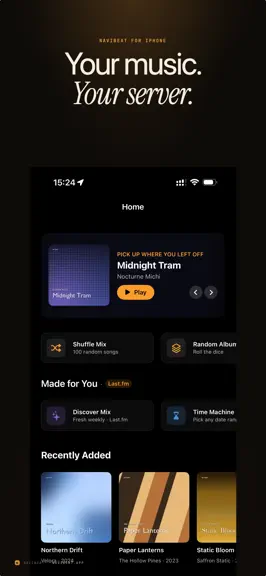
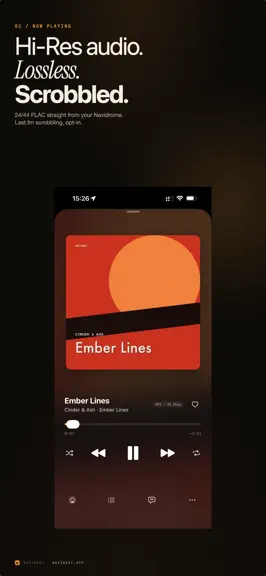
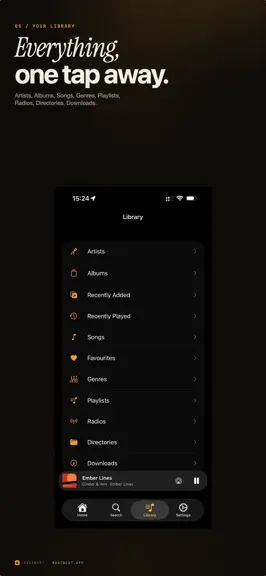
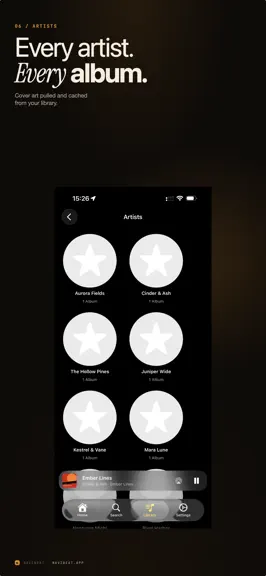
NaviBeat brings your own music library to every Apple device you own: iPhone, iPad, Mac, Apple TV, and Apple Watch, plus CarPlay, as a single Universal Purchase. Pay once. No subscriptions. No ads. No tracking. No NaviBeat cloud. Your music stays on your own server, exactly where you put it. NaviBeat just plays it, beautifully. ABOUT NAVIDROME NaviBeat is a client for Navidrome, the free and op…
Trends & analysis
Chart rank trend
US · categoryWhy it's surfacing
Scout 33Ratings & velocity
★ -0.64 in windowGeographic reach
best rank · 1 storefrontRevenue & downloads trend
ARPU $4Update history
11 updates tracked- v1.5.25d ago
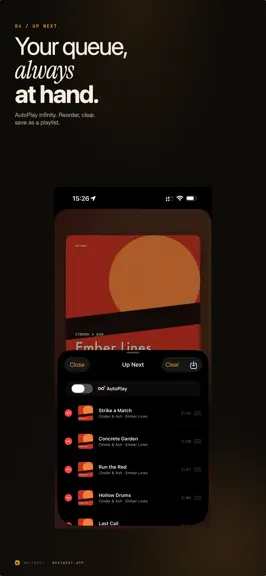
NEW IN THIS VERSION Ready for Navidrome's new sign-in. Navidrome plans to turn off token sign-in by default. NaviBeat still tries the token first, and if your server says no, it signs in with your password and remembers that for the server. It can also sign in with an API key, for servers that offer one. Look & Feel. Artist and album pages and Now Playing can take the blurred colour of the cover, with a slider for how strong it is. On iPhone with Filled, Now Playing shows the cover edge to edge, its bottom fades into the page, and the next cover slides in as you swipe. Album and artist pages that fit the screen. Turn your iPhone sideways and the page is two columns, cover on the left and songs on the right. On iPhone Duo the page follows the sidebar and the hinge. Your queue is safe. If songs you added with Play Next or Add to Queue are still waiting, a tap on a song asks before it replaces them. Reverse Order in the sort menu of playlists and song lists, and Songs sorted by Date Added now lists every song, album tag or not. Bigger artwork. "Larger artwork in grids" shows fewer, bigger covers in every grid, with bigger titles. An equalizer that reads AutoEQ. Import a headphone profile from text, use peak and shelf bands, and drag points on the curve to shape the sound. Smart playlists are sorted by name and shown as tiles above your playlists. Playlists has an Owner menu when your server shares playlists from several accounts, and Select mode has Play. Discography your way. Grouping by release type can be switched off, and a single or EP tagged as an album too shows only under Singles or EPs. Offline that keeps its shape. Downloaded playlists keep the server's order, mirrored playlists show up offline, and on iPhone and iPad the "Show downloaded only" button is on every Library page. Apple TV works behind a gateway that needs custom headers, covers included. The setup wizard offers the Look & Feel choices from Settings. Mac. Choose where downloads live, an external drive too. Stop is in the playing bar's ... menu and on Cmd+. Apple Watch runs from watchOS 10, so the first Apple Watch SE can run it. FIXED A song that stopped at its very end with Pause showing now moves on. A stream that freezes on mobile data restarts where it was. Crossfade works again for streamed songs. A song your server cannot play is skipped. Ratings given without a connection are sent later. The widget's Play works from a cold start. The "No network" bar shows only when the server really stops answering. Serbian texts have their proper letters. And many smaller fixes for battery, memory and fewer requests to your server.
- v1.510d ago
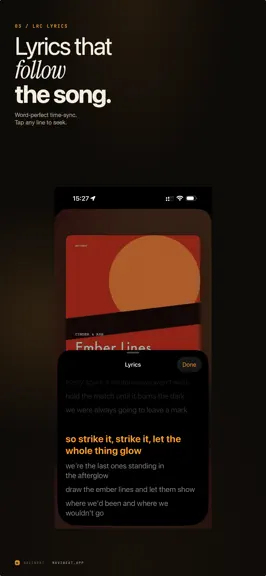
NEW IN THIS VERSION Play on a speaker in the room. Send your music to a UPnP or DLNA speaker: a network streamer, an AV receiver, a smart TV. Add yours by address in Settings, Speakers, and your phone becomes its remote. Lyrics can romanize and translate. A second line under each lyric: Latin pronunciation for Japanese, Korean and more, or an on-device translation. Settings, Lyrics, Second line. Artwork, your way. Artist and album pages come in Squared, which is today's look, or Filled, where the cover runs edge to edge under the title and its colour carries down the page. The first run asks which you prefer, and Settings shows a picture of each. The album description from your server. If your Navidrome has an external metadata agent, the album notes now appear on iPhone, iPad, Mac and Apple TV. An equalizer you can type into. Frequency, gain, Q and width all take typed values, and every preset carries its own preamp so a profile with big boosts can take the headroom it needs. Gapless MP3. An MP3 carries its own record of the silence the encoder added at each end. NaviBeat reads it and ends the track where the music ends, so live and concert albums join without the gap. New Releases on Home. Recent and upcoming records from the artists in your library, from MusicBrainz, cached so it costs one small request at a time. Offline, one tap away. The Offline Mode switch lives in the Library toolbar on iPhone and iPad, and at the bottom of the sidebar on Mac. Downloads heal themselves. If a long download batch slows to a crawl, NaviBeat notices and refreshes the stalled transfers on its own. More. Add to Playlist takes several playlists at once and groups them by folder. The Mac can pick its output device. Shortcuts can ask what is playing. The scrubber expands under your finger like Apple Books. A playlist can be pinned, its description opens, and playback can stop when an album ends. Play one song, and stop. On the Mac, Settings, Playback: Tap plays only that song. Clicking a song in Songs, in a playlist or in search plays that song and queues nothing behind it. Next to it, Stop at the end turns the end of a queue into a full stop. Grouping in smart playlists. A rule can ask for the Grouping tag, so a tag like Christmas or Live builds its own playlist. Scrobble when you decide. How much of a song has to play before it counts, from 25 to 90 percent, in Settings, Playback. Four minutes is always enough, whatever it says. Appears On, as songs. The shelf on an artist page has a Songs button that lists the guest tracks behind it, and it no longer draws the same record twice when your library holds two copies of it. FIXED Around a hundred fixes since 1.4.1. The ones most likely to have bitten you: playlists you made yourself could disappear from the Playlists screen; scrubbing a streamed song landed near the spot instead of on it, and the track could cut off early; Navidrome 0.64 re-keys every song, which made downloads unrecognisable until now; a live album was filed twice in a discography; the Apple Watch could stop between songs, spin a downloaded list forever, or forget which source you picked; a call on Bluetooth earbuds could leave music playing under it; and on a Mac the player bar wore a shadow around every glyph in the light theme. Also: AirPlay from a Mac connected and then played nothing; granting the microphone permission for voice search could close the app; the Mac menu bar showed pause when a queue had simply ended; and eleven rows in Settings could not be found by the search field at the top of it, including the artwork choice, which now sits in Appearance and Language where the first run says it is.
- v1.4.121d ago
NEW IN THIS VERSION Jukebox mode. Play through the speakers attached to your Navidrome server itself, with the app as the remote. The queue, the transport and the volume all drive the server. One output button. AirPlay, the jukebox and speakers on your network now live behind a single speaker icon instead of two controls that looked alike. It sits on Now Playing, in the mini player and in the Mac menu bar. Speaker controls on Now Playing. When you are playing to a network speaker, the transport and the progress bar drive it from the same screen you always use. A real Stop. Not a pause: it clears the queue and the position. It is in the More menu on Now Playing, and a Stop button on a car head unit or a Bluetooth remote now works too. Album editions. Deluxe Edition, 2011 Remaster and the rest show as a badge on the album page, and the title stops saying it twice where the server already glued it in. Playlists. Sort by name, recently created or recently changed. Rename and delete your own playlists from the iPhone, not only the Mac. Mac keyboard shortcuts. Command L for favourite, Option Command 1 to 5 for a rating, with the full list in Settings. Opus. It appears in the download picker on every platform and in the stream picker wherever the engine can play it, with tiers from 128 to 320. Swipe the cover sideways to change song, on iPhone, iPad and Mac, with switches for it in Settings, Appearance. Up Next on iPad can be reordered, swiped and cleared. A new switch makes a tap play only that song instead of the rest of the list. FIXED Around two hundred fixes since 1.4, from a pass over the whole app. The ones most likely to have bitten you: a call answered on Bluetooth earbuds could leave the music playing over it; the app could report your server as unreachable on a guest network or a hotspot while it was answering; playback could go silent between two songs on the Apple Watch; Continue Playlist forgot that shuffle was on; tapping a song already playing through a speaker started it on the phone as well; Settings was English in every language; and Russian, Ukrainian and Polish counted wrong on every number.
- v1.426d ago
NaviBeat 1.4 is the largest update since launch. A NEW NOW PLAYING On the Mac it fills the window and splits evenly, and both the artwork and the lyrics grow with your display, so a large screen gives you more music and more words instead of more empty space. On iPad and in iPhone landscape every control sits on one screen. On Apple Watch the cover sits on a card over an ambient colour field drawn from the album. OFFLINE IS THE WHOLE APP With no connection you still get the real Artists, Albums, Songs and Playlists screens, with their sorts and filters, reading from your device. NaviBeat can also keep your library downloaded on a schedule, over Wi-Fi only, with a free space check. CARPLAY IS YOUR OWN MUSIC, IN YOUR OWN ORDER The car home screen is your shelves drawn as rows of artwork, arranged from your phone. Play All and Shuffle All are named rows at the top of every list. Search hands the typing back to your phone. And when you switch the car off, the music stops instead of moving to your phone speaker. START ON ONE DEVICE, CARRY ON WITH ANOTHER Your Home screen shows what is playing on your other devices, with a live position. One press takes it over from the exact second, and the device you left pauses itself rather than playing to an empty room. Apple TV joins in this release. PLAYBACK HOLDS THROUGH A BAD CONNECTION When a stream is cut short over cellular or a tunnel, NaviBeat notices and picks the song back up at the second it stopped instead of skipping on. Lossless files start much faster on a cold stream, gapless works for ALAC, and playback resumes properly after a phone call. SMART PLAYLISTS YOU WRITE YOURSELF Build rules over rating, genre, year, play count, date added, format, duration, even membership of another playlist. Combine them with ALL or ANY, sort them six ways including a random you can re-roll, and watch the results stay current. Save Snapshot writes a real server playlist so your other clients can see it too. Your rules follow you between your devices through iCloud Keychain. ALSO IN 1.4 Lyrics can show a second line under each one: Latin pronunciation for Japanese, Korean and more, or an on-device translation. Compilations that your server splits into one album per artist now draw as a single album. Play to a UPnP or DLNA speaker on your network. Covers that are not square can be shown whole instead of cropped, now on Apple TV as well. Several servers can be saved and switched between. Long downloads notice when they stall and restart themselves. NaviBeat still collects nothing, phones home to nobody, and works with your own Navidrome or Subsonic server. One purchase covers iPhone, iPad, Mac, Apple TV and Apple Watch.
- v1.3.31mo ago
The biggest update since launch, built almost entirely from tester and customer requests. ROCK-SOLID PLAYBACK ON THE ROAD - Track changes on cellular are now served from a local cache, so tunnels, handovers and weak signal cannot interrupt the music. - The moment your phone hops between WiFi and cellular is handled gracefully: downloaded music always plays instantly from your device. - The quality badge now reads the actual playing file, so it always tells the truth. CARPLAY - Choose where NaviBeat opens when your car connects: Favorite Artists, Albums, Downloads and more. - Optional: switch to downloaded music automatically for the whole drive. - Artist lists show images, respect your sort tags ("Lastname, Firstname" libraries sort correctly), and follow your Show All Album Artists setting. FOR CLASSICAL LISTENERS - Multi-movement works render as proper sections, stand-alone tracks stay clearly separate. - Add a whole work to the queue with one tap. - Cleaner movement titles and full-length work names. YOUR LIBRARY, YOUR WAY - Albums can be sorted by Artist. - Hide Library sections you never use (iPhone, matching the Mac). - Recently Released can show unplayed albums only. - Similar Artists can now come straight from your own server: works even with no external services connected, and AudioMuse-AI upgrades it to sonic similarity automatically. - Upcoming Concerts link on every artist page. DOWNLOADS AND OFFLINE - Download your entire library in one tap, on iPhone and Apple Watch. - Search and A-Z navigation inside Downloads. - If your server is unreachable, Home shows your downloaded music right away, and a new "Downloaded only" filter browses just what is on your device. NAVIBEAT MIXES - With the NaviBeat Mixes server plugin, Home gets a shelf of personal mixes that leads with the right mix for the time of day, with generated cover art and a New Mix button. Plus dozens of refinements across iPhone, iPad, Mac, Apple TV and Apple Watch.
NaviBeat — FAQ
How much money does NaviBeat make?
According to AppCurrents estimates, NaviBeat generates approximately $900–$16k per month (medium confidence), modeled from its the App Store chart performance, rating velocity, and monetization signals.
How many downloads does NaviBeat get?
NaviBeat sees an estimated 400–2k downloads per month on the App Store, per AppCurrents modeling.
Is NaviBeat free?
NaviBeat is a paid app priced at $5.99 on the App Store.
What is NaviBeat's rating?
NaviBeat holds a 4.36-star average from 22 ratings on the App Store. It currently ranks #28 on the Music paid chart.
When was NaviBeat released?
NaviBeat launched on the App Store on 22.05.2026. Its latest version shipped 26.09.2026.


