
MilGPS PRO
MilGPS PRO generates an estimated $300–$5k/month in revenue from 80–400 downloads/month on the App Store, according to AppCurrents estimates (updated 2026-10-02).
| Est. revenue / month | $300–$5k |
|---|---|
| Est. downloads / month | 80–400 |
| Estimate confidence | medium |
| Pricing | Paid $9.99 |
| Rating | 3.00 ★ (2 ratings) |
| Category | Navigation |
| Best chart rank | #82 Navigation Paid |
| Released | 13.03.2026 |
| App last updated | 01.08.2026 |
| Platform | iOS |
Modeled monthly estimate · rating velocity · medium confidence



About
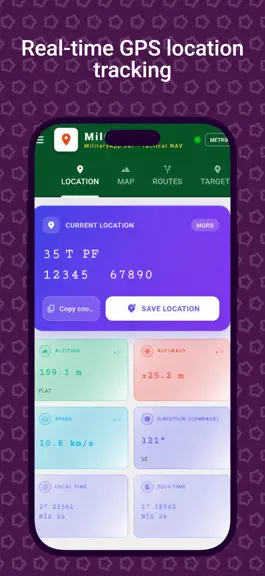
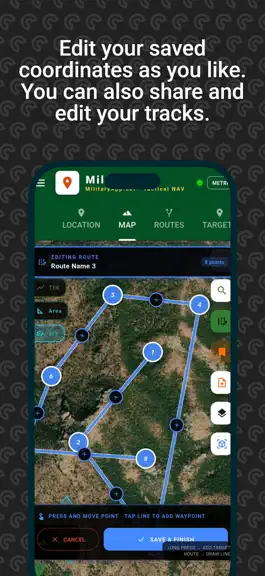
MilGPS PRO — Professional Military GPS Navigation MilGPS PRO is a professional-grade military GPS navigation app that puts everything you need in the field into a single application. Built for terrain, operations, and navigation. LOCATION & COORDINATE SYSTEMS - MGRS (Military Grid Reference System) — full 10-digit precision - UTM coordinate system - USNG (US National Grid) - QTH Locator - Deci…
Trends & analysis
Chart rank trend
US · categoryWhy it's surfacing
Scout 24Ratings & velocity
★ +2 in windowRating distribution
0% positive · 1 ratingsGeographic reach
best rank · 1 storefrontRevenue & downloads trend
ARPU $7Update history
7 updates tracked- v8.0.8.2112mo ago
• Maps and downloaded offline maps open even when location is turned off • Range circle: enter radius or draw with your finger, assign name and color • Precise target addition: align the crosshairs and place a point with a single tap • Mil support in measurement (distance · degrees · mils) • Reference point: distance and bearing to all targets from your selected point • Directions with Google, Yandex, and Apple Maps • Bulk select targets by folder • Edit name and color in areas • Improved battery usage
- v8.0.6+2052mo ago
Adjustments were made to the targets and folder selections.
- v8.0.5+2002mo ago
Hello valued MilGPS Pro users, Almost this entire update came to life thanks to your feedback and requests. Every suggestion you send us is highly valuable — in this version, we have implemented many of the features you asked for. We wish you a pleasant and safe experience. WHAT'S NEW • Auto Route Now you can create an automatic route between two destinations or from your current location to a destination. A true route following roads and trails is drawn with vehicle, pedestrian, and hiking profiles; you can customize the color, thickness, and name of the generated route as you wish. • Directions with Google Maps With a single tap on any destination, you can start voice-guided navigation with live traffic via Google Maps. • Brand New Search Experience The search screen has been completely revamped. You can now search by place name in addition to coordinates (results are listed instantly as you type) and search for airfields using airport ICAO codes (e.g., LTAC). Symbol keys have also been added to make it easier to manually enter formats like DMS. • New Coordinate Formats DDM, DMS, Google Plus Code, and CK-42 (Gauss-Krüger) formats have been added. These formats are now fully supported on the location screen, the map coordinate band, in destination details, and in search. • Aviation Features An aviation map layer displaying airspaces, airfields, and navigation waypoints has been added. Also, an offline airfield database containing thousands of airports worldwide has arrived; by tapping on an airfield, you can view its ICAO code, altitude, and distance information. • Location Lock and Compass Mode With the location lock, the map continuously follows you; with the compass (heading-up) mode, the map rotates to the direction you are facing. The location indicator has also been renewed: a direction arrow and a light beam showing your field of view have been added. • Track Log Editing You can now edit the color, name, and line thickness of the track logs in the tracks section. • Altitude and Distance Info Destination altitudes are shown in both meters and feet. While navigating on the map, the distance, bearing, and reverse bearing information to the looked-at point are instantly displayed on the screen. Keep reaching out to us with your suggestions and requests — we will be listening to you again in the next update. Have a productive day!
- v8.0.4.+1002mo ago
bug fixes
- v7.0.3.953mo ago
COMPASS • Angle unit: Degrees (°) ↔ 6400 mil (NATO) — localized toggle • Back azimuth readout • Haptic alert when aligned with the target • Bottom compass opens automatically on "Navigate"
MilGPS PRO — FAQ
How much money does MilGPS PRO make?
According to AppCurrents estimates, MilGPS PRO generates approximately $300–$5k per month (medium confidence), modeled from its the App Store chart performance, rating velocity, and monetization signals.
How many downloads does MilGPS PRO get?
MilGPS PRO sees an estimated 80–400 downloads per month on the App Store, per AppCurrents modeling.
Is MilGPS PRO free?
MilGPS PRO is a paid app priced at $9.99 on the App Store.
What is MilGPS PRO's rating?
MilGPS PRO holds a 3.00-star average from 2 ratings on the App Store. It currently ranks #82 on the Navigation paid chart.
When was MilGPS PRO released?
MilGPS PRO launched on the App Store on 13.03.2026. Its latest version shipped 01.08.2026.
Apps like MilGPS PRO
See all alternatives → Google MapsNavigation · $750k–$4.0M/mo
 Transit • Subway & Bus TimesNavigation · $710k–$3.8M/mo
 onX Hunt: GPS Hunting MapsNavigation · $190k–$640k/mo
 onX Offroad: Trail Maps & GPSNavigation · $110k–$620k/mo
 Trucker Path: Truck GPS & FuelNavigation · $48k–$260k/mo
 Speedometer SimpleNavigation · $48k–$260k/mo