
Lina Viewer - Comics & Books
Lina Viewer - Comics & Books generates an estimated $0/month in revenue from 0 downloads/month on the App Store, according to AppCurrents estimates (updated 2026-08-02).
| Est. revenue / month | $0 |
|---|---|
| Est. downloads / month | 0 |
| Estimate confidence | low |
| Pricing | Paid $4.99 |
| Rating | 0.00 ★ (0 ratings) |
| Category | Productivity |
| Released | 06.07.2026 |
| App last updated | 20.07.2026 |
| Platform | iOS |
Modeled monthly estimate · rating velocity · low confidence


About
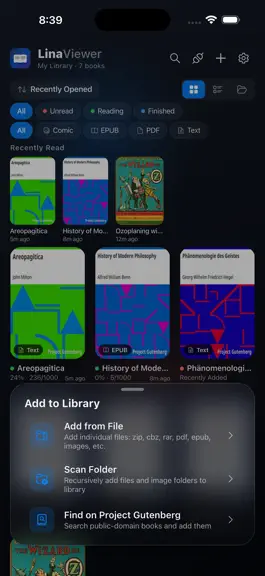
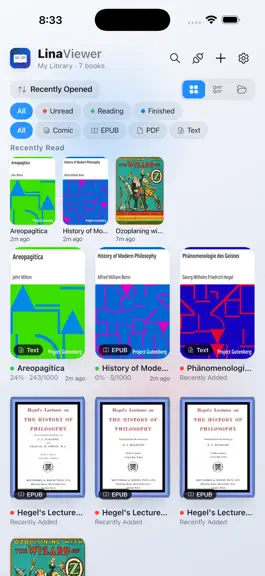
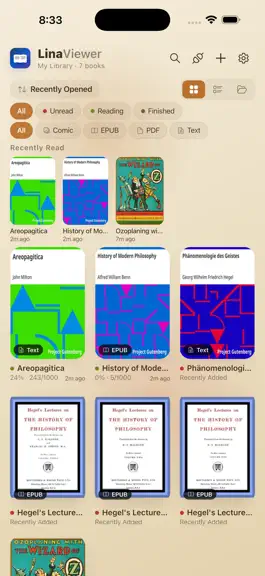
Lina Viewer — One App for Comics, Webtoons, Ebooks, and More Lina Viewer is an all-in-one reader built for every kind of digital content. CBZ and CBR comic archives, EPUB novels, PDF documents, Korean webtoons, and plain text files all open in one beautifully crafted glassmorphism interface. Stop switching between apps — Lina Viewer handles every format elegantly. -- Glassmorphism Design Every…
Trends & analysis
Chart rank trend
US · overallWhy it's surfacing
Scout 45Ratings & velocity
★ 0 in windowGeographic reach
best rank · 0 storefrontsRevenue & downloads trend
monthly estimateUpdate history
2 updates tracked- v1.0.1017d ago
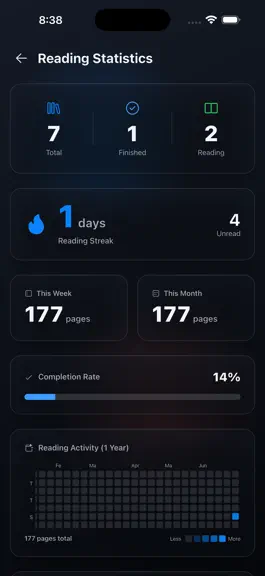
[What's New] This major update completely transforms your file management experience with a fully redesigned Grid UX, along with enhanced support for large-screen tablets and meticulous design refinements. Discover a more intuitive and beautiful Lina Viewer today! 1 All-New Grid UX - Intelligent Pinch-to-Zoom Columns: Simply pinch or spread two fingers on the Home screen or file browsers. The grid dynamically adjusts with smooth animations, scaling from a minimum of 2 columns up to 6 columns (and even more on larger screens). - Seamless Manual Reordering (Drag & Drop): Long-press any item to instantly enter edit mode. Drag and drop items freely to customize your layout. Auto-scroll on screen edges is now supported to make managing long lists effortless. - Responsive Under-Cover Titles: Book titles have moved directly underneath the cover container for a clean, file-explorer-style look. Even when column counts increase, font sizes and padding scale responsively to guarantee readability. 2 Enhanced 'Series (Folder)' Management - Smart Folder Thumbnails: Folders now dynamically display the cover of the first book based on your current sorting order. You can also manually lock and set any cover of your choice. -Safe Folder Deletion Options: When deleting a folder, you can now choose between "Keep books and move them back to the Home screen" or "Delete the folder along with all its books at once." 3 Premium Glassmorphic Action System - Bottom Action Bar & 'More' Sheet: A beautiful, translucent glass bar has been introduced at the bottom of the screen for quick access to frequent actions (Add, Sort, Select, etc.). Access the full menu anytime via the swipe-up 'More' sheet. - Customizable Action Layout: Tap the pencil icon in the top right corner of the 'More' sheet to rearrange action icons. Personalize the sequence to perfectly match your workflow. 4 Unified File Viewer & Network Browsers - PDF First-Page Cover Generation: In addition to comic files, high-resolution covers are now automatically generated from the first page of your PDF documents. - Unified Browser Grid Layout: The Network Browser (FTP/WebDAV/Drive/iCloud) and the Gutenberg Catalog screen now share the identical refined grid UX as the Home screen. Long-press to select multiple items and download (import) them in a seamless queue. - Persistent Sorting & Layout States: Your column counts (zoom levels) and sorting configurations are now fully memorized independently for the Home screen, Series details, and Browsers—even after restarting the app. 5 Tablet & Large Screen Optimization - Screen-Width Aware Column Expansion: On tablets and foldable devices, the grid dynamically scales past the usual 6-column limit to prevent cells from becoming overly large, maximizing screen real estate. - Centered Reader Bars with Width Cap (680dp): The top and bottom control bars in the reader—which previously stretched awkwardly across wide tablet screens—are now neatly capped at 680dp and centered for a balanced look. - Webtoon & Fit-to-Width Mode Enhancements: To prevent image degradation and excessive stretching on wide screens, a maximum content width cap of 960dp has been applied to Webtoon and Fit-Width modes in the comic viewer, delivering an optimal aspect ratio on tablets. 6 Meticulous Theme Refinements & Convenience - Sophisticated Stats Analytics Palette: The Activity Heatmap and Daily Charts in the Stats tab have been meticulously recalibrated with a 5-step brightness ramp tailored uniquely for Sepia, Dark, and Light themes, boosting data legibility and visual harmony. - Grid & Action Reset Tool: A "Reset Grid & Action Settings" button has been added to the Settings screen. Easily revert icon arrangements or column presets to defaults at any time. Lina Viewer is constantly evolving based on your valuable feedback. If you love using our app, please take a moment to leave us a warm review and rating! It means the world to us.
- v1.0.827d ago
feat: You can now collapse or expand your "Recently Viewed Books" on the home screen! Enjoy a much cleaner, more spacious view whenever you need it!
Lina Viewer - Comics & Books — FAQ
How many downloads does Lina Viewer - Comics & Books get?
Lina Viewer - Comics & Books sees an estimated 0 downloads per month on the App Store, per AppCurrents modeling.
Is Lina Viewer - Comics & Books free?
Lina Viewer - Comics & Books is a paid app priced at $4.99 on the App Store.
When was Lina Viewer - Comics & Books released?
Lina Viewer - Comics & Books launched on the App Store on 06.07.2026. Its latest version shipped 20.07.2026.


