Just Focus generates an estimated $0/month in revenue from 0 downloads/month on the App Store, according to AppCurrents estimates (updated 2026-08-02).
| Est. revenue / month | $0 |
|---|---|
| Est. downloads / month | 0 |
| Estimate confidence | low |
| Pricing | Free + IAP |
| Rating | 0.00 ★ (0 ratings) |
| Category | Productivity |
| Released | 06.09.2016 |
| App last updated | 01.08.2026 |
| Platform | iOS |
Modeled monthly estimate · rating velocity · low confidence




About
JustFocus for Mac – Stay Focused, Rest Better JustFocus helps you work in focused sessions and take real breaks — so you stay healthy, protect your attention, and get more done. TAKE REAL BREAKS * A beautifully designed full-screen break locks your mouse and keyboard, so you actually step away. * Wallpapers refresh every 24 hours to keep your break screen inspiring. * Read something worth readin…
Trends & analysis
Chart rank trend
US · overallWhy it's surfacing
Scout 4Ratings & velocity
★ 0 in windowGeographic reach
best rank · 0 storefrontsRevenue & downloads trend
monthly estimateIn-app purchases
3 tiersUpdate history
3 updates tracked- v2.7.53d ago
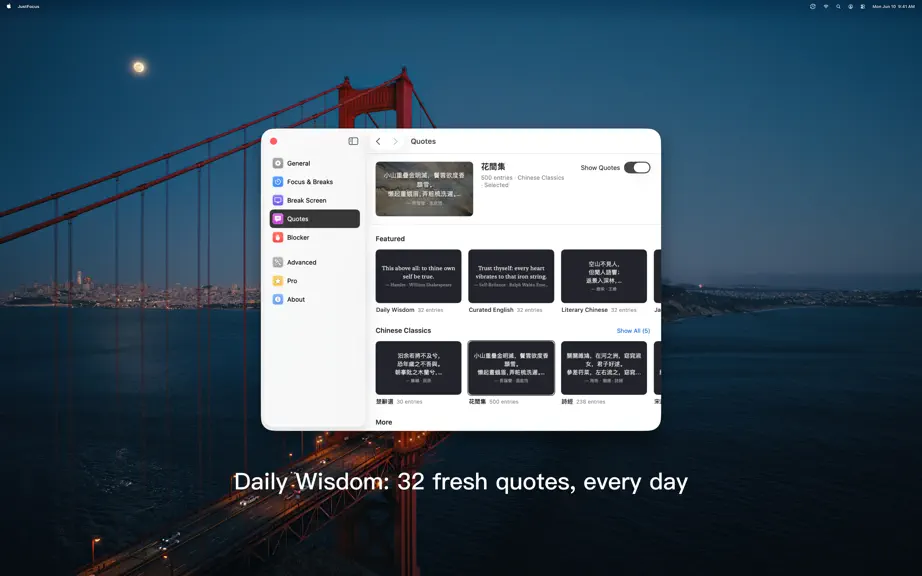
v2.7.5 * Fixed a rare crash when sound effects overlapped, improving playback stability v2.7.4 * NEW: Daily Wisdom — a fresh mix of 32 hand-reviewed quotes for your break screen, renewed every day * All-new Quotes page in Preferences: browse and pick curated English, Literary Chinese, and Japanese sources, with secure updates and offline support * Five free Chinese classics collections to download: The Book of Songs, Selected Songs of Chu, Three Hundred Tang Poems, Three Hundred Song Lyrics, and Among the Flowers * Redesigned Stats with clearer charts, smoother navigation, and hover details * Day stats are now free for everyone: Focus Time, Sessions, Longest Session, and fair comparisons with the previous day * Pro adds Week, Month, 6 Months, and Year views, daily averages, and CSV export * Redesigned Preferences with a sidebar and dedicated Focus & Breaks, Break Screen, and Quotes pages * Personal Quotes now persist more reliably across edits and app launches * Requires macOS 14 or later v2.7.3 * New Break Screen styles: choose Immersive Quote or Breathe in Preferences * The Breathe style guides you through a full-screen breathing session — inhale and exhale with the rhythm for a truly restful break * New menu bar reminder glow: gentle effects like Breathing Halo, Radar Ping, Heartbeat, and Comet Orbit nudge you to start your next focus session * Start a break anytime with the new "Start Break Now" menu bar action * Redesigned the Pro upgrade page and General preferences with a cleaner look * Allow lists no longer count toward the free-tier blocking limit * Fixed occasional menu bar hangs for smoother performance v2.6.11 * Bug Fixes v2.6.9 * Redesigned Blocker and Pro preferences with a cleaner, more consistent look * Fixed crashes and improved performance during break screens * Better accessibility and color contrast * Requires macOS 13.5 or later v2.6.5 * Bug fixes v2.6.3 * Fixed various bugs for a smoother experience * Added compatibility with macOS 26 v2.5.14 * macOS 12.4 Monterey supported * Bug fixes v2.5.12 * Fixed some minor bugs to improve stability. * Temporarily removed the reminder to restart the work timer after a break. We’re always listening to your feedback and will continue to enhance the overall user experience. Thank you for your continued support! v2.5.9 * Welcome Screen: We’ve introduced a brand-new welcome screen when you launch the app, making it easier than ever to get started. * Break Reminder: If you haven’t started a new focus session within 5 minutes after your break ends, you’ll now receive a helpful reminder. * SwiftUI Preferences: The Preferences panel has been completely rewritten in SwiftUI for a smoother and more consistent experience. * Bug Fixes: We’ve squashed a few bugs to improve overall performance and stability. * Added support for Japanese v2.5.0 2.5.0 is HERE! * Enhanced Statistics: View detailed focus data daily, monthly, or yearly for deeper insights into your productivity. * Website & App Blocking: Stay focused by blocking distracting websites and apps during your work sessions. * New Visual Effect: Enjoy stunning high-resolution images from pexels.com as your break-time background. v2.2.4 * Bug fixes v2.2.1 * Brought back the 'STOP' button on the break screen * Added a link to the Raycast extension * Fixed a typo in the break screen popover v2.2.0 * New option: postpone 1 minute on current break * Preferences panel is now scrollable on small screens v2.1.0 * New option: no cancellation during the break v2.0.9 * Fixed a issue in which count down progress on the menu bar icon is not working * Auto clean up wallpapers downloaded 3 days ago v2.0.7 * New option to hide option popover when stopping the break * New option to filter all/work only timers on the stats window
- v2.7.322d ago
v2.7.3 * New Break Screen styles: choose Immersive Quote or Breathe in Preferences * The Breathe style guides you through a full-screen breathing session — inhale and exhale with the rhythm for a truly restful break * New menu bar reminder glow: gentle effects like Breathing Halo, Radar Ping, Heartbeat, and Aurora Shimmer nudge you to start your next Pomodoro * Start a break anytime with the new "Start Break Now" menu bar action * Redesigned the Pro upgrade page and General preferences with a cleaner look * Allow lists no longer count toward the free-tier blocking limit * Fixed occasional menu bar hangs for smoother performance v2.6.11 * Bug Fixes v2.6.9 * Redesigned Blocker and Pro preferences with a cleaner, more consistent look * Fixed crashes and improved performance during break screens * Better accessibility and color contrast * Requires macOS 13.5 or later v2.6.5 * Bug fixes v2.6.3 * Fixed various bugs for a smoother experience * Added compatibility with macOS 26 v2.5.14 * macOS 12.4 Monterey supported * Bug fixes v2.5.12 * Fixed some minor bugs to improve stability. * Temporarily removed the reminder to restart the work timer after a break. We’re always listening to your feedback and will continue to enhance the overall user experience. Thank you for your continued support! v2.5.9 * Welcome Screen: We’ve introduced a brand-new welcome screen when you launch the app, making it easier than ever to get started. * Break Reminder: If you haven’t started a new Pomodoro session within 5 minutes after your break ends, you’ll now receive a helpful reminder. * SwiftUI Preferences: The Preferences panel has been completely rewritten in SwiftUI for a smoother and more consistent experience. * Bug Fixes: We’ve squashed a few bugs to improve overall performance and stability. * Added support for Japanese v2.5.0 2.5.0 is HERE! * Enhanced Statistics: View detailed Pomodoro usage data daily, monthly, or yearly for deeper insights into your productivity. * Website & App Blocking: Stay focused by blocking distracting websites and apps during your work sessions. * New Visual Effect: Enjoy stunning high-resolution images from pexels.com as your break-time background. v2.2.4 * Bug fixes v2.2.1 * Brought back the 'STOP' button on the break screen * Added a link to the Raycast extension * Fixed a typo in the break screen popover v2.2.0 * New option: postpone 1 minute on current break * Preferences panel is now scrollable on small screens v2.1.0 * New option: no cancellation during the break v2.0.9 * Fixed a issue in which count down progress on the menu bar icon is not working * Auto clean up wallpapers downloaded 3 days ago v2.0.7 * New option to hide option popover when stopping the break * New option to filter all/work only timers on the stats window v2.0.4 * fixed an issue in which auto-started break may display blank background on macOS 11.15 * fixed an issue that caused desktop picture not working * fixed an issue in which text on buttons are blurry * fixed an issue in which popover buttons shows English on a Chinese system v2.0.2 Just Focus 2.0 is here! * Brand new design of the whole app * Pomodoro progress on the menu bar icon * More customization options for the timers * More customization options for the break screen, including wallpaper optoins, quotes options * Allow unlock with Apple Watch when passcode protection enabled * New options when stopping the break * Removed stop button from the break ended screen * No more second action after unlocked with Touch ID/Apple Watch * Upgraded daily tasks storage module
- v2.6.113mo ago
v2.6.11 * Bug Fixes v2.6.9 * Redesigned Blocker and Pro preferences with a cleaner, more consistent look * Fixed crashes and improved performance during break screens * Better accessibility and color contrast * Requires macOS 13.5 or later v2.6.5 * Bug fixes v2.6.3 * Fixed various bugs for a smoother experience * Added compatibility with macOS 26 v2.5.14 * macOS 12.4 Monterey supported * Bug fixes v2.5.12 * Fixed some minor bugs to improve stability. * Temporarily removed the reminder to restart the work timer after a break. We’re always listening to your feedback and will continue to enhance the overall user experience. Thank you for your continued support! v2.5.9 * Welcome Screen: We’ve introduced a brand-new welcome screen when you launch the app, making it easier than ever to get started. * Break Reminder: If you haven’t started a new Pomodoro session within 5 minutes after your break ends, you’ll now receive a helpful reminder. * SwiftUI Preferences: The Preferences panel has been completely rewritten in SwiftUI for a smoother and more consistent experience. * Bug Fixes: We’ve squashed a few bugs to improve overall performance and stability. * Added support for Japanese v2.5.0 2.5.0 is HERE! * Enhanced Statistics: View detailed Pomodoro usage data daily, monthly, or yearly for deeper insights into your productivity. * Website & App Blocking: Stay focused by blocking distracting websites and apps during your work sessions. * New Visual Effect: Enjoy stunning high-resolution images from pexels.com as your break-time background. v2.2.4 * Bug fixes v2.2.1 * Brought back the 'STOP' button on the break screen * Added a link to the Raycast extension * Fixed a typo in the break screen popover v2.2.0 * New option: postpone 1 minute on current break * Preferences panel is now scrollable on small screens v2.1.0 * New option: no cancellation during the break v2.0.9 * Fixed a issue in which count down progress on the menu bar icon is not working * Auto clean up wallpapers downloaded 3 days ago v2.0.7 * New option to hide option popover when stopping the break * New option to filter all/work only timers on the stats window v2.0.4 * fixed an issue in which auto-started break may display blank background on macOS 11.15 * fixed an issue that caused desktop picture not working * fixed an issue in which text on buttons are blurry * fixed an issue in which popover buttons shows English on a Chinese system v2.0.2 Just Focus 2.0 is here! * Brand new design of the whole app * Pomodoro progress on the menu bar icon * More customization options for the timers * More customization options for the break screen, including wallpaper optoins, quotes options * Allow unlock with Apple Watch when passcode protection enabled * New options when stopping the break * Removed stop button from the break ended screen * No more second action after unlocked with Touch ID/Apple Watch * Upgraded daily tasks storage module
Just Focus — FAQ
How many downloads does Just Focus get?
Just Focus sees an estimated 0 downloads per month on the App Store, per AppCurrents modeling.
Is Just Focus free?
Just Focus is free to download on the App Store, monetizing through in-app purchases.
When was Just Focus released?
Just Focus launched on the App Store on 06.09.2016. Its latest version shipped 01.08.2026.


