
Juno – Python and Jupyter
Juno – Python and Jupyter generates an estimated $1k–$8k/month in revenue from 5k–20k downloads/month on the App Store, according to AppCurrents estimates (updated 2026-08-02).
| Est. revenue / month | $1k–$8k |
|---|---|
| Est. downloads / month | 5k–20k |
| Estimate confidence | low |
| Pricing | Free + IAP |
| Rating | 4.59 ★ (1,080 ratings) |
| Category | Developer Tools |
| Best chart rank | #75 Developer Tools Grossing |
| Released | 26.09.2019 |
| App last updated | 30.07.2026 |
| Platform | iOS |
Modeled monthly estimate · rating velocity · low confidence



About
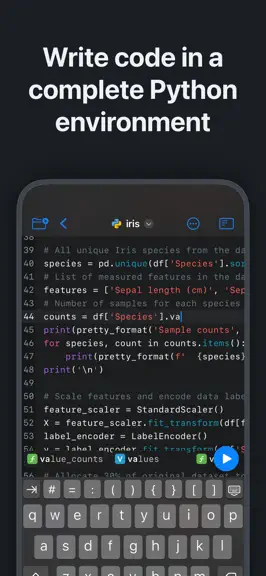
Zero-setup Python IDE that runs your code offline, an AI coding assistant, and a developer toolbox — in a first-class citizen app for iPad and iPhone. Juno is designed to cover all your Python coding needs, supporting both Python scripts (.py) and Jupyter notebooks (.ipynb) — a document format focused on applying Python to data analysis and computational science. FREE FEATURES - Navigate and ma…
Trends & analysis
Chart rank trend
US · categoryWhy it's surfacing
Scout 29Ratings & velocity
★ +0.01 in windowRating distribution
90% positive · 1k ratingsGeographic reach
best rank · 12 storefrontsRevenue & downloads trend
ARPU $0In-app purchases
1 tiersUpdate history
6 updates tracked- v4.1.44d ago
What's New in Juno 4.1.4: HTML files now open in a live web view: pages run their JavaScript and load their own stylesheets, images, and scripts. This update also fixes installing certain packages from source, moving files in the project tree, and a range of stability issues. Juno 4 is our biggest update yet — here's everything new. CODING ASSISTANT – Code alongside an AI assistant in your notebooks and scripts. Bring your own OpenAI, Anthropic, or Gemini API key and stay in full control of your data and usage. PYTHON 3.13 – The built-in environment now runs Python 3.13, with every bundled package — NumPy, pandas, SciPy, Matplotlib, OpenCV, and more — updated along with it. NEW WAYS TO RUN – Python REPL: run code interactively at a prompt — standalone, or drop in after running a script or project. – Project mode: open a folder as a project with a file tree, multiple editor tabs, and a project-aware assistant. – Object Inspector: browse the variables, functions, and imports defined in your session. – Output sidebar: keep previews, the console, a browser, and the inspector side by side. PYTHON MEETS iOS – New juno modules reach the clipboard, Keychain, device info, location, motion, contacts, reminders, photos, sound, notifications, sharing, and Bluetooth — plus native dialogs, full-screen previews, and an Objective-C bridge. – Run Python files and code from Shortcuts and Siri, and keep long-running scripts and sessions going in the background. MORE – A built-in browser for local web servers and HTML, with view-source and console-log forwarding. – One editor for code and text, with syntax highlighting and the coding assistant for both. – Faster package search, collapsible cells, auto-scrolling notebooks, a customizable keyboard toolbar, redesigned settings, and a wide range of fixes and polish. Editing notebooks and files is now free. Running code is a Pro feature — and you can try it, and every other Pro feature, free before you buy.
- v4.1.312d ago
What's New in Juno 4.1.3: This update includes under-the-hood fixes and improves overall stability. Juno 4 is our biggest update yet — here's everything new. CODING ASSISTANT – Code alongside an AI assistant in your notebooks and scripts. Bring your own OpenAI, Anthropic, or Gemini API key and stay in full control of your data and usage. PYTHON 3.13 – The built-in environment now runs Python 3.13, with every bundled package — NumPy, pandas, SciPy, Matplotlib, OpenCV, and more — updated along with it. NEW WAYS TO RUN – Python REPL: run code interactively at a prompt — standalone, or drop in after running a script or project. – Project mode: open a folder as a project with a file tree, multiple editor tabs, and a project-aware assistant. – Object Inspector: browse the variables, functions, and imports defined in your session. – Output sidebar: keep previews, the console, a browser, and the inspector side by side. PYTHON MEETS iOS – New juno modules reach the clipboard, Keychain, device info, location, motion, contacts, reminders, photos, sound, notifications, sharing, and Bluetooth — plus native dialogs, full-screen previews, and an Objective-C bridge. – Run Python files and code from Shortcuts and Siri, and keep long-running scripts and sessions going in the background. MORE – A built-in browser for local web servers and HTML, with view-source and console-log forwarding. – One editor for code and text, with syntax highlighting and the coding assistant for both. – Faster package search, collapsible cells, auto-scrolling notebooks, a customizable keyboard toolbar, redesigned settings, and a wide range of fixes and polish. Editing notebooks and files is now free. Running code is a Pro feature — and you can try it, and every other Pro feature, free before you buy.
- v4.1.215d ago
What's New in Juno 4.1.2: This update fixes several crashes and improves overall stability. Juno 4 is our biggest update yet — here's everything new. CODING ASSISTANT – Code alongside an AI assistant in your notebooks and scripts. Bring your own OpenAI, Anthropic, or Gemini API key and stay in full control of your data and usage. PYTHON 3.13 – The built-in environment now runs Python 3.13, with every bundled package — NumPy, pandas, SciPy, Matplotlib, OpenCV, and more — updated along with it. NEW WAYS TO RUN – Python REPL: run code interactively at a prompt — standalone, or drop in after running a script or project. – Project mode: open a folder as a project with a file tree, multiple editor tabs, and a project-aware assistant. – Object Inspector: browse the variables, functions, and imports defined in your session. – Output sidebar: keep previews, the console, a browser, and the inspector side by side. PYTHON MEETS iOS – New juno modules reach the clipboard, Keychain, device info, location, motion, contacts, reminders, photos, sound, notifications, sharing, and Bluetooth — plus native dialogs, full-screen previews, and an Objective-C bridge. – Run Python files and code from Shortcuts and Siri, and keep long-running scripts and sessions going in the background. MORE – A built-in browser for local web servers and HTML, with view-source and console-log forwarding. – One editor for code and text, with syntax highlighting and the coding assistant for both. – Faster package search, collapsible cells, auto-scrolling notebooks, a customizable keyboard toolbar, redesigned settings, and a wide range of fixes and polish. Editing notebooks and files is now free. Running code is a Pro feature — and you can try it, and every other Pro feature, free before you buy.
- v4.1.117d ago
What's New in Juno 4: This update also makes installing packages more reliable: packages that bundle extra data files now install correctly, and you can find a package by its import name — like sklearn, cv2, or PIL. Juno 4 is our biggest update yet — here's everything new. CODING ASSISTANT – Code alongside an AI assistant in your notebooks and scripts. Bring your own OpenAI, Anthropic, or Gemini API key and stay in full control of your data and usage. PYTHON 3.13 – The built-in environment now runs Python 3.13, with every bundled package — NumPy, pandas, SciPy, Matplotlib, OpenCV, and more — updated along with it. NEW WAYS TO RUN – Python REPL: run code interactively at a prompt — standalone, or drop in after running a script or project. – Project mode: open a folder as a project with a file tree, multiple editor tabs, and a project-aware assistant. – Object Inspector: browse the variables, functions, and imports defined in your session. – Output sidebar: keep previews, the console, a browser, and the inspector side by side. PYTHON MEETS iOS – New juno modules reach the clipboard, Keychain, device info, location, motion, contacts, reminders, photos, sound, notifications, sharing, and Bluetooth — plus native dialogs, full-screen previews, and an Objective-C bridge. – Run Python files and code from Shortcuts and Siri, and keep long-running scripts and sessions going in the background. MORE – A built-in browser for local web servers and HTML, with view-source and console-log forwarding. – One editor for code and text, with syntax highlighting and the coding assistant for both. – Faster package search, collapsible cells, auto-scrolling notebooks, a customizable keyboard toolbar, redesigned settings, and a wide range of fixes and polish. Editing notebooks and files is now free. Running code is a Pro feature — and you can try it, and every other Pro feature, free before you buy.
- v4.1.020d ago
What's New in 4.1: Juno 4 is our biggest update yet — here's everything new. CODING ASSISTANT – Code alongside an AI assistant in your notebooks and scripts. Bring your own OpenAI, Anthropic, or Gemini API key and stay in full control of your data and usage. PYTHON 3.13 – The built-in environment now runs Python 3.13, with every bundled package — NumPy, pandas, SciPy, Matplotlib, OpenCV, and more — updated along with it. NEW WAYS TO RUN – Python REPL: run code interactively at a prompt — standalone, or drop in after running a script or project. – Project mode: open a folder as a project with a file tree, multiple editor tabs, and a project-aware assistant. – Object Inspector: browse the variables, functions, and imports defined in your session. – Output sidebar: keep previews, the console, a browser, and the inspector side by side. PYTHON MEETS iOS – New juno modules reach the clipboard, Keychain, device info, location, motion, contacts, reminders, photos, sound, notifications, sharing, and Bluetooth — plus native dialogs, full-screen previews, and an Objective-C bridge. – Run Python files and code from Shortcuts and Siri, and keep long-running scripts and sessions going in the background. MORE – A built-in browser for local web servers and HTML, with view-source and console-log forwarding. – One editor for code and text, with syntax highlighting and the coding assistant for both. – Faster package search, collapsible cells, auto-scrolling notebooks, a customizable keyboard toolbar, redesigned settings, and a wide range of fixes and polish. Editing notebooks and files is now free. Running code is a Pro feature — and you can try it, and every other Pro feature, free before you buy.
Juno – Python and Jupyter — FAQ
How much money does Juno – Python and Jupyter make?
According to AppCurrents estimates, Juno – Python and Jupyter generates approximately $1k–$8k per month (low confidence), modeled from its the App Store chart performance, rating velocity, and monetization signals.
How many downloads does Juno – Python and Jupyter get?
Juno – Python and Jupyter sees an estimated 5k–20k downloads per month on the App Store, per AppCurrents modeling.
Is Juno – Python and Jupyter free?
Juno – Python and Jupyter is free to download on the App Store, monetizing through in-app purchases.
What is Juno – Python and Jupyter's rating?
Juno – Python and Jupyter holds a 4.59-star average from 1,080 ratings on the App Store. It currently ranks #75 on the Developer Tools grossing chart.
When was Juno – Python and Jupyter released?
Juno – Python and Jupyter launched on the App Store on 26.09.2019. Its latest version shipped 30.07.2026.


