gtsync: Sync Tasks & Reminders
gtsync: Sync Tasks & Reminders generates an estimated $300–$6k/month in revenue from 200–900 downloads/month on the App Store, according to AppCurrents estimates (updated 2026-10-02).
| Est. revenue / month | $300–$6k |
|---|---|
| Est. downloads / month | 200–900 |
| Estimate confidence | medium |
| Pricing | Paid $4.99 |
| Rating | 4.80 ★ (5 ratings) |
| Category | Productivity |
| Best chart rank | #88 Productivity Paid |
| Released | 27.04.2026 |
| App last updated | 18.09.2026 |
| Platform | iOS |
Modeled monthly estimate · rating velocity · medium confidence
About
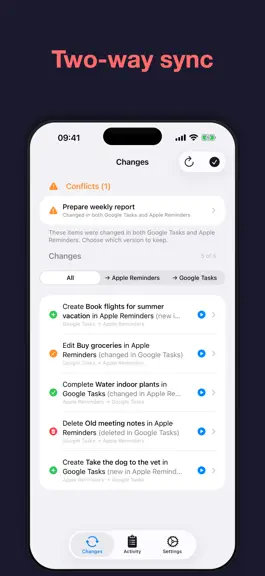
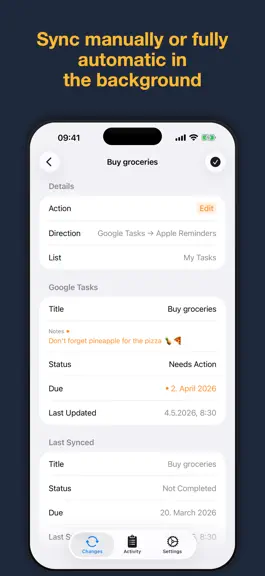
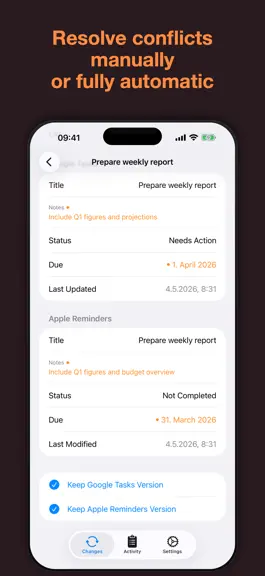
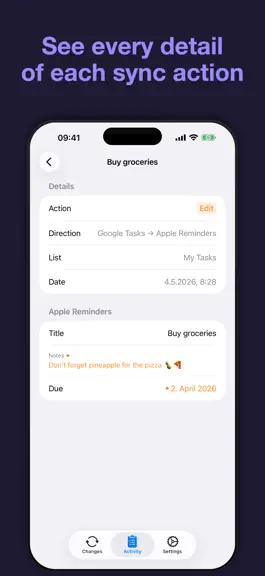
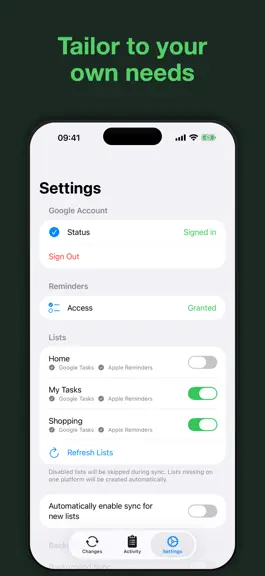
Two-way sync between Google Tasks (including tasks in Google Calendar) and the Reminders app (including Reminders in the Calendar app). A seamless way to keep everything you need to do synchronized across both platforms. gtsync securely connects Google Tasks to the Reminders app. Add a reminder using Siri on your commute, and it's waiting for you alongside your tasks in Google Calendar on your la…
Trends & analysis
Chart rank trend
US · categoryWhy it's surfacing
Scout 32Ratings & velocity
★ +4.8 in windowGeographic reach
best rank · 1 storefrontRevenue & downloads trend
ARPU $3Update history
11 updates tracked- v1.1114d ago
Bug fixes: • Clearing a due date in Reminders now clears it in Google Tasks and prevents it from reappearing after sync. • Clearing notes in Reminders now clears them in Google Tasks.
- v1.101mo ago
Improvements: • Minor improvements to the Settings screen.
- v1.91mo ago
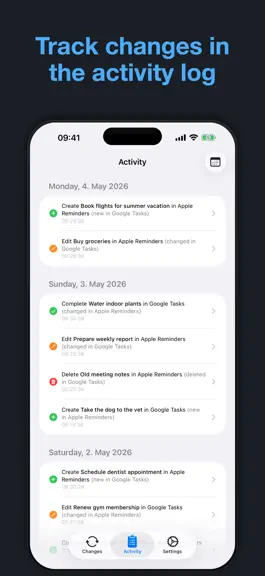
New features: • The Activity log gained a search field — search titles, notes, and previous values, with matches highlighted and a preview snippet showing where a hit came from. • The Activity log gained Action, Direction, and List filters, shown as dropdown menus that indicate how many options are selected. • Text in the Activity log, change detail, and task detail screens can now be selected and copied — including selecting part of a value's text, not just the whole thing — and links inside task titles and notes are tappable there. • Tasks assigned to you via Google Chat or from a Google Doc now sync into Reminders — previously they were skipped entirely. Docs-assigned tasks include a short note explaining that gtsync manages their description (Google Tasks doesn't support notes for these tasks) and a link back to the source, both kept in sync automatically; the link is also saved to the reminder's URL field on iCloud and on-device lists, so other apps can read it. When gtsync restores a note that was edited elsewhere, that shows up in the Activity log as its own "Restore" entry. Updating triggers a one-time catch-up sync, so tasks that were already assigned to you before the update aren't missed. Improvements: • The Activity log tells you when it's showing fewer entries than actually exist, instead of silently hiding older ones. • Backup and restore screens show "Unknown size" instead of a misleading "0 KB" when a backup's size can't be determined. • The "Detecting Changes" overlay text no longer repeats itself.
- v1.81mo ago
New features: • Moving a task between lists in Google Tasks, or a reminder between lists in Reminders, now syncs as a move to the matching list on the other side — with the previous and new list shown side by side on the Changes and Activity screens — instead of being deleted and re-created. Improvements: • Redesigned the Changes and Activity detail screens: each changed field now has its own row, with word-level highlighting showing exactly what changed in a title or notes edit, and a summary sentence alongside the relevant timestamps under "Details". • List and conflict rows on the Changes and Activity screens now read as a short description of what happened (for example, "Edit notes for Buy milk"), with the sync direction shown as a caption. • Completing or uncompleting an item is now described as "Completed" or "Uncompleted" instead of the generic "Status changed", combined with any other field that changed at the same time. • Timestamps on the detail screens are now grouped under a single "Last Changed" label, one line per service, with a tap-to-explain info button describing what "Last Changed" and "Last Synced" mean. • Enlarged the Apply button on the Changes screen and gave it an "Apply" label for VoiceOver (it previously announced as "Play"). • Changed the "No actions matching filter" message on the Changes screen to "No changes matching the filter". Bug fixes: • Moving a task in Google Tasks into a list you haven't turned on syncing for is now treated the same as deleting it — the matching reminder in Reminders is removed, and moving the task back re-creates it — instead of leaving a stale reminder behind forever. The same now applies to a reminder moved into an unsynced list in Reminders. • Completing or uncompleting an item that also had a content edit, such as its notes, now shows that edit as a full before/after comparison on the Changes screen instead of only the new value. • Notes containing only whitespace no longer show up as a false change on the Changes screen.
- v1.72mo ago
New features: • New Statistics tab shows your sync activity by Day, Week, or Month, with summary tiles, an activity chart, and breakdowns by direction, action type, list, and issues — swipe or jump to a date to browse other periods, and tap a breakdown to see the matching entries in the Activity log. Improvements: • Sync action colors (create, update, complete, uncomplete, and delete/error) are now distinct and consistent across Changes, Activity, and Statistics.
gtsync: Sync Tasks & Reminders — FAQ
How much money does gtsync: Sync Tasks & Reminders make?
According to AppCurrents estimates, gtsync: Sync Tasks & Reminders generates approximately $300–$6k per month (medium confidence), modeled from its the App Store chart performance, rating velocity, and monetization signals.
How many downloads does gtsync: Sync Tasks & Reminders get?
gtsync: Sync Tasks & Reminders sees an estimated 200–900 downloads per month on the App Store, per AppCurrents modeling.
Is gtsync: Sync Tasks & Reminders free?
gtsync: Sync Tasks & Reminders is a paid app priced at $4.99 on the App Store.
What is gtsync: Sync Tasks & Reminders's rating?
gtsync: Sync Tasks & Reminders holds a 4.80-star average from 5 ratings on the App Store. It currently ranks #88 on the Productivity paid chart.
When was gtsync: Sync Tasks & Reminders released?
gtsync: Sync Tasks & Reminders launched on the App Store on 27.04.2026. Its latest version shipped 18.09.2026.


