
GPS Camera 55. Field Survey
GPS Camera 55. Field Survey generates an estimated $500–$3k/month in revenue from 1k–5k downloads/month on the App Store, according to AppCurrents estimates (updated 2026-08-02).
| Est. revenue / month | $500–$3k |
|---|---|
| Est. downloads / month | 1k–5k |
| Estimate confidence | low |
| Pricing | Free + IAP |
| Rating | 4.70 ★ (2,749 ratings) |
| Category | Navigation |
| Released | 06.12.2018 |
| App last updated | 09.05.2026 |
| Platform | iOS |
Modeled monthly estimate · rating velocity · low confidence
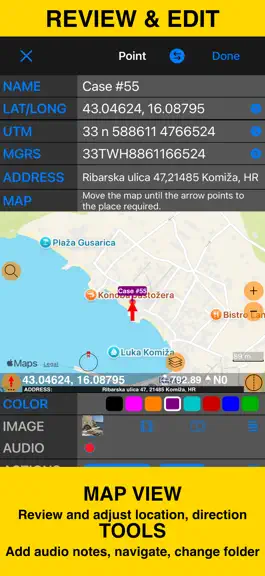
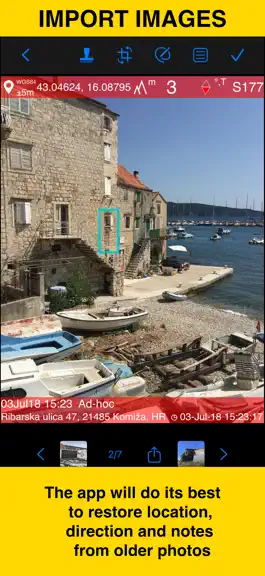
About
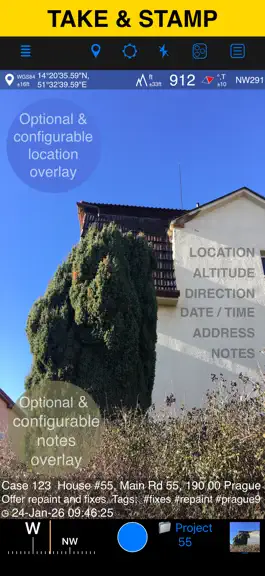
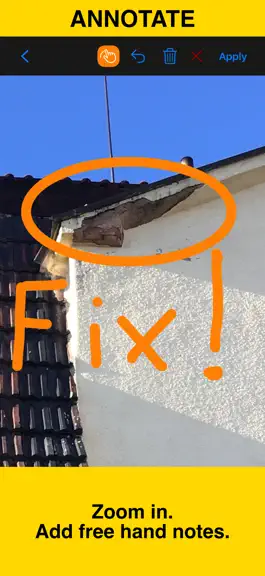
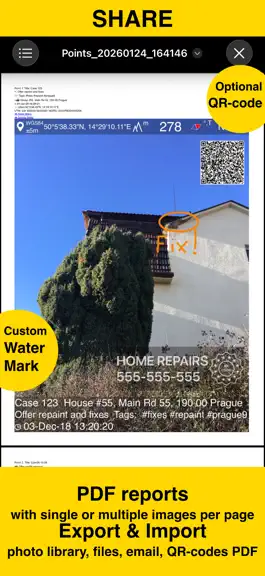
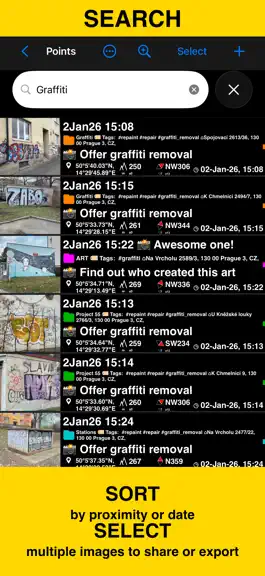
Capture photos with precise location, date, address, and custom notes stamped right on the image. Add hand-drawn annotations for quick markups in the field. Easily search and filter your shots by title, tags, or notes — or sort them by proximity and date. Organize everything into folders or collections for structured reporting. Need to work with older photos? Import from your library and restore t…
Trends & analysis
Chart rank trend
US · overallWhy it's surfacing
Scout 11Ratings & velocity
★ 0 in windowRating distribution
93% positive · 3k ratingsGeographic reach
best rank · 7 storefrontsRevenue & downloads trend
ARPU $0In-app purchases
3 tiersUpdate history
1 update tracked- v5.1.12mo ago
■ Improved toolbars for compact screens on iOS 26 ‣ Paint and selection tools now stay within easy reach on very narrow iPhone layouts and small iPad app windows. They move to the bottom toolbar instead of being tucked away in an overflow menu, making drawing, selecting, and applying changes faster on iOS 26 and iPadOS 26. ‣ Camera and preview actions now also have clear names when iOS 26 places them in the overflow menu, so Save, Notes, Drawing tools, Crop, Flash, Settings, and camera switching remain easy to find. ‣ Huge thanks to Ed for reporting the compact-screen toolbar issue and sharing screenshots. Don't miss the major version updates: ■ Draw More Freely ‣ Add double-headed arrows, dimension lines, and text labels to call out details more clearly. ‣ You’re no longer limited to 8 fixed colors. Choose your own stroke and fill colors to match your style and needs. ‣ Adjust stroke and fill transparency separately for clearer overlays. ■ Edit Drawings Later ‣ Starting with version 5.1, drawings are saved in photo metadata instead of being baked into the saved photo, so you can select, edit, or delete them later. ‣ Use the new arrow button in the paint toolbar to enter selection mode. ‣ Tap a drawing’s border to select it, then use the Style button to change stroke, fill, transparency, or colors. ‣ Use the Text button to attach text to a drawing or edit the attached text. ‣ The trash button in the paint toolbar now removes all drawings, letting you return to the photo without drawings. If the photo was cropped or resized, the result is the cropped or resized photo, not the original uncropped image. ■ Share and Restore More Reliably ‣ Photos can still be shared with drawings applied, with or without location and note stamps, just like before. ‣ KMZ export still supports the previous presentation-style option that exports photos with drawings applied. ‣ A new KMZ export option now includes both the rendered photo and the original image with drawing metadata, so imports can restore your drawings for later editing. ‣ Please note: this rework only applies to drawings created in version 5.1 and later. ■ Quality of Life Improvements ‣ The automatically resolved address shown in the camera viewfinder now displays a warning indicator when the address is stale or when address resolution failed. ‣ Fixed the HTML formatting warning shown in Google Earth for Mac and PC when opening exported photo popups. Loving the app? Your rating makes a huge difference. Please take a moment to leave one — it means the world to us!
GPS Camera 55. Field Survey — FAQ
How much money does GPS Camera 55. Field Survey make?
According to AppCurrents estimates, GPS Camera 55. Field Survey generates approximately $500–$3k per month (low confidence), modeled from its the App Store chart performance, rating velocity, and monetization signals.
How many downloads does GPS Camera 55. Field Survey get?
GPS Camera 55. Field Survey sees an estimated 1k–5k downloads per month on the App Store, per AppCurrents modeling.
Is GPS Camera 55. Field Survey free?
GPS Camera 55. Field Survey is free to download on the App Store, monetizing through in-app purchases.
What is GPS Camera 55. Field Survey's rating?
GPS Camera 55. Field Survey holds a 4.70-star average from 2,749 ratings on the App Store.
When was GPS Camera 55. Field Survey released?
GPS Camera 55. Field Survey launched on the App Store on 06.12.2018. Its latest version shipped 09.05.2026.


