
GoodReader PDF Editor & Viewer
GoodReader PDF Editor & Viewer generates an estimated $2k–$29k/month in revenue from 800–4k downloads/month on the App Store, according to AppCurrents estimates (updated 2026-10-03).
| Est. revenue / month | $2k–$29k |
|---|---|
| Est. downloads / month | 800–4k |
| Estimate confidence | medium |
| Pricing | Paid $5.99 |
| Rating | 4.66 ★ (13,805 ratings) |
| Category | Productivity |
| Best chart rank | #22 Productivity Paid |
| Released | 07.05.2014 |
| App last updated | 01.10.2026 |
| Platform | iOS |
Modeled monthly estimate · rating velocity · medium confidence
About
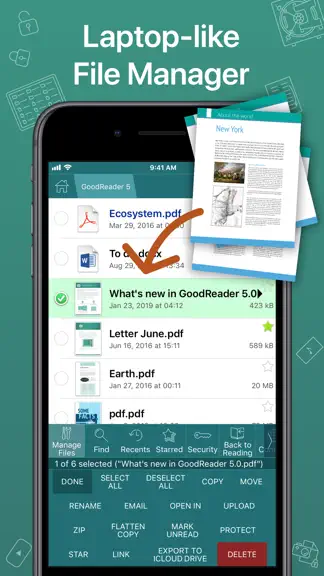
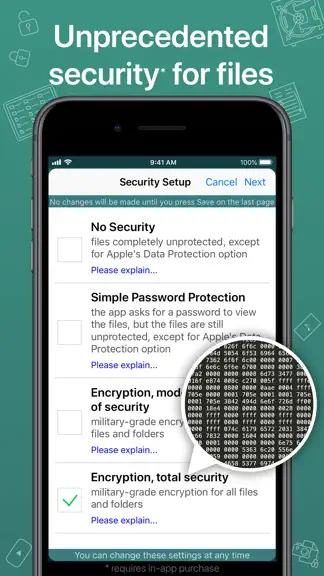
First released in 2009, GoodReader® is truly a veteran of the App Store. In the modern app business, it's not easy to stay relevant that long. We're proud to say that after 17 years and counting, we've been delivering wonderful updates with extraordinary new features. And we're going to keep doing that! GoodReader is a perfect combination of document-reading and file-managing capabilities. It's…
Trends & analysis
Chart rank trend
US · categoryWhy it's surfacing
Scout 18Ratings & velocity
★ 0 in windowRating distribution
92% positive · 14k ratingsGeographic reach
best rank · 1 storefrontRevenue & downloads trend
ARPU $4In-app purchases
4 tiersUpdate history
7 updates tracked- v6.0.12381d ago
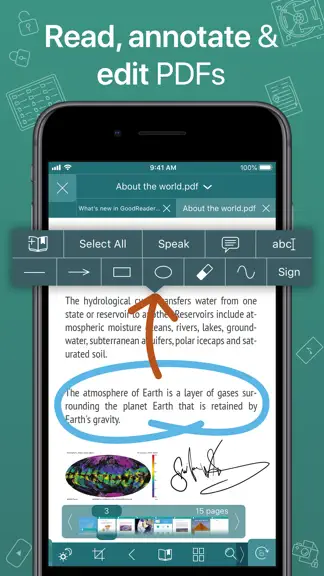
• Fixed the bug that caused incorrect displaying of PDF Outlines (Table of Contents). Was New in 6.0: GoodReader 6 is here! Explore our powerful new features and workflow enhancements: • MULTI-WINDOW SUPPORT: Seamlessly view and manage multiple files simultaneously on iPad. • INTUITIVE DRAG-AND-DROP: Move files and folders into and out of the app instantly. Skip the Import from Files dialog—just drag a downloaded file directly into GoodReader. • MAC COMPATIBILITY: Enjoy the full GoodReader experience on your Mac. • PDF ANNOTATIONS: Undo/Redo and Copy/Paste capabilities for effortless editing. • INTRODUCING NOTES: Capture ideas and comments instantly without ever leaving your document. Organize your thoughts into categories, and use Widgets or Shortcuts for instant, one-tap access. • TEXT FORMAT STRIPPER: Automatically strip rich text formatting from Pasteboard. Turn web clips into plain text suitable for emails. • PDF HYPERLINKS: Create tappable PDF links to web pages or local files. Supports standard URL schemes (http, https, mailto, file). • GOOGLE DRIVE UPGRADES: Sync files and folders directly from your "Shared with Me" section. • ENHANCED FILE TABS: Starred files now display their specific color tags on your tabs. • BOOKMARK & OUTLINE SEARCH: Quickly find exactly what you need within your Bookmarks and PDF Outlines. We’ve also included countless minor improvements and performance optimizations. Enjoy! (Note: Some features require a Pro Pack® subscription.)
- v6.0.12301mo ago
UPDATE: Split Screen is back!!! GoodReader 6 is here! Explore our powerful new features and workflow enhancements: • MULTI-WINDOW SUPPORT: Seamlessly view and manage multiple files simultaneously on iPad. • INTUITIVE DRAG-AND-DROP: Move files and folders into and out of the app instantly. Skip the Import from Files dialog—just drag a downloaded file directly into GoodReader. • MAC COMPATIBILITY: Enjoy the full GoodReader experience on your Mac. • PDF ANNOTATIONS: Undo/Redo and Copy/Paste capabilities for effortless editing. • INTRODUCING NOTES: Capture ideas and comments instantly without ever leaving your document. Organize your thoughts into categories, and use Widgets or Shortcuts for instant, one-tap access. • TEXT FORMAT STRIPPER: Automatically strip rich text formatting from Pasteboard. Turn web clips into plain text suitable for emails. • PDF HYPERLINKS: Create tappable PDF links to web pages or local files. Supports standard URL schemes (http, https, mailto, file). • GOOGLE DRIVE UPGRADES: Sync files and folders directly from your "Shared with Me" section. • ENHANCED FILE TABS: Starred files now display their specific color tags on your tabs. • BOOKMARK & OUTLINE SEARCH: Quickly find exactly what you need within your Bookmarks and PDF Outlines. We’ve also included countless minor improvements and performance optimizations. Enjoy! (Note: Some features require a Pro Pack® subscription.)
- v6.0.12291mo ago
UPDATE: Split Screen is back!!! GoodReader 6 is here! Explore our powerful new features and workflow enhancements: • MULTI-WINDOW SUPPORT: Seamlessly view and manage multiple files simultaneously on iPad. • INTUITIVE DRAG-AND-DROP: Move files and folders into and out of the app instantly. Skip the Import from Files dialog—just drag a downloaded file directly into GoodReader. • MAC COMPATIBILITY: Enjoy the full GoodReader experience on your Mac. • PDF ANNOTATIONS: Undo/Redo and Copy/Paste capabilities for effortless editing. • INTRODUCING NOTES: Capture ideas and comments instantly without ever leaving your document. Organize your thoughts into categories, and use Widgets or Shortcuts for instant, one-tap access. • TEXT FORMAT STRIPPER: Automatically strip rich text formatting from Pasteboard. Turn web clips into plain text suitable for emails. • PDF HYPERLINKS: Create tappable PDF links to web pages or local files. Supports standard URL schemes (http, https, mailto, file). • GOOGLE DRIVE UPGRADES: Sync files and folders directly from your "Shared with Me" section. • ENHANCED FILE TABS: Starred files now display their specific color tags on your tabs. • BOOKMARK & OUTLINE SEARCH: Quickly find exactly what you need within your Bookmarks and PDF Outlines. We’ve also included countless minor improvements and performance optimizations. Enjoy! (Note: Some features require a Pro Pack® subscription.)
- v6.0.12271mo ago
UPDATE: Split Screen is back!!! GoodReader 6 is here! Explore our powerful new features and workflow enhancements: • MULTI-WINDOW SUPPORT: Seamlessly view and manage multiple files simultaneously on iPad. • INTUITIVE DRAG-AND-DROP: Move files and folders into and out of the app instantly. Skip the Import from Files dialog—just drag a downloaded file directly into GoodReader. • MAC COMPATIBILITY: Enjoy the full GoodReader experience on your Mac. • PDF ANNOTATIONS: Undo/Redo and Copy/Paste capabilities for effortless editing. • INTRODUCING NOTES: Capture ideas and comments instantly without ever leaving your document. Organize your thoughts into categories, and use Widgets or Shortcuts for instant, one-tap access. • TEXT FORMAT STRIPPER: Automatically strip rich text formatting from Pasteboard. Turn web clips into plain text suitable for emails. • PDF HYPERLINKS: Create tappable PDF links to web pages or local files. Supports standard URL schemes (http, https, mailto, file). • GOOGLE DRIVE UPGRADES: Sync files and folders directly from your "Shared with Me" section. • ENHANCED FILE TABS: Starred files now display their specific color tags on your tabs. • BOOKMARK & OUTLINE SEARCH: Quickly find exactly what you need within your Bookmarks and PDF Outlines. We’ve also included countless minor improvements and performance optimizations. Enjoy! (Note: Some features require a Pro Pack® subscription.)
- v6.0.12261mo ago
UPDATE: By popular request, we will be bringing Split Screen back in the next update, expected soon! GoodReader 6 is here! Explore our powerful new features and workflow enhancements: • MULTI-WINDOW SUPPORT: Seamlessly view and manage multiple files simultaneously on iPad. • INTUITIVE DRAG-AND-DROP: Move files and folders into and out of the app instantly. Skip the Import from Files dialog—just drag a downloaded file directly into GoodReader. • MAC COMPATIBILITY: Enjoy the full GoodReader experience on your Mac. • PDF ANNOTATIONS: Undo/Redo and Copy/Paste capabilities for effortless editing. • INTRODUCING NOTES: Capture ideas and comments instantly without ever leaving your document. Organize your thoughts into categories, and use Widgets or Shortcuts for instant, one-tap access. • TEXT FORMAT STRIPPER: Automatically strip rich text formatting from Pasteboard. Turn web clips into plain text suitable for emails. • PDF HYPERLINKS: Create tappable PDF links to web pages or local files. Supports standard URL schemes (http, https, mailto, file). • GOOGLE DRIVE UPGRADES: Sync files and folders directly from your "Shared with Me" section. • ENHANCED FILE TABS: Starred files now display their specific color tags on your tabs. • BOOKMARK & OUTLINE SEARCH: Quickly find exactly what you need within your Bookmarks and PDF Outlines. We’ve also included countless minor improvements and performance optimizations. Enjoy! (Note: Some features require a Pro Pack® subscription.)
GoodReader PDF Editor & Viewer — FAQ
How much money does GoodReader PDF Editor & Viewer make?
According to AppCurrents estimates, GoodReader PDF Editor & Viewer generates approximately $2k–$29k per month (medium confidence), modeled from its the App Store chart performance, rating velocity, and monetization signals.
How many downloads does GoodReader PDF Editor & Viewer get?
GoodReader PDF Editor & Viewer sees an estimated 800–4k downloads per month on the App Store, per AppCurrents modeling.
Is GoodReader PDF Editor & Viewer free?
GoodReader PDF Editor & Viewer is a paid app priced at $5.99 on the App Store.
What is GoodReader PDF Editor & Viewer's rating?
GoodReader PDF Editor & Viewer holds a 4.66-star average from 13,805 ratings on the App Store. It currently ranks #22 on the Productivity paid chart.
When was GoodReader PDF Editor & Viewer released?
GoodReader PDF Editor & Viewer launched on the App Store on 07.05.2014. Its latest version shipped 01.10.2026.


