
ERP Mobile by DateConta
ERP Mobile by DateConta generates an estimated $0/month in revenue from 7–30 downloads/month on the App Store, according to AppCurrents estimates (updated 2026-10-02).
| Est. revenue / month | $0 |
|---|---|
| Est. downloads / month | 7–30 |
| Estimate confidence | medium |
| Pricing | Free |
| Rating | 5.00 ★ (1 ratings) |
| Category | Business |
| Released | 10.06.2026 |
| App last updated | 18.09.2026 |
| Platform | iOS |
Modeled monthly estimate · rating velocity · medium confidence


About
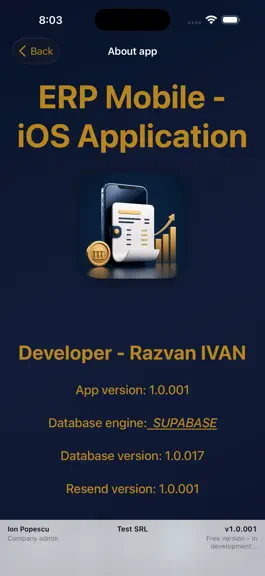
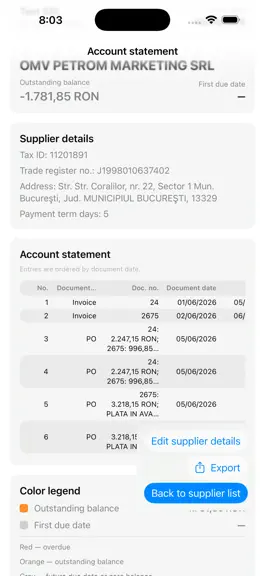
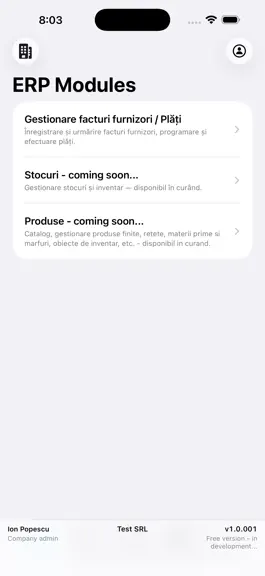
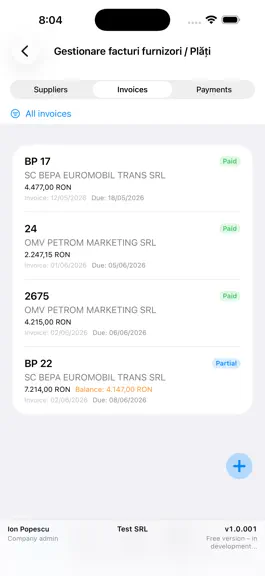
Smart Mobile ERP for Modern Business Manage your entire business operations anytime, anywhere. ERP Mobile brings the power of an enterprise-grade ERP system straight to your pocket, enabling real-time control, seamless collaboration, and smarter decision-making on the go. Whether you are tracking inventory, managing sales pipelines, approving financial workflows, or monitoring team performance, ER…
Trends & analysis
Chart rank trend
US · overallWhy it's surfacing
Scout 23Ratings & velocity
★ 0 in windowGeographic reach
best rank · 0 storefrontsRevenue & downloads trend
ARPU $0Update history
8 updates tracked- v1.0.06114d ago
What’s new in 1.0.061 HR • New HR module for the active company: employees, contracts, monthly payroll, timesheet and PDF listings. • Payroll is built from active contracts. Per person you can enter leave, sick leave, bonuses and deductions. • Timesheet is generated from payroll and the company weekly schedule. • NextUp salary import Excel is built from payroll (gross, employee CAS/CASS, income tax, employer CAM) — no Saga PDF needed. • Choose a simple journal note or amounts collected in account 4311. Preview the note before saving. Utilities • Create a NextUp payroll import from a salary journal-note PDF (including Saga). • Compound notes are split into 1:1 debit/credit pairs, each with that line’s amount. • Same simple / collected-in-4311 option and journal-note preview as in HR. Z reports and Zetta • Scanned Z reports → Zetta import: upload photos or PDFs; each page is one Z; one file with several Zs stays one firm and one Excel. • PDFs follow the Raport_Z_model.pdf layout. Save a combined PDF, one PDF per Z, or Excel — using the firm read from the Z. • Reread unread pages. Preview PDF and Excel before saving. • Set the first accounting note number; Excel numbers Nr. inreg. from there (Utilities and Clients → Zetta). • English BINA Z reports: VAT group sales (BRUT A/B/D) are read correctly again. • Fixed a crash when scrolling the Zetta import screen. Cash register • Opening balance at the start of the period; the previous month’s closing balance is taken automatically when available. • Manual receipts stay in the list and post on the document date. New type: cash deposit to bank. • Filter current week / current month / all, plus document search. • Cash supplier payments appear in the operations list. On Mac, Save and Send from PDF preview no longer open a blank screen. Also • Document dates (invoice, GRN, due date, cash register, inventory) stay the day you enter — they are no longer shifted one day earlier. • Help manual updated for HR, Utilities, Zetta and Cash register.
- v1.0.0331mo ago
e-Invoice import now reuses existing items when the supplier code or barcode already exists, so invoices no longer fail with a duplicate error. • If an import is interrupted, the incomplete invoice is removed automatically so you can load the same file again.
- v1.0.0241mo ago
Cash register (new) • Generate daily cash register journals from imported Z reports and cash payments • Official PDF template with preview, Print, Save PDF, and share • HQ and work-location registers, with automatic transfers between tills • Supplier cash receipts (numerar) included automatically • Negative daily balance handled with an automatic “advance returned for settlement” line • A4 landscape PDF, ready for printing Utilities (new tab) • Zetta import — standalone access from the main menu • MT940 — upload a bank statement (PDF/CSV/MT940) and get one MT940 file per day in a ZIP archive; Raiffeisen PDF support • Z report extraction (BINA) — log in, list reports by date range, and batch-download Romanian PDFs for Zetta import CRM • Full CRM workspace: Overview, Leads, Deals Kanban, Contacts, Companies, Quotes, Activities, Analytics • Support tickets with conversation; open a ticket from a client record • Auto-sync ERP clients into CRM companies and contacts • Deal pipeline metrics, activities (call/meeting/task), and sales analytics Zetta & accounting • Per-company Zetta settings: VAT rates A–D, cash/card/modern payment accounts, registers at multiple work locations • Improved accounting note generation from Z reports (transfers, zero lines skipped, partner account on 4111) • Zetta import: drag & drop JPG/PDF, clearer errors, direct file save on Mac Help & app experience • In-app Help manual with screenshots and quick table-of-contents navigation • What’s New: offline bilingual release history (RO + EN) • Privacy, Terms, GDPR, and About moved into Help • App version shown on the launch screen • Date pickers close automatically after you select a date Suppliers & inventory • GRN (NIR) improvements: line editing, stock corrections, reuse of released GRN numbers • Supplier/client account sheets: period filters and improved PDF/XLS export • Storno invoices and credit notes recorded correctly on supplier accounts Other • Dashboard tiles for Cash register and Bank statement (bank statement module coming soon) • Bug fixes and performance improvements throughout the app
- v1.0.0181mo ago
Minor bug fixes and improvments. Improvements and corrections in the preparation of the NIR.
- v1.0.0152mo ago
- Minor bug fixes and improvments. - ADMIN only - The structure of the item sheet has been modified, and the following item categories have been introduced: Merchandise, Raw Materials, Finished Product (mandatory visible in the catalog), Packaging and Consumables. - ADMIN only - The implementation of the "Stock Sheet" began in parallel with the work on the "Catalog", the finished products and the unloading of the stock by selling them.
ERP Mobile by DateConta — FAQ
How many downloads does ERP Mobile by DateConta get?
ERP Mobile by DateConta sees an estimated 7–30 downloads per month on the App Store, per AppCurrents modeling.
Is ERP Mobile by DateConta free?
ERP Mobile by DateConta is free to download on the App Store, with no in-app purchases detected.
What is ERP Mobile by DateConta's rating?
ERP Mobile by DateConta holds a 5.00-star average from 1 ratings on the App Store.
When was ERP Mobile by DateConta released?
ERP Mobile by DateConta launched on the App Store on 10.06.2026. Its latest version shipped 18.09.2026.


