
Enterprise Files for Intune
Enterprise Files for Intune generates an estimated $0/month in revenue from 0 downloads/month on the App Store, according to AppCurrents estimates (updated 2026-10-02).
| Est. revenue / month | $0 |
|---|---|
| Est. downloads / month | 0 |
| Estimate confidence | low |
| Pricing | Free |
| Rating | 0.00 ★ (0 ratings) |
| Category | Business |
| Released | 07.11.2022 |
| App last updated | 17.08.2026 |
| Platform | iOS |
Modeled monthly estimate · rating velocity · low confidence
About
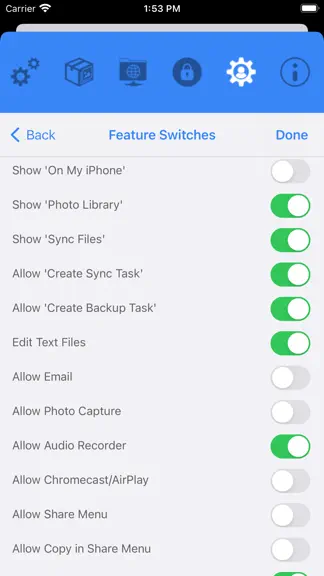
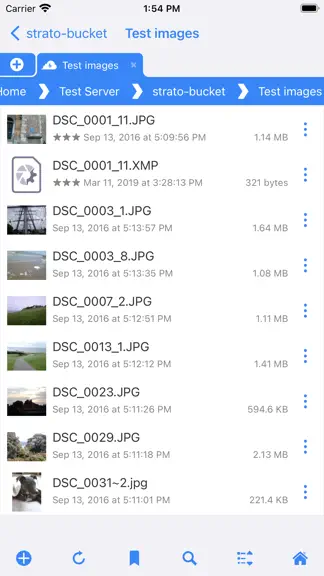
Integrated with inTune Mobile Application Management, the Enterprise Files for inTune app provides safe document access to multiple back-end file stores. Provide access to cloud and on-premise storage with enforceable MAM Protection Polices for your data. Used with a Stratospherix Configuration Server, you can customise file access with Data Loss Prevention and App Protection Policy. Enterprise F…
Trends & analysis
Chart rank trend
US · overallWhy it's surfacing
Scout 4Ratings & velocity
★ 0 in windowGeographic reach
best rank · 0 storefrontsRevenue & downloads trend
monthly estimateUpdate history
2 updates tracked- v7.161mo ago
New Features * Thumbnails are now generated for PSD and PSB files. * GPS info can now be removed from a photo. * HDR images are now rendered at full dynamic range. * It is now easier to export task log files. * Bulk rename format text now has a history list. * The current tab can now be duplicated. * Improved audio player UI. * Improved image viewer UI. * Improved Bookmarks popup UI. * The image viewer can now optionally avoid the dynamic island. * Added support for JFIF images. * File Sharing extension now offers recent folders to save to. * Thumbnails are now generated for office documents. * Improved workflow when editing Markdown documents. * Improved long filename display in grid mode. * Improved the image viewer swipe to dismiss feature. * New tabs are now added to the right of the active tab. * Sort By Name now uses the same sort mode as Finder. * Added Properties menu to video viewer. * Image Viewer's property panel now persists across image swipes. * Added support for more Markdown formatting. * Empty folders are now reported as such. Bug Fixes * Improved message when removing an image from a Photo Library album. * Fixed Favorites list sometimes not working in the Files App. * Fixed the document scanner for long narrow documents. * Reduced screen-update motion when changing the Use Trash option. * Fixed OneDrive for Business 'Shared With Me' listing. * Fixed FTP listing showing wrong size for files > 2GB. * Fixed case-sensitivity issue when saving to a XMP file. * Fixed glitchy slideshow image transitions. * Improved renaming of folders with leading dot characters. * Fixed loading of large images not completing. * Improved unzipping archives containing non ASCII filenames. * Improved performance of listing large folders.
- v7.156mo ago
New Features * Improved wording in config pages. * Smoother scrolling of images in grid mode. * Generated ePub files now pass validation tests. * Backup tasks can now delete empty sub-folders. * Handling of special characters in SMB file/folder names. * Improved performance when copying files to the local device. * Added support for OGG file playback. * Added a Go To Page feature when viewing PDF documents. * Improved performance for Sync Tasks of large folders. Bug Fixes * Fixed some password-protected RAR files not expanding. * Fixed crash when backing up a large number of photos. * Fixed crash when renaming a Sync Task. * Fixed long-press not updating the toolbar in Select Mode. * Fixed FLAC Files not playing from OneDrive. * File listing action buttons are now automatically dismissed. * Fixed DFS redirections using IPv6 when not expected. * Fixed Favourites not working in iOS Files App. * Fixed missing breadcrumb bar on Pending Uploads screen.
Enterprise Files for Intune — FAQ
How many downloads does Enterprise Files for Intune get?
Enterprise Files for Intune sees an estimated 0 downloads per month on the App Store, per AppCurrents modeling.
Is Enterprise Files for Intune free?
Enterprise Files for Intune is free to download on the App Store, with no in-app purchases detected.
When was Enterprise Files for Intune released?
Enterprise Files for Intune launched on the App Store on 07.11.2022. Its latest version shipped 17.08.2026.


