
Dex - for TCG Collectors
Dex - for TCG Collectors generates an estimated $6k–$38k/month in revenue from 15k–64k downloads/month on the App Store, according to AppCurrents estimates (updated 2026-10-02).
| Est. revenue / month | $6k–$38k |
|---|---|
| Est. downloads / month | 15k–64k |
| Estimate confidence | low |
| Pricing | Free + IAP |
| Rating | 4.81 ★ (13,840 ratings) |
| Category | Reference |
| Best chart rank | #63 Reference Grossing |
| Released | 08.03.2021 |
| App last updated | 16.09.2026 |
| Platform | iOS |
Modeled monthly estimate · rating velocity · low confidence
About
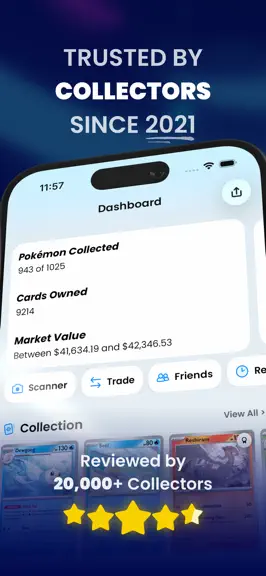
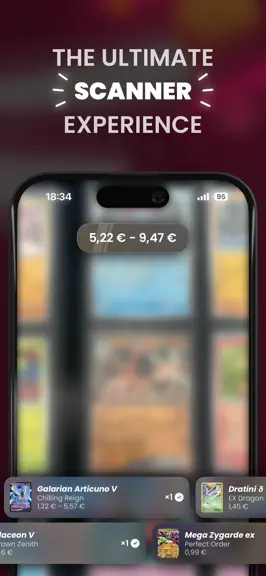
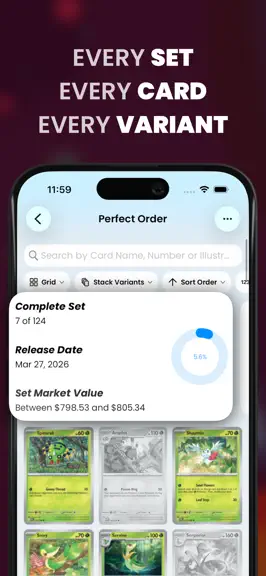
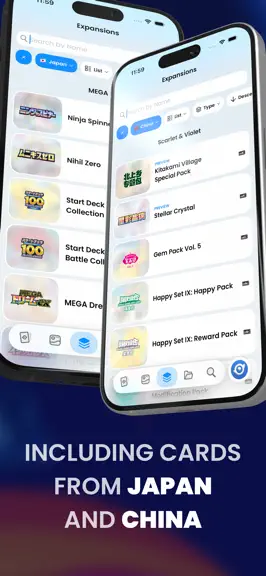
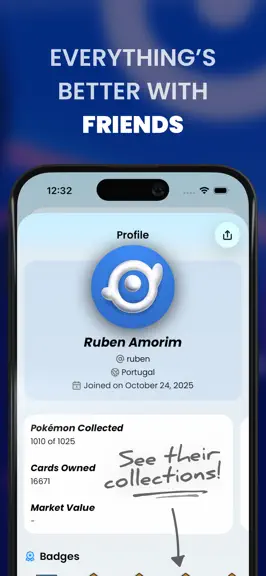
Dex is the ultimate unofficial app for Pokémon TCG collectors. Trusted by collectors since 2021, Dex lets you scan cards, track your collection, check prices, and explore every set, all in one place. • Track Your Collection Easily manage the cards you own and see what’s missing. • Powerful Card Scanner Add cards instantly using your camera — fast and accurate. • Complete Card Database Browse e…
Trends & analysis
Chart rank trend
US · categoryWhy it's surfacing
Scout 34Ratings & velocity
★ +0.01 in windowRating distribution
96% positive · 12k ratingsGeographic reach
best rank · 1 storefrontRevenue & downloads trend
ARPU $0In-app purchases
5 tiersUpdate history
12+ updates tracked- v26.0.015d ago
This release is about understanding your collection and finishing the binder. There’s a lot to get through, so let’s dig in! • Say Hello to Insights Stats got a brand-new name and a ground-up redesign. Every screen with a collection now leads with a row of Insight cards: your progress ring, the market value of what you own with your priciest cards fanned out, and a breakdown of energy types, card types, rarities, and more. Tap a type or a status and the grid filters to match. Behind every row sits a full Insights page. • Spot the Cameo A Pokémon doesn’t only appear on its own cards. Cameos are the cards it’s drawn on without being named, hiding in the background of someone else’s illustration, and Dex now knows about every one of them. Switch between Card and Cameo on any Pokémon’s page to browse them, track your cameo progress in its Insights, and see every Pokémon drawn on a card right from card details. Cameos were built in direct collaboration with RottomAmiti, the creator and maintainer of the most popular cameo spreadsheet out there. Huge thanks for the years of work that made this possible! • Share Cards, Beautifully Share images have been redesigned from scratch: a gradient in your accent color, a subtle Dex pattern, and the Dex wordmark. Share any single card as a poster-style image straight from card details, where the share button now offers Share Link and Share Image. Decks can be exported as an image too, with quantities and the deck name. Shared card links now open on the exact variant you were looking at. • A Better Binder The binder settings moved into the Display chip, so Pockets and First Page no longer crowd the filter row. The control bar above the pages is gone: the page chip now sits with the other filters, a row of dots shows where you are, and pages turn with a swipe or while dragging a card. Pockets are now capped at a sensible size on iPad, and page counts go all the way up to 92, with 32 and 36 pages added for other popular binders. You can also flip through your friends’ binders from their profile. • Fewer Chips, Same Filters Sort and Types each collapse into a single chip that opens a sheet, so the filter row fits on a phone again. Sort carries its direction, Types groups card, energy, and trainer types together, and Stack / Split shortens its label once you’ve used it. A new Additional Variants filter shows every additional printing of a set, owned or not. • Folders, Sharpened Creating a folder now starts with a dedicated type picker that explains each type before you commit. Quick Add remembers your search and filters until you close the folder, so adding a run of cards is one piece of work, and the restored query is pre-selected so typing replaces it. ... and a few more things! This update also comes with a handful of smaller wins and fixes: • Upcoming expansions show a release countdown, and sets released in the last month get a New pill. • Dex+ now lets you add up to 50 friends, up from 25. • Your profile banner was redesigned around your avatar color. • The About screen tells the story of Dex, from 2019 to today, and introduces the team. • A friend’s collection now sorts by acquisition date, continuing what the Recently Acquired preview shows. • Fixed smart folder rules disappearing after an update. • Card values and price rules now follow the card’s master-set variants, so promos no longer inflate your folder and expansion totals. • Fixed a new binder losing its first pages when syncing. • Opening a Dex link while a card is already open now works. • Various design tweaks, performance boosts, and bug fixes across the app.
- v25.0.423d ago
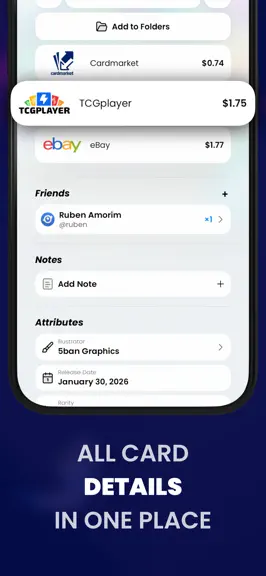
The one we promised is finally here. • Your Binder, Your Rules A few updates ago we promised a Binder folder type you build yourself. It’s here. Create a Binder folder and place each card in exactly the pocket you want: pick the page size, leave pockets empty on purpose, and arrange every spread the way it sits in your real binder. • Card Details, Remastered Card details got a serious glow-up, with one goal in mind: making each section a bit more compact to clear the way for some major features coming soon. Market prices now scroll horizontally as cards, so comparing marketplaces is a swipe instead of a scroll. The friends section follows the same style, showing who owns the card in a scrollable row. Everything important now fits in the first screenful, the background art got a subtle new blur treatment, and swiping between cards now lands on the exact variant of the row you tapped. ... and a few more things! • Smart folders, the Folders tab and the Dashboard are now dramatically faster with large collections. • The CSV export is customizable before sharing, and gained card notes, number and illustrator columns, with rows sorted by card number. • Smart folder rules for Card Type and Trainer Type now support picking multiple values. • Multi-select folder actions now respect the exact variant you picked. • The stack/split toggle is back on the trade screens. • Card names now update properly when you change your device language. • Various design tweaks, performance boosts, and bug fixes across the app.
- v25.0.31mo ago
The one we promised is finally here. • Your Binder, Your Rules A few updates ago we promised a Binder folder type you build yourself. It’s here. Create a Binder folder and place each card in exactly the pocket you want: pick the page size, leave pockets empty on purpose, and arrange every spread the way it sits in your real binder. • Card Details, Remastered Card details got a serious glow-up, with one goal in mind: making each section a bit more compact to clear the way for some major features coming soon. Market prices now scroll horizontally as cards, so comparing marketplaces is a swipe instead of a scroll. The friends section follows the same style, showing who owns the card in a scrollable row. Everything important now fits in the first screenful, the background art got a subtle new blur treatment, and swiping between cards now lands on the exact variant of the row you tapped. ... and a few more things! • Smart folders, the Folders tab and the Dashboard are now dramatically faster with large collections. • The CSV export is customizable before sharing, and gained card notes, number and illustrator columns, with rows sorted by card number. • Smart folder rules for Card Type and Trainer Type now support picking multiple values. • Multi-select folder actions now respect the exact variant you picked. • The stack/split toggle is back on the trade screens. • Card names now update properly when you change your device language. • Various design tweaks, performance boosts, and bug fixes across the app.
- v25.0.11mo ago
The one we promised is finally here. • Your Binder, Your Rules A few updates ago we promised a Binder folder type you build yourself. It’s here. Create a Binder folder and place each card in exactly the pocket you want: pick the page size, leave pockets empty on purpose, and arrange every spread the way it sits in your real binder. • Card Details, Remastered Card details got a serious glow-up, with one goal in mind: making each section a bit more compact to clear the way for some major features coming soon. Market prices now scroll horizontally as cards, so comparing marketplaces is a swipe instead of a scroll. The friends section follows the same style, showing who owns the card in a scrollable row. Everything important now fits in the first screenful, the background art got a subtle new blur treatment, and swiping between cards now lands on the exact variant of the row you tapped. ... and a few more things! • Smart folders, the Folders tab and the Dashboard are now dramatically faster with large collections. • The CSV export is customizable before sharing, and gained card notes, number and illustrator columns, with rows sorted by card number. • Smart folder rules for Card Type and Trainer Type now support picking multiple values. • Multi-select folder actions now respect the exact variant you picked. • The stack/split toggle is back on the trade screens. • Card names now update properly when you change your device language. • Various design tweaks, performance boosts, and bug fixes across the app.
- v24.1.51mo ago
This update starts with a thank you, and ends with a few things we’ve been quietly building. Let’s get into it. • Every Marketplace, Free Consider this one a thank you. Marketplaces are no longer a Dex+ feature, for anyone. Your support is what carried Dex past the point of needing a paywall on something as basic as a price, and Dex+ has more than enough of its own to offer without it. It only felt right to give this one back. So from today, every collector can choose where their prices come from, browse the full price listings, and set their Cardmarket preferences, no subscription needed. Every market, every price listing, for everyone. • Say Hello to CardTrader There’s a new marketplace in Dex: CardTrader. It started in Italy and now covers sellers and stores around the world, and it prices English, Japanese and Chinese cards, so you’ll see it wherever prices appear in the app. Friendly reminder that you pick your own primary marketplaces, one for each region, over in Preferences. They lead on card details, value your collection, and set the order when you sort by price. • Binders, Everywhere When we introduced Binder mode last update, we said we’d bring it to more places. It’s now on every card screen: My Collection, smart folders, standard folders, Pokédex folders, and the folders on other people’s profiles, alongside the expansions and Pokédex pages it already covered. Each binder keeps its own page size and layout, so a 9-pocket spread for one folder and a 4-pocket for another is entirely fine. The one we promised last time is still on its way too: a Binder folder type you build yourself, placing each card in exactly the pocket you want. • One Phone, Every Account If you keep more than one Dex account, moving between them used to mean signing out and waiting for everything to sync back down. Now you can store up to five on the same phone and switch from Settings in a couple of taps, each with its own collection, folders and stats. Anything you collected offline is uploaded before the switch, so nothing gets left behind. • Spotted a Wrong Price? Prices come from listings we match to each card, variant and marketplace, and every so often we match the wrong one. There’s now a “Incorrect or missing price? Let us know” line right under the prices on any card, opening a short form already filled in with the card, the variant you’re looking at, and your marketplace. Paste the correct listing link and we’ll take it from there. ... and a few more things! This update also comes with a handful of smaller wins and fixes: • Preferences are now grouped into sections, so related settings sit together instead of being scattered by control type. • Settings has a new footer with all our social accounts, plus quick access to About and System Status, with a live indicator when something’s up. • Multi-select now works per variant and per slot, so batch actions act on exactly the row you picked. • Standard folders with variant tracking now show up properly when you’re browsing someone else’s profile. • Card data and prices moved to a new on-device database, so launches, search and large collections are all noticeably quicker. • Various design tweaks, performance boosts, and bug fixes across the app.
Dex - for TCG Collectors — FAQ
How much money does Dex - for TCG Collectors make?
According to AppCurrents estimates, Dex - for TCG Collectors generates approximately $6k–$38k per month (low confidence), modeled from its the App Store chart performance, rating velocity, and monetization signals.
How many downloads does Dex - for TCG Collectors get?
Dex - for TCG Collectors sees an estimated 15k–64k downloads per month on the App Store, per AppCurrents modeling.
Is Dex - for TCG Collectors free?
Dex - for TCG Collectors is free to download on the App Store, monetizing through in-app purchases.
What is Dex - for TCG Collectors's rating?
Dex - for TCG Collectors holds a 4.81-star average from 13,840 ratings on the App Store. It currently ranks #63 on the Reference grossing chart.
When was Dex - for TCG Collectors released?
Dex - for TCG Collectors launched on the App Store on 08.03.2021. Its latest version shipped 16.09.2026.
Apps like Dex - for TCG Collectors
See all alternatives → Translate Now - AI TranslatorReference · $420k–$2.7M/mo
 Ancestry: Family History & DNAReference · $420k–$2.7M/mo
 Bible Chat: Daily DevotionalReference · $420k–$2.7M/mo
 Hallow: Prayer & MeditationReference · $280k–$1.8M/mo
 Quran Majeed – القران الكريمReference · $230k–$1.3M/mo
 CoinSnap: Coin IdentifierReference · $200k–$1.4M/mo