
Da Vinci Eye: AR Trace & Draw
Da Vinci Eye: AR Trace & Draw generates an estimated $7k–$37k/month in revenue from 16k–67k downloads/month on the App Store, according to AppCurrents estimates (updated 2026-10-02).
| Est. revenue / month | $7k–$37k |
|---|---|
| Est. downloads / month | 16k–67k |
| Estimate confidence | medium |
| Pricing | Free + IAP |
| Rating | 4.55 ★ (11,716 ratings) |
| Category | Graphics & Design |
| Best chart rank | #26 Graphics & Design Grossing |
| Released | 16.06.2016 |
| App last updated | 29.09.2026 |
| Platform | iOS |
Modeled monthly estimate · rating velocity · medium confidence


About
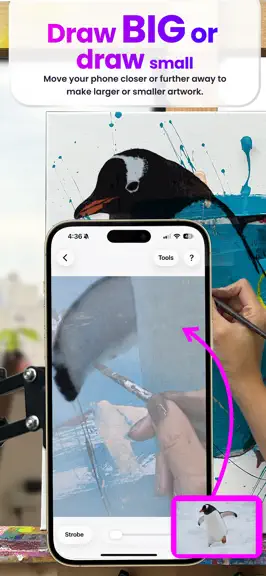
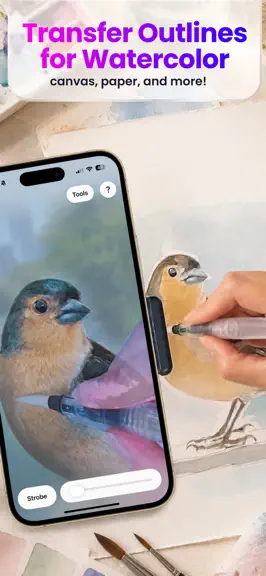
As seen on Shark Tank and featured in Apple's Apps We Love, Watercolor Artist Magazine, Handmade Seller Magazine, LifeHacker, MakeUseOf, Fast Company (Innovation Award winner), Apple News and more! Da Vinci Eye is used by millions of creatives from painters to bakers to make incredible artwork. The app is not just for tracing, it offers a wide range of drawing tools, lessons, daily drawing prompt…
Trends & analysis
Chart rank trend
US · categoryWhy it's surfacing
Scout 33Ratings & velocity
★ -0.01 in windowRating distribution
89% positive · 11k ratingsGeographic reach
best rank · 1 storefrontRevenue & downloads trend
ARPU $0In-app purchases
9 tiersUpdate history
4 updates tracked- v5.0.22d ago
Da Vinci Eye 5.0 is here! This is one of the biggest updates we’ve ever made. We redesigned the app from the ground up to make creating artwork easier, more intuitive, and more enjoyable. What’s new in 5.0: • A completely new Liquid Glass design • A rebuilt drawing screen with a cleaner interface and easier-to-understand controls • A new Guided Setup that walks you through getting started step by step • Record long-form videos of your drawing process • Support for 7 new languages • Brand new instructional videos to help you get the most out of Da Vinci Eye • Search community inspiration to quickly find photos and artwork you want to create • And so much more! We’ve also made improvements throughout the app to make everything feel faster, clearer, and easier to use. Da Vinci Eye has grown a lot since we first launched, but our goal is still the same: create powerful digital tools that help you make real artwork. As always, thank you so much for your support, feedback, drawings, paintings, murals, cakes, and everything else you’ve created with Da Vinci Eye. We genuinely could not keep building this without you. If you run into a bug, have an idea for a feature, or just want to say hello, you can contact us directly from the side menu in the app. We hope you love Da Vinci Eye 5.0! Sam & Charissa 5.0.1 -5.0.2 -> Quick fixes and updates + Tap with 3 fingers to hide the drawings screen overlay.
- v5.0.13d ago
Da Vinci Eye 5.0 is here! This is one of the biggest updates we’ve ever made. We redesigned the app from the ground up to make creating artwork easier, more intuitive, and more enjoyable. What’s new in 5.0: • A completely new Liquid Glass design • A rebuilt drawing screen with a cleaner interface and easier-to-understand controls • A new Guided Setup that walks you through getting started step by step • Record long-form videos of your drawing process • Support for 7 new languages • Brand new instructional videos to help you get the most out of Da Vinci Eye • Search community inspiration to quickly find photos and artwork you want to create • And so much more! We’ve also made improvements throughout the app to make everything feel faster, clearer, and easier to use. Da Vinci Eye has grown a lot since we first launched, but our goal is still the same: create powerful digital tools that help you make real artwork. As always, thank you so much for your support, feedback, drawings, paintings, murals, cakes, and everything else you’ve created with Da Vinci Eye. We genuinely could not keep building this without you. If you run into a bug, have an idea for a feature, or just want to say hello, you can contact us directly from the side menu in the app. We hope you love Da Vinci Eye 5.0! Sam & Charissa 5.0.1 -> Quick fixes and updates + Tap with 3 fingers to hide the drawings screen overlay.
- v5.0.08d ago
Da Vinci Eye 5.0 is here! This is one of the biggest updates we’ve ever made. We redesigned the app from the ground up to make creating artwork easier, more intuitive, and more enjoyable. What’s new in 5.0: • A completely new Liquid Glass design • A rebuilt drawing screen with a cleaner interface and easier-to-understand controls • A new Guided Setup that walks you through getting started step by step • Record long-form videos of your drawing process • Support for 7 new languages • Brand new instructional videos to help you get the most out of Da Vinci Eye • Search community inspiration to quickly find photos and artwork you want to create • And so much more! We’ve also made improvements throughout the app to make everything feel faster, clearer, and easier to use. Da Vinci Eye has grown a lot since we first launched, but our goal is still the same: create powerful digital tools that help you make real artwork. As always, thank you so much for your support, feedback, drawings, paintings, murals, cakes, and everything else you’ve created with Da Vinci Eye. We genuinely could not keep building this without you. If you run into a bug, have an idea for a feature, or just want to say hello, you can contact us directly from the side menu in the app. We hope you love Da Vinci Eye 5.0! Sam & Charissa
- v4.6.46mo ago
Join the millions of creatives using Da Vinci Eye, from painters to cake decorators, to create stunning artwork. The app goes beyond tracing with its extensive drawing tools, lessons, daily drawing prompts, and a vibrant community to share your work with! As seen in Watercolor Artist Magazine, Artists Magazine, Handmade Seller Magazine, LifeHacker, Apple News, The Guardian, AR/VR Journey, and many other publications! We've launched a fantastic new section where you can explore a vast collection of inspirational photos shared by our creative community. With the latest update, we've tackled some quirks from iOS 18 and introduced and enhanced the scrolling of the community drawing feed. Also, keep an eye out for some enhancements to our breakdown mode, which if you haven't checked it out, lets you transform any photo into a detailed, step-by-step tutorial. Your feedback is invaluable to us. Whether it's a bug report, a feature suggestion, or just a friendly hello, don't hesitate to get in touch through the app's contact form located in the side menu. As always thank you so much for your support in making this project possible! - Sam & Charissa 4.6.4 -> Fixed Profile's not showing all drawings issue 4.6.3 -> Fixed Image Picker Bug 4.6.2 -> Fixed iOS 26.1 bugs 4.6.1 -> A regional special event section and a few UI Updates 4.5.25 - 4.6.0 -> Updates to the Video Recording Feature 4.5.10 - 4.5.24 -> UI Updates and Bug Fixes 4.5.9 -> EU Instructional Videos now displaying correctly 4.5.7 / 4.5.8 -> UI Updates and Bug Fixes
Da Vinci Eye: AR Trace & Draw — FAQ
How much money does Da Vinci Eye: AR Trace & Draw make?
According to AppCurrents estimates, Da Vinci Eye: AR Trace & Draw generates approximately $7k–$37k per month (medium confidence), modeled from its the App Store chart performance, rating velocity, and monetization signals.
How many downloads does Da Vinci Eye: AR Trace & Draw get?
Da Vinci Eye: AR Trace & Draw sees an estimated 16k–67k downloads per month on the App Store, per AppCurrents modeling.
Is Da Vinci Eye: AR Trace & Draw free?
Da Vinci Eye: AR Trace & Draw is free to download on the App Store, monetizing through in-app purchases.
What is Da Vinci Eye: AR Trace & Draw's rating?
Da Vinci Eye: AR Trace & Draw holds a 4.55-star average from 11,716 ratings on the App Store. It currently ranks #26 on the Graphics & Design grossing chart.
When was Da Vinci Eye: AR Trace & Draw released?
Da Vinci Eye: AR Trace & Draw launched on the App Store on 16.06.2016. Its latest version shipped 29.09.2026.
Apps like Da Vinci Eye: AR Trace & Draw
See all alternatives → ProcreateGraphics & Design · $300k–$5.0M/mo
 Reface: AI Face Swap & EditorGraphics & Design · $270k–$1.5M/mo
 AI Maker: Photo Video FiltersGraphics & Design · $240k–$1.3M/mo
 Nomad SculptGraphics & Design · $100k–$1.7M/mo
 ThemePack: Widgets & WallpaperGraphics & Design · $160k–$850k/mo
 Artmate: Drawing TogetherGraphics & Design · $140k–$790k/mo