
Course Draft: Homeschool AI
Course Draft: Homeschool AI generates an estimated $0/month in revenue from 0 downloads/month on the App Store, according to AppCurrents estimates (updated 2026-10-02).
| Est. revenue / month | $0 |
|---|---|
| Est. downloads / month | 0 |
| Estimate confidence | low |
| Pricing | Free + IAP |
| Rating | 0.00 ★ (0 ratings) |
| Category | Education |
| Released | 12.05.2026 |
| App last updated | 14.07.2026 |
| Platform | iOS |
Modeled monthly estimate · rating velocity · low confidence


About
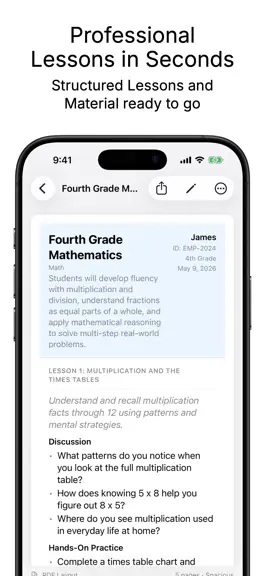
Generate complete, grade-appropriate curricula for your children in seconds - powered by Apple Intelligence, running entirely on your device. Course Draft is the homeschool planning tool built for how real families work. Choose a subject, grade level, and format, then let the AI handle the structure while you stay in control of every detail. TWO CURRICULUM FORMATS Simple - A scope and overview,…
Trends & analysis
Chart rank trend
US · overallWhy it's surfacing
Scout 21Ratings & velocity
★ 0 in windowGeographic reach
best rank · 0 storefrontsRevenue & downloads trend
monthly estimateIn-app purchases
2 tiersUpdate history
2 updates tracked- v1.22mo ago
• Start from an Idea - Found a great kit, workbook, or skill you want to teach, but not sure what subject or topics it fits? Type it in, tell Course Draft whether it's a material, skill, topic, or subject, and watch AI fill in the rest of the form for you - subject, topics, goals, and materials. Don't love the suggestion? Tap once to get another. You can edit everything before generating. • Two ways to generate - Ready to go? Generate Curriculum now takes you straight into editing the moment your curriculum is finished. Want to look first? The new Preview First option pauses when generation completes so you can retry until it's just right. • Tidier PDFs by default - Exported PDFs now start with the compact layout most families prefer, so your records take fewer pages. The spacing slider is still there if you want more room. As always, everything runs privately on your device with Apple Intelligence.
- v1.14mo ago
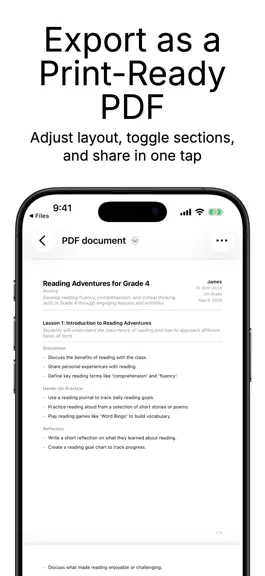
PDF Export Controls Set your preferred PDF layout once in the new global Settings - choose which header fields appear by default across all curricula. Every curriculum can still override these individually. Student email is now an optional field on each child profile and can be included in exported PDFs. Batch Export (Pro) Export all of a student's curricula at once - as a single combined PDF or as individual files - directly from the curriculum list. Duplicate & Copy Quickly duplicate any curriculum for the same student with a swipe, or use the expanded Copy menu to duplicate for the same student or copy to a different student. Curriculum Form Improvements The grade level now pre-fills from the student's profile. The format picker footer shows exactly what will be generated - lesson count included - so there are no surprises before you tap Generate. Curricula are now grouped by academic year in the student view, making it easy to stay organized across school years. New curricula are automatically filed under the current year, and existing ones are grouped based on when they were created. You can also change a curriculum's year at any time from the Review screen. "Created with Course Draft" Footer (Optional) Pro users can opt in to a subtle App Store QR code footer on exported PDFs. Off by default.
Course Draft: Homeschool AI — FAQ
How many downloads does Course Draft: Homeschool AI get?
Course Draft: Homeschool AI sees an estimated 0 downloads per month on the App Store, per AppCurrents modeling.
Is Course Draft: Homeschool AI free?
Course Draft: Homeschool AI is free to download on the App Store, monetizing through in-app purchases.
When was Course Draft: Homeschool AI released?
Course Draft: Homeschool AI launched on the App Store on 12.05.2026. Its latest version shipped 14.07.2026.


