
CNC Milling Speeds & Feeds Pro
CNC Milling Speeds & Feeds Pro generates an estimated $1–$4/month in revenue from 2–6 downloads/month on the App Store, according to AppCurrents estimates (updated 2026-08-02).
| Est. revenue / month | $1–$4 |
|---|---|
| Est. downloads / month | 2–6 |
| Estimate confidence | low |
| Pricing | Free + IAP |
| Rating | 3.67 ★ (3 ratings) |
| Category | Productivity |
| Released | 03.08.2011 |
| App last updated | 20.07.2026 |
| Platform | iOS |
Modeled monthly estimate · rating velocity · low confidence
About
You are the kind of person who checks the cut before committing the part, and Milling Calcs is built for that level of care. Whether you are running a CNC mill, planning a manual setup, dialing in feeds and speeds, or saving shop records for the next job, this app helps you move faster without treating the numbers casually. Milling Calcs gives machinists, CNC programmers, setup techs, fabricators…
Trends & analysis
Chart rank trend
US · overallWhy it's surfacing
Scout 5Ratings & velocity
★ 0 in windowRating distribution
67% positive · 3 ratingsGeographic reach
best rank · 0 storefrontsRevenue & downloads trend
ARPU $1In-app purchases
2 tiersUpdate history
3 updates tracked- v9.315d ago
Thanks for using Milling Calcs. The app is getting better because users like you notice the difference between a calculator that gives an answer and a tool that supports the whole job. The latest work is focused on navigation, record handling, setup sheets, calculator menus, and the small details that make the app easier to trust during a busy setup. Navigation is clearer across the More workspace: - Calendar records now open with a visible way back on iPad layouts. - Opening a saved record from Calendar no longer leaves you stuck in the detail view. - Setup Sheet opened from a calendar record now has a direct path back to the record. - The More workspace no longer lets a sidebar control hide the calendar back action. - Regular-width layouts now use a more predictable detail flow for Calendar, Today, records, and setup sheets. - Compact navigation keeps its normal push behavior. Setup Sheet has been cleaned up for real use: - The duplicate Job and Operation rows are gone when they both represent the same calculator. - The Source section now shows the calculator clearly. - If a saved record has a custom job title, it can still appear as a separate Job field. - Customer, DOC, and WOC are now presented as the editable fields. - The save action is now labeled Save to Record so it is clear where the data goes. - Saved setup sheet values are stored on the calculation record itself. - Material, tool, and machine rows only appear when the saved record actually has those dedicated fields. - Empty Not Assigned placeholders were removed from setup sheet display. - Setup details that were saved inside calculator inputs still remain visible in the Inputs section. - Help text now explains what a setup sheet is, what can be edited, and what comes from the source record. Exports are cleaner: - Plain text setup sheets no longer include empty placeholder rows. - Setup sheet summaries omit blank customer, setup, and cut sections. - QR setup cards now use the same cleaned source and setup information. - Cut fields only appear when DOC or WOC has been entered. - Shared record summaries avoid printing empty DOC or WOC lines. Calculator menus are more useful: - Randomize has been added where it helps test and learn calculator behavior. - Duplicate Record was removed from calculator menus where it did not belong. - Report a Bug is available from calculator hamburger menus. - Reset and Help remain easy to reach. - Calculator actions are clearer and better matched to what a user expects while working. The More view has been improved: - A Pro cell now appears at the top of More. - More navigation is more stable in the free version. - Opening a record from More no longer kicks the app back to the Calculate tab. - More cells continue navigating properly after attempting to open a record. - The paywall includes a debug-only QA unlock section for testing builds. Record behavior is steadier: - Saved calculation records keep editable setup fields on the record. - Calendar grouping is easier to browse. - Record detail keeps dates, setup data, inputs, outputs, notes, tags, and actions together. - Setup sheets can be reached from saved records without losing the path back.
- v9.222d ago
Thanks for using Milling Calcs. The app is getting better because users like you notice the difference between a calculator that gives an answer and a tool that supports the whole job. The latest work is focused on navigation, record handling, setup sheets, calculator menus, and the small details that make the app easier to trust during a busy setup. Navigation is clearer across the More workspace: - Calendar records now open with a visible way back on iPad layouts. - Opening a saved record from Calendar no longer leaves you stuck in the detail view. - Setup Sheet opened from a calendar record now has a direct path back to the record. - The More workspace no longer lets a sidebar control hide the calendar back action. - Regular-width layouts now use a more predictable detail flow for Calendar, Today, records, and setup sheets. - Compact navigation keeps its normal push behavior. Setup Sheet has been cleaned up for real use: - The duplicate Job and Operation rows are gone when they both represent the same calculator. - The Source section now shows the calculator clearly. - If a saved record has a custom job title, it can still appear as a separate Job field. - Customer, DOC, and WOC are now presented as the editable fields. - The save action is now labeled Save to Record so it is clear where the data goes. - Saved setup sheet values are stored on the calculation record itself. - Material, tool, and machine rows only appear when the saved record actually has those dedicated fields. - Empty Not Assigned placeholders were removed from setup sheet display. - Setup details that were saved inside calculator inputs still remain visible in the Inputs section. - Help text now explains what a setup sheet is, what can be edited, and what comes from the source record. Exports are cleaner: - Plain text setup sheets no longer include empty placeholder rows. - Setup sheet summaries omit blank customer, setup, and cut sections. - QR setup cards now use the same cleaned source and setup information. - Cut fields only appear when DOC or WOC has been entered. - Shared record summaries avoid printing empty DOC or WOC lines. Calculator menus are more useful: - Randomize has been added where it helps test and learn calculator behavior. - Duplicate Record was removed from calculator menus where it did not belong. - Report a Bug is available from calculator hamburger menus. - Reset and Help remain easy to reach. - Calculator actions are clearer and better matched to what a user expects while working. The More view has been improved: - A Pro cell now appears at the top of More. - More navigation is more stable in the free version. - Opening a record from More no longer kicks the app back to the Calculate tab. - More cells continue navigating properly after attempting to open a record. - The paywall includes a debug-only QA unlock section for testing builds. Record behavior is steadier: - Saved calculation records keep editable setup fields on the record. - Calendar grouping is easier to browse. - Record detail keeps dates, setup data, inputs, outputs, notes, tags, and actions together. - Setup sheets can be reached from saved records without losing the path back.
- v9.12mo ago
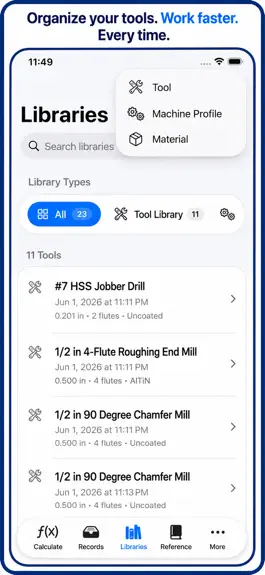
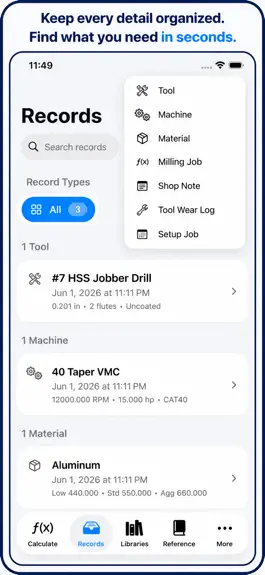
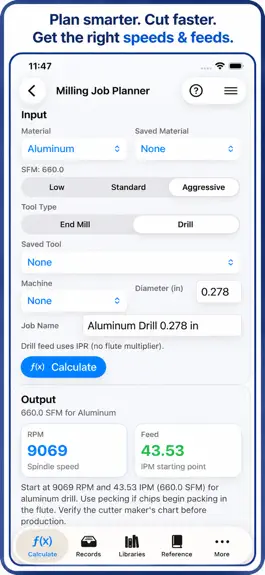
Version 9.1 is focused on one goal: making your best setup work easier to repeat. The calculators are still fast, but now the app does a much better job of helping you save, find, and reuse the numbers that keep jobs moving. This update introduces a cleaner flow across Calculate, Records, Reference, Calendar, and Settings. - iPhone keeps a quick list-and-detail workflow for machine-side use. - iPad gets split views in Calculate and Records so you can review details without losing context. - Search is faster and now reaches deeper across calculators and saved content. - Navigation titles, icons, and row layouts were cleaned up for better glance reading. Calculator coverage is broader, with a clearer structure. - Added Milling Job Planner for material, cutter, diameter, flute count, RPM, feed, and SFM planning. - Added Speeds and Feeds Guide for quick starting values. - Added Plunge Feed Rate calculator. - Added True Position calculator. - Added Tap Drill calculator. - Added Shrinkage Compensation calculator. - Added Unit Converter. - Expanded geometry and layout tools for offsets, kicks, saddle bends, arcs, chords, and segment height. Records are the biggest practical change in this release. Instead of retyping setup notes on every repeat order, you can now keep structured shop history that is easy to search and hand off. - Save calculations with title, material, machine, tool, notes, tags, and timestamps. - Keep both inputs and outputs in each saved record. - Mark favorites to pin proven setups. - Search by title, material, machine, tool, notes, tags, or calculator type. - Sort by recently updated, newest, name, material, or calculator type. - Filter views for favorites, milling jobs, tools, machines, notes, and calculations. - Duplicate records for repeat parts and similar setups. - Share a formatted setup summary. - Remove stale records that no longer apply. Shop Library was expanded so the app works more like a real shop notebook. - Save and maintain tool records. - Save and maintain machine records. - Save and maintain material records. - Save milling job records. - Save setup job records. - Save shop notes. - Save tool wear logs. Reference content was reorganized around searchable data while keeping familiar chart access. - Imperial Tap Drill Table. - Metric Tap Drill Table. - Tap, Thread, and Drill Database. - Drill Size Conversion and clearance drill references. - Pipe Threads and thread references. - Decimal, Fraction, and Metric lookup tables. - G-Code and M-Code reference entries. - Material Machinability database. - Speeds and Feeds database. - Tooling database. - CNC Machine reference. Calendar is now part of the daily workflow. - Browse saved work by date. - Review activity for today, this week, this month, selected date, or favorites. - Track what was calculated, saved, and changed on real production timelines. Multiple calculation fixes were included to improve trust in layout and bend outputs. - Corrected conduit offset distance using D = H / sin(theta). - Corrected straight pipe kick distance using D = H / sin(theta). - Corrected straight pipe kick total length behavior. - Corrected compound offset rotation handling. Quality and reliability work was expanded as well. - Added automated test coverage for compound offset layout, conduit offset bend, parallel offset bend, and straight pipe kick. - Improved persistence error handling so failures surface as readable messages. - Preserved existing saved milling jobs while introducing the expanded record model. - Improved migration readiness for Core Data growth. - Updated empty states across Records, Reference, and Calendar. This version is built for how shops actually run: calculate quickly, save what worked, find it fast, and hand off cleaner setup details with less rework between shifts.
CNC Milling Speeds & Feeds Pro — FAQ
How much money does CNC Milling Speeds & Feeds Pro make?
According to AppCurrents estimates, CNC Milling Speeds & Feeds Pro generates approximately $1–$4 per month (low confidence), modeled from its the App Store chart performance, rating velocity, and monetization signals.
How many downloads does CNC Milling Speeds & Feeds Pro get?
CNC Milling Speeds & Feeds Pro sees an estimated 2–6 downloads per month on the App Store, per AppCurrents modeling.
Is CNC Milling Speeds & Feeds Pro free?
CNC Milling Speeds & Feeds Pro is free to download on the App Store, monetizing through in-app purchases.
What is CNC Milling Speeds & Feeds Pro's rating?
CNC Milling Speeds & Feeds Pro holds a 3.67-star average from 3 ratings on the App Store.
When was CNC Milling Speeds & Feeds Pro released?
CNC Milling Speeds & Feeds Pro launched on the App Store on 03.08.2011. Its latest version shipped 20.07.2026.


