
Chest Tube Simulator
Chest Tube Simulator generates an estimated $7k–$110k/month in revenue from 300–2k downloads/month on the App Store, according to AppCurrents estimates (updated 2026-10-02).
| Est. revenue / month | $7k–$110k |
|---|---|
| Est. downloads / month | 300–2k |
| Estimate confidence | medium |
| Pricing | Paid $49.99 |
| Rating | 5.00 ★ (13 ratings) |
| Category | Medical |
| Best chart rank | #88 Medical Paid |
| Released | 24.06.2026 |
| App last updated | 24.09.2026 |
| Platform | iOS |
Modeled monthly estimate · rating velocity · medium confidence
About
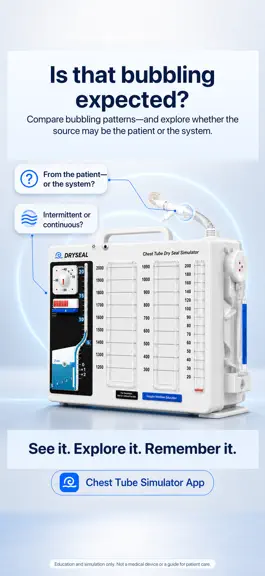
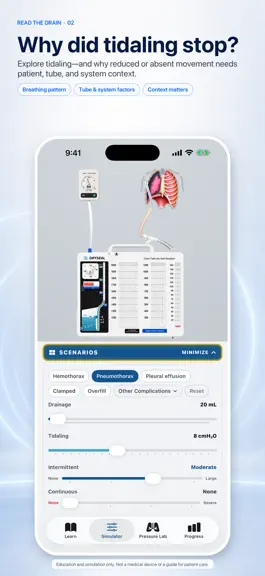
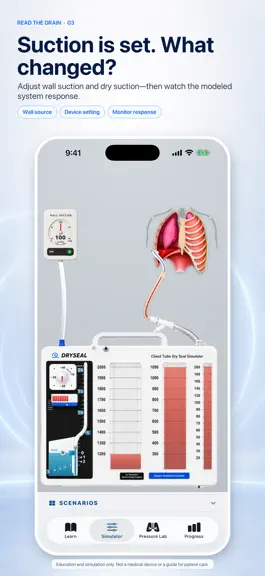
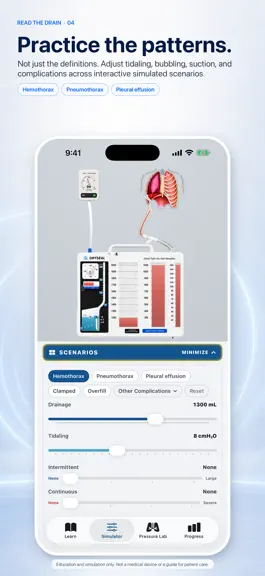
Chest Tube Simulator is a hands-on educational simulation for licensed nurses, nursing and medical students, respiratory therapy learners, and clinical educators. Learners should use it under instructor supervision and follow facility policy and provider orders. Instead of memorizing diagrams, you work with a realistic, fully animated chest drain and watch every chamber respond as you change the…
Trends & analysis
Chart rank trend
US · categoryWhy it's surfacing
Scout 33Ratings & velocity
★ 0 in windowRating distribution
100% positive · 13 ratingsGeographic reach
best rank · 1 storefrontRevenue & downloads trend
ARPU $35Update history
4 updates tracked- v1.3.18d ago
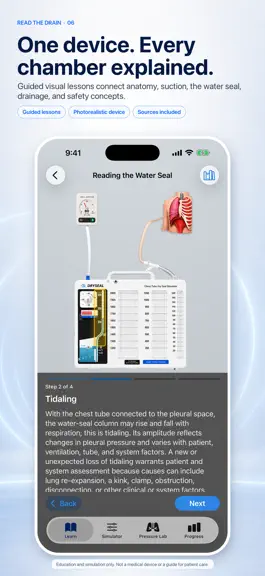
The education-only notice gets a screen of its own, and the Learn tab is drawn from your own instruments. EVERY LESSON OPENS ON THE EDUCATION-ONLY SCREEN The notice is now a step of its own at the head of every lesson, with nothing else on the screen: the lesson's name, its picture, and the words in full. Education only, not medical advice, and no replacement for clinical judgment, facility policy or provider orders. Nothing of the lesson competes with it for the screen, and it is read before the teaching begins rather than above it. Every lesson therefore counts one step more than it did, so Drainage System Anatomy runs twelve steps where it ran eleven. A lesson you had already started resumes exactly where you left it. THE LEARN TAB IS DRAWN FROM THE DEVICE ITSELF Every lesson, complication and quiz now carries its own picture instead of a symbol: the drainage unit, the water seal at its line, the suction monitor, the regulator, the wall unit, the pleura. The instruments among them are captures of this app's own device at the state the lesson teaches, not drawings of it. THE SUCTION MONITOR BEHAVES LIKE THE REAL ONE Raising the wall source past the setting that reaches the triangle mark used to change nothing on screen. The red bellows now keeps expanding as the source rises, out to a nearly full window at the top of the range. What the patient receives has not changed: the regulator, not the wall, sets that, and the lesson and the bellows information card now say so in as many words. ALSO IN THIS UPDATE The Learn tab opens on the lessons themselves, without a screen title repeating the tab you are already on. The card at the top of that tab is smaller, so more of the course is in view. An animated illustration, for simulation and education only. Not for clinical practice.
- v1.3.014d ago
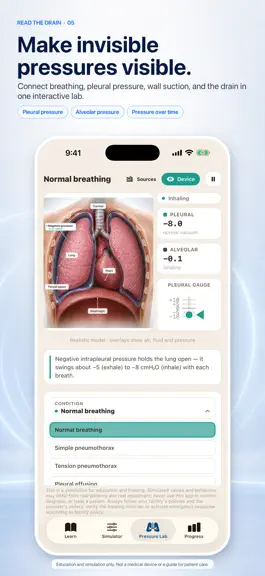
Tip the drain. See the breath. TILT TO TIP THE DRAIN Turn on Tilt to tip the drain in the Simulator's Scenarios panel and lean your device. The fluid in the three collection columns stays level with the world, so a leaning drain pours from one column into the next, the way fluid can cross between the chambers when a real unit is knocked over, and the column readings can no longer be trusted. Here the water seal leans with it and returns to its line once the unit is upright; on a real unit, the water level is one of the things you check per the manufacturer's instructions. A caution row tells you the drain is knocked over, and opens to the rest of the teaching when you tap it. THE BREATH, DRAWN AS AIR In the Pressure Lab and in the Simulator's patient, every breath is now air you can see: it streams down the trachea, splits at the carina, runs out along the bronchi and fills both lungs as the chest inhales, then flows back out the same way as it exhales. A collapsed lung takes only a trickle, the lung on the tension side next to none, and a lung above fluid less. The breath's air is drawn only in the airways and lungs, never in the pleural space around them. BUBBLES THAT KNOW WHICH WAY IS UP When the drain leans, air leak bubbles rise toward the sky rather than the top of the device, and once the water runs off the inlet there is nothing left to bubble through, so the bubbles disappear while the leak goes on, and the state line says so. THE SCENARIOS Normal breathing, Hemothorax, Pneumothorax, Hemopneumothorax, Pleural effusion and Tension pneumothorax, in that order, every scenario button in the same ink and outline. The scenario labeled Simple pneumothorax in 1.2.0 is now labeled Pneumothorax, with Tension pneumothorax unchanged beside it. PIN THE PRESSURES ON THE LUNG In the Pressure Lab, tap Pressures to pin the two modeled readings on the lung itself: alveolar pressure at the middle of the affected lung, pleural pressure at that lung's base. Both ride the breath, so each number stays on the tissue it names, and where the base sits is part of the teaching: air or fluid under a lung lifts its foot off the diaphragm. The pins and the gauge print from one formatter, so a running lab cannot show two numbers for one breath. With Reduce Motion on, the picture holds at the end of a breath out and the pins print that moment. EVERY LESSON OPENS ON ITS OWN CARD A lesson now begins with a card carrying its name, its icon and the education-only notice in full, in view without a tap: education only, not medical advice, and no replacement for clinical judgment, facility policy or provider orders. "For Simulation · Not for Clinical Practice" is printed on the drain itself, and the same words sit under every lesson picture and lab scene. ALSO IN THIS UPDATE In the Pressure Lab, the pleural gauge for Tension pneumothorax now peaks at the end of each exhale, and the water seal tidals in step with it. Rotating an iPad during the tilt exercise no longer draws the drain on its side. The Under Pressure lessons carry labeled anatomy with their captions beside the picture. With Reduce Motion on, the air holds still and each lung still shows how much air it takes. An animated illustration, for simulation and education only. Not for clinical practice.
- v1.0.81mo ago
This update rebuilds the anatomy across the whole app. Pressure Lab • Every condition now uses its own medical illustration. The affected lung is genuinely smaller, and air, serous fluid, blood, pus, and chyle are rendered in the pleural space rather than drawn over it. • A single pleural pressure gauge shows intrapleural and alveolar pressure together, with a legend and values that ride their own markers. • Breath-synced airflow moves through the airway on inhale and exhale, and the heart beats at the rate the condition implies. Simulator • Scenario patients use the same regenerated illustrations, so pneumothorax, tension pneumothorax, pleural effusion, hemothorax, empyema, and chylothorax look consistent everywhere in the app. • Adjusting the drainage level or the suction dial no longer clears the scenario you selected. Learn • The pleural anatomy and chest tube placement steps use the new photoreal artwork, with corrected labels for the visceral pleura, pleural space, and parietal pleura. • The education-only safety notice now sits in a single row and expands when you tap it, so it no longer crowds the teaching text. Throughout • Wording cleaned up across lessons, quizzes, alerts, and scenario descriptions.
- v1.0.72mo ago
Meet the redesigned 3D chest-drain simulator. • Explore a more detailed drainage unit, wall suction regulator, patient anatomy, and connected tubing. • Adjust tidaling and graded intermittent or continuous bubbling while keeping the selected scenario in view. • Learn with updated chest-tube disconnection images and cleaner lesson cards. • iPhone now stays in portrait for a consistent simulation layout. For simulation and education only—not for clinical practice.
Chest Tube Simulator — FAQ
How much money does Chest Tube Simulator make?
According to AppCurrents estimates, Chest Tube Simulator generates approximately $7k–$110k per month (medium confidence), modeled from its the App Store chart performance, rating velocity, and monetization signals.
How many downloads does Chest Tube Simulator get?
Chest Tube Simulator sees an estimated 300–2k downloads per month on the App Store, per AppCurrents modeling.
Is Chest Tube Simulator free?
Chest Tube Simulator is a paid app priced at $49.99 on the App Store.
What is Chest Tube Simulator's rating?
Chest Tube Simulator holds a 5.00-star average from 13 ratings on the App Store. It currently ranks #88 on the Medical paid chart.
When was Chest Tube Simulator released?
Chest Tube Simulator launched on the App Store on 24.06.2026. Its latest version shipped 24.09.2026.


