
CalDown
CalDown generates an estimated $5–$90/month in revenue from 1–6 downloads/month on the App Store, according to AppCurrents estimates (updated 2026-10-02).
| Est. revenue / month | $5–$90 |
|---|---|
| Est. downloads / month | 1–6 |
| Estimate confidence | medium |
| Pricing | Paid $9.99 |
| Rating | 5.00 ★ (1 ratings) |
| Category | Productivity |
| Best chart rank | #90 Productivity Paid |
| Released | 14.04.2025 |
| App last updated | 16.09.2026 |
| Platform | iOS |
Modeled monthly estimate · rating velocity · medium confidence
About
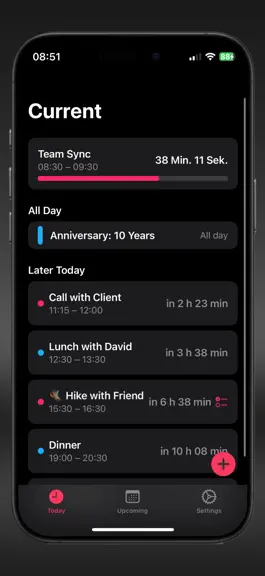
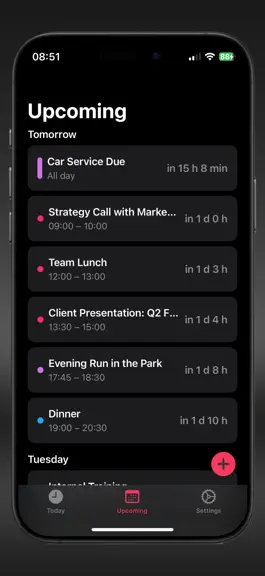
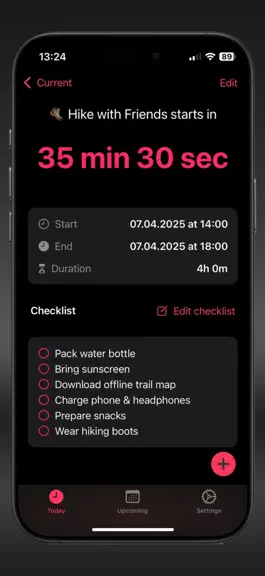
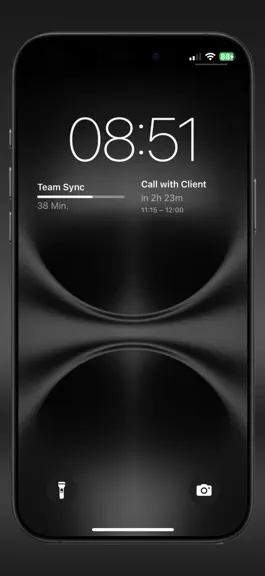
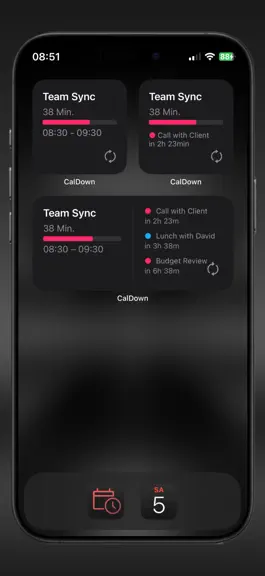
CalDown – Focus. Clarity. Time Awareness. What is happening now? What comes next? How much time is left? CalDown turns Apple Calendar events into a focused timeline across iPhone, iPad, widgets and Apple Watch. Choose your calendars and see your day without the clutter. Designed for clarity, not complexity. A TIMELINE BUILT AROUND NOW • Follow your current event with a live countdown and prog…
Trends & analysis
Chart rank trend
US · categoryWhy it's surfacing
Scout 15Ratings & velocity
★ +5 in windowGeographic reach
best rank · 1 storefrontRevenue & downloads trend
ARPU $7In-app purchases
1 tiersUpdate history
3 updates tracked- v1.6.315d ago
What's New – CalDown 1.6.3 CalDown 1.6.3 brings reminders into your timeline, new ways to use your Apple Watch, and optional colors that help you see when time is running short. • Apple Reminders integration (Beta, requires Pro): view dated tasks from selected lists, complete them and review today’s completed tasks in Done Tasks • Complete reminders from Watch through your paired iPhone, with saved offline requests and an hourglass until the iPhone confirms the save • Expand Watch events directly in the timeline; add notes or checklist items without replacing existing content • Customize Remaining Time Colors: calendar color or a chosen start color, followed by warning and urgent colors at your selected time limits • Check contrast with each calendar in the color preview, with clearer settings and guidance; choose where colors apply: timeline, widgets and Apple Watch • Use the new Corner Countdown complication to show remaining time alongside a progress bar • Ask Siri or use Shortcuts to check your schedule, hide or restore an event, and open Today or Upcoming • Let Watch follow your iPhone’s calendar selection, or keep separate selections • See compact gaps and overlap durations between Watch events, with timed reminders included in gap calculations on both devices • When events overlap, see the soonest-ending current event first on Watch and in all event complications • Keep Reminders collapsed or expanded between launches, and remember the same preference for All Day on Watch • Switch directly between calendars in the free version, with one calendar selected at a time • Prepare optional diagnostic reports for support, with an attachment or copy-and-paste option for your mail app • Refined timeline layouts, updated explanations and improvements to Watch calendar handling and reminder updates Reminders are not shown in widgets or complications. Watch reminder completion and event-note changes require the paired iPhone to process and confirm the request. Delivery depends on connectivity; widget and complication refreshes are scheduled by the system.
- v1.6.129d ago
CalDown 1.6 makes it easier to keep your timeline focused on what matters. • Hide a specific event occurrence from CalDown without changing or deleting it in Apple Calendar • Restore hidden events at any time, organized by day • Keep hidden events aligned across the iPhone app, widgets, paired Apple Watch, and complication • See more of your schedule with the new large Home Screen widget • Enjoy refined Today, Upcoming, Hidden Events, Settings, and CalDown Pro screens • Benefit from improved calendar loading, widget layouts, Watch handling, and overall stability Your calendar stays intact. Your CalDown timeline stays focused. 1.6.1 • Fixed an Apple Watch issue where the first event could appear repeatedly across multiple timeline rows • Improved Watch refresh handling for more reliable event updates when opening the app or complication • Widgets, Apple Watch, and complications now follow your selected 3-, 5-, or 7-day Upcoming range • Standardized countdown progress bars across iPhone, widgets, Apple Watch, and complications
- v1.51.3y ago
• New: “Past Events” section on iPhone and Apple Watch → See today’s recently ended events, including how long ago they ended
CalDown — FAQ
How much money does CalDown make?
According to AppCurrents estimates, CalDown generates approximately $5–$90 per month (medium confidence), modeled from its the App Store chart performance, rating velocity, and monetization signals.
How many downloads does CalDown get?
CalDown sees an estimated 1–6 downloads per month on the App Store, per AppCurrents modeling.
Is CalDown free?
CalDown is a paid app priced at $9.99 on the App Store.
What is CalDown's rating?
CalDown holds a 5.00-star average from 1 ratings on the App Store. It currently ranks #90 on the Productivity paid chart.
When was CalDown released?
CalDown launched on the App Store on 14.04.2025. Its latest version shipped 16.09.2026.


