
BusyCal: Calendar & Tasks
BusyCal: Calendar & Tasks generates an estimated $3k–$46k/month in revenue from 800–3k downloads/month on the App Store, according to AppCurrents estimates (updated 2026-10-02).
| Est. revenue / month | $3k–$46k |
|---|---|
| Est. downloads / month | 800–3k |
| Estimate confidence | medium |
| Pricing | Paid $9.99 |
| Rating | 4.69 ★ (4,497 ratings) |
| Category | Productivity |
| Best chart rank | #28 Productivity Paid |
| Released | 22.06.2016 |
| App last updated | 24.09.2026 |
| Platform | iOS |
Modeled monthly estimate · rating velocity · medium confidence
About
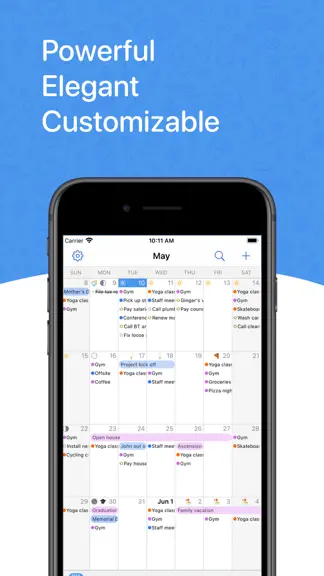
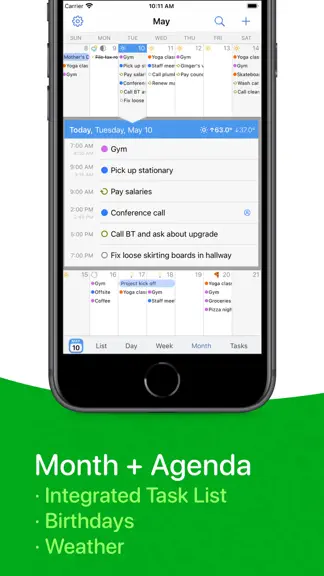
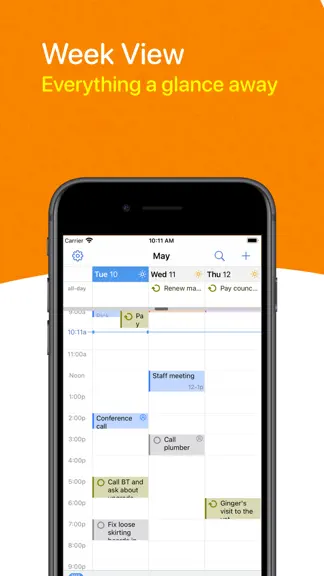
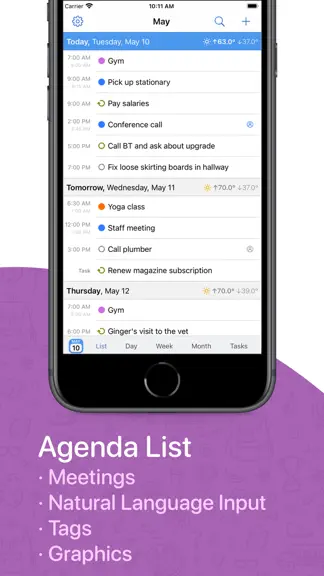
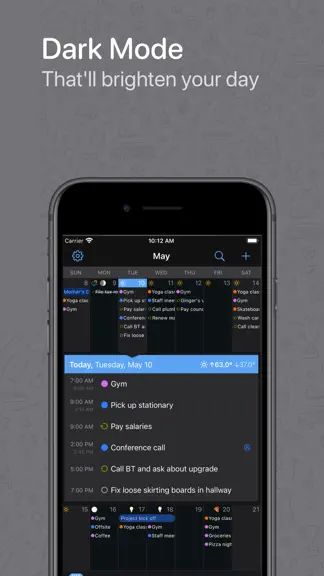
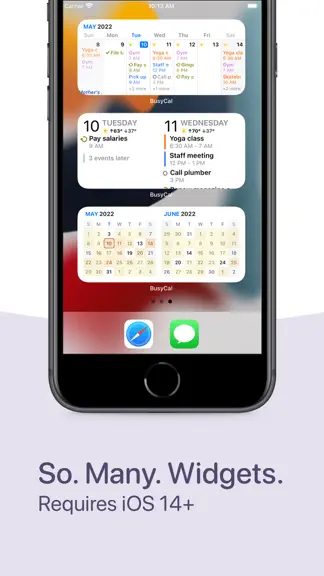
BusyCal is a calendar and task planner built for busy schedules. It connects to every account you already use, shows your events and tasks side by side, and bends to the way you work: pinch to see more days or weeks, type events the way you would say them, and keep everything in sync with BusyCal for Mac. One-time purchase. No subscription. YOUR CALENDAR, YOUR WAY • Day, Week, Month, Year and Li…
Trends & analysis
Chart rank trend
US · categoryWhy it's surfacing
Scout 18Ratings & velocity
★ 0 in windowRating distribution
93% positive · 4k ratingsGeographic reach
best rank · 1 storefrontRevenue & downloads trend
ARPU $7Update history
11 updates tracked- v6.7.68d ago
· [NEW] New support for pasting multiple email addresses when adding attendees · [NEW] New 30-minute snooze option for event and task notifications · Improved recurring time blocks across time zone and daylight saving changes · Improved Outlook syncing for events using certain custom time zones · Improved syncing with SOGo and shared DAViCal calendars · Improved Apple Watch syncing and background stability · Improved error messages for Microsoft sign-in and CalDAV sync failures · Fixed time blocking of recurring events to offer a choice between one occurrence and the entire series · Fixed resizing of floating events in Day and Week views · Fixed incorrect dimming of floating and all-day events in different time zones · Fixed an extra day being highlighted when editing all-day events · Fixed week numbers overlapping dates in Month view in some locales · Fixed duplicate recurring tasks when syncing with Outlook · Fixed syncing of edits and deletions to individual occurrences in Outlook · Fixed duplicate subscribed calendars showing up for certain WebDAV subscriptions · Ongoing stability and performance enhancements
- v6.7.518d ago
· [NEW] Siri AI and Shortcuts related improvements and additions · [NEW] Added support for Google Calendar’s expanded palette and custom event colors · [NEW] New option in Settings New Event Defaults to choose whether tapping the + button creates an event or a task, instead of the automatic default · [NEW] Add guests to Google meetings you've been invited to, when the organizer allows it · [NEW] New Year Planner option to align weekdays across months, wall-planner style. Rotate to landscape to see Year View option · [NEW] New and improved settings screen · [NEW] Redesigned first-run setup, making it quicker to add your accounts when you start out · [NEW] New option to reorder accounts from Settings, so calendars from one account can be listed above another · [NEW] Rearrange calendars and accounts directly from a Calendar Set's edit screen, with a Sort Alphabetically option for each account · [NEW] New setting to choose how phone numbers in event notes are called, including FaceTime, WhatsApp, Google Voice and Zoom · [NEW] New Remove Blocking command in the Block on Calendar menu, which now also checkmarks the calendars an event is already blocked on · [NEW] New Include All-Day Tasks setting to show or hide all-day tasks in the calendar · [NEW] Hide tasks assigned to others setting for Todoist accounts · [NEW] Added Russian localization · Improved overall reliability of Google Calendar syncing for meetings, RSVPs, and shared calendars · Improvements to the lock feature; you can now lock and unlock BusyCal with your device passcode when Face ID is not available · Calendar sorting within the Task List now uses the same calendar order visible in Settings Account Calendars. Calendars can be sorted alphabetically from the same settings screen · WebDAV Calendar Titles are now visible in the main Accounts screen · Improved calendar imports to better handle invalid .ics files · Improved location searches for places outside your current area · Optimizations to launch times and memory usage · Improved handling of meeting responses on Office 365 accounts · Smoother scrolling in Month view, including days with event graphics · Export to CSV now has a Select All option · Fixed the calendar landing on the wrong date when opening the app or switching between views · Fixed Google Tasks not moving to their new list in BusyCal when moved in Google · Fixed meeting invitations on Microsoft 365 and Outlook accounts not appearing in the Inbox when the invite was sent to a group or distribution list · Fixed an issue where temperatures could appear on the wrong date · Fixed the forecast not appearing until the app was reopened after allowing access to your location · Ongoing stability and performance enhancements
- v6.7.419d ago
· [NEW] Siri AI and Shortcuts related improvements and additions · [NEW] Added support for Google Calendar’s expanded palette and custom event colors · [NEW] New option in Settings New Event Defaults to choose whether tapping the + button creates an event or a task, instead of the automatic default · [NEW] Add guests to Google meetings you've been invited to, when the organizer allows it · [NEW] New Year Planner option to align weekdays across months, wall-planner style. Rotate to landscape to see Year View option · [NEW] New and improved settings screen · [NEW] Redesigned first-run setup, making it quicker to add your accounts when you start out · [NEW] New option to reorder accounts from Settings, so calendars from one account can be listed above another · [NEW] Rearrange calendars and accounts directly from a Calendar Set's edit screen, with a Sort Alphabetically option for each account · [NEW] New setting to choose how phone numbers in event notes are called, including FaceTime, WhatsApp, Google Voice and Zoom · [NEW] New Remove Blocking command in the Block on Calendar menu, which now also checkmarks the calendars an event is already blocked on · [NEW] New Include All-Day Tasks setting to show or hide all-day tasks in the calendar · [NEW] Hide tasks assigned to others setting for Todoist accounts · [NEW] Added Russian localization · Improved overall reliability of Google Calendar syncing for meetings, RSVPs, and shared calendars · Improvements to the lock feature; you can now lock and unlock BusyCal with your device passcode when Face ID is not available · Calendar sorting within the Task List now uses the same calendar order visible in Settings Account Calendars. Calendars can be sorted alphabetically from the same settings screen · WebDAV Calendar Titles are now visible in the main Accounts screen · Improved calendar imports to better handle invalid .ics files · Improved location searches for places outside your current area · Optimizations to launch times and memory usage · Improved handling of meeting responses on Office 365 accounts · Smoother scrolling in Month view, including days with event graphics · Export to CSV now has a Select All option · Fixed the calendar landing on the wrong date when opening the app or switching between views · Fixed Google Tasks not moving to their new list in BusyCal when moved in Google · Fixed meeting invitations on Microsoft 365 and Outlook accounts not appearing in the Inbox when the invite was sent to a group or distribution list · Fixed an issue where temperatures could appear on the wrong date · Fixed the forecast not appearing until the app was reopened after allowing access to your location · Ongoing stability and performance enhancements
- v6.7.320d ago
· [NEW] Siri AI and Shortcuts related improvements and additions · [NEW] Added support for Google Calendar’s expanded palette and custom event colors · [NEW] New option in Settings New Event Defaults to choose whether tapping the + button creates an event or a task, instead of the automatic default · [NEW] Add guests to Google meetings you've been invited to, when the organizer allows it · [NEW] New Year Planner option to align weekdays across months, wall-planner style. Rotate to landscape to see Year View option · [NEW] New and improved settings screen · [NEW] Redesigned first-run setup, making it quicker to add your accounts when you start out · [NEW] New option to reorder accounts from Settings, so calendars from one account can be listed above another · [NEW] Rearrange calendars and accounts directly from a Calendar Set's edit screen, with a Sort Alphabetically option for each account · [NEW] New setting to choose how phone numbers in event notes are called, including FaceTime, WhatsApp, Google Voice and Zoom · [NEW] New Remove Blocking command in the Block on Calendar menu, which now also checkmarks the calendars an event is already blocked on · [NEW] New Include All-Day Tasks setting to show or hide all-day tasks in the calendar · [NEW] Hide tasks assigned to others setting for Todoist accounts · [NEW] Added Russian localization · Improved overall reliability of Google Calendar syncing for meetings, RSVPs, and shared calendars · Improvements to the lock feature; you can now lock and unlock BusyCal with your device passcode when Face ID is not available · Calendar sorting within the Task List now uses the same calendar order visible in Settings Account Calendars. Calendars can be sorted alphabetically from the same settings screen · WebDAV Calendar Titles are now visible in the main Accounts screen · Improved calendar imports to better handle invalid .ics files · Improved location searches for places outside your current area · Optimizations to launch times and memory usage · Improved handling of meeting responses on Office 365 accounts · Smoother scrolling in Month view, including days with event graphics · Export to CSV now has a Select All option · Fixed the calendar landing on the wrong date when opening the app or switching between views · Fixed Google Tasks not moving to their new list in BusyCal when moved in Google · Fixed meeting invitations on Microsoft 365 and Outlook accounts not appearing in the Inbox when the invite was sent to a group or distribution list · Fixed an issue where temperatures could appear on the wrong date · Fixed the forecast not appearing until the app was reopened after allowing access to your location · Ongoing stability and performance enhancements
- v6.7.222d ago
· [NEW] Siri and Shortcuts related improvements and additions · [NEW] New option in Settings New Event Defaults to choose whether tapping the + button creates an event or a task, instead of the automatic default · [NEW] Add guests to Google meetings you've been invited to, when the organizer allows it · [NEW] New Year Planner option to align weekdays across months, wall-planner style. Rotate to landscape to see Year View option · [NEW] New and improved settings screen · [NEW] Redesigned first-run setup, making it quicker to add your accounts when you start out · [NEW] New option to reorder accounts from Settings, so calendars from one account can be listed above another · [NEW] Rearrange calendars and accounts directly from a Calendar Set's edit screen, with a Sort Alphabetically option for each account · [NEW] New setting to choose how phone numbers in event notes are called, including FaceTime, WhatsApp, Google Voice and Zoom · [NEW] New Remove Blocking command in the Block on Calendar menu, which now also checkmarks the calendars an event is already blocked on · [NEW] New Include All-Day Tasks setting to show or hide all-day tasks in the calendar · [NEW] Hide tasks assigned to others setting for Todoist accounts · [NEW] Added Russian localization · Improved overall reliability of Google Calendar syncing for meetings, RSVPs, and shared calendars · Improvements to the lock feature; you can now lock and unlock BusyCal with your device passcode when Face ID is not available · Calendar sorting within the Task List now uses the same calendar order visible in Settings Account Calendars. Calendars can be sorted alphabetically from the same settings screen · WebDAV Calendar Titles are now visible in the main Accounts screen · Improved calendar imports to better handle invalid .ics files · Improved location searches for places outside your current area · Optimizations to launch times and memory usage · Improved handling of meeting responses on Office 365 accounts · Smoother scrolling in Month view, including days with event graphics · Export to CSV now has a Select All option · Fixed the calendar landing on the wrong date when opening the app or switching between views · Fixed Google Tasks not moving to their new list in BusyCal when moved in Google · Fixed meeting invitations on Microsoft 365 and Outlook accounts not appearing in the Inbox when the invite was sent to a group or distribution list · Fixed an issue where temperatures could appear on the wrong date · Fixed the forecast not appearing until the app was reopened after allowing access to your location · Ongoing stability and performance enhancements
BusyCal: Calendar & Tasks — FAQ
How much money does BusyCal: Calendar & Tasks make?
According to AppCurrents estimates, BusyCal: Calendar & Tasks generates approximately $3k–$46k per month (medium confidence), modeled from its the App Store chart performance, rating velocity, and monetization signals.
How many downloads does BusyCal: Calendar & Tasks get?
BusyCal: Calendar & Tasks sees an estimated 800–3k downloads per month on the App Store, per AppCurrents modeling.
Is BusyCal: Calendar & Tasks free?
BusyCal: Calendar & Tasks is a paid app priced at $9.99 on the App Store.
What is BusyCal: Calendar & Tasks's rating?
BusyCal: Calendar & Tasks holds a 4.69-star average from 4,497 ratings on the App Store. It currently ranks #28 on the Productivity paid chart.
When was BusyCal: Calendar & Tasks released?
BusyCal: Calendar & Tasks launched on the App Store on 22.06.2016. Its latest version shipped 24.09.2026.


