
Basketball+ Stats & Scorebook
Basketball+ Stats & Scorebook generates an estimated $0/month in revenue from 80–400 downloads/month on the App Store, according to AppCurrents estimates (updated 2026-08-02).
| Est. revenue / month | $0 |
|---|---|
| Est. downloads / month | 80–400 |
| Estimate confidence | high |
| Pricing | Free |
| Rating | 3.00 ★ (2 ratings) |
| Category | Sports |
| Best chart rank | #76 Sports Paid |
| Released | 02.11.2012 |
| App last updated | 16.07.2026 |
| Platform | iOS |
Modeled monthly estimate · rating velocity · high confidence

About
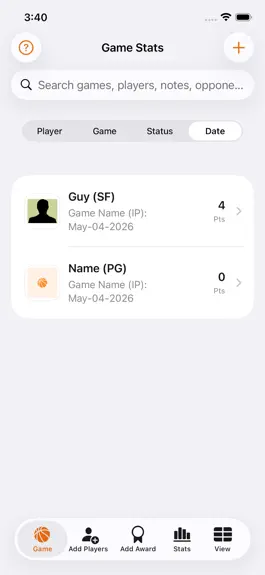
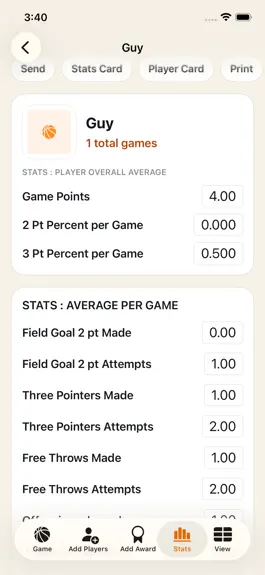
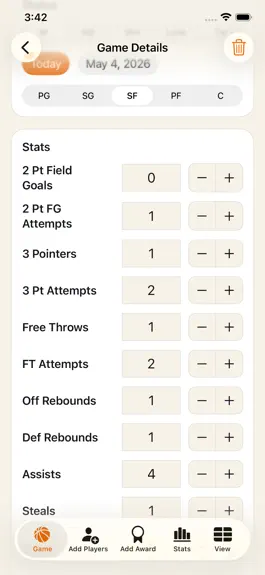
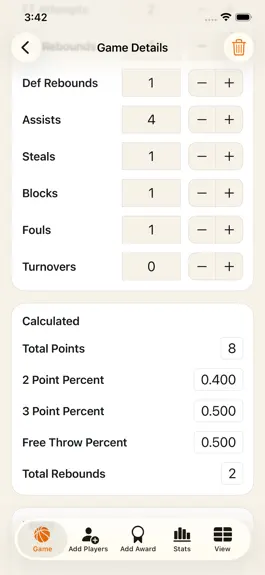
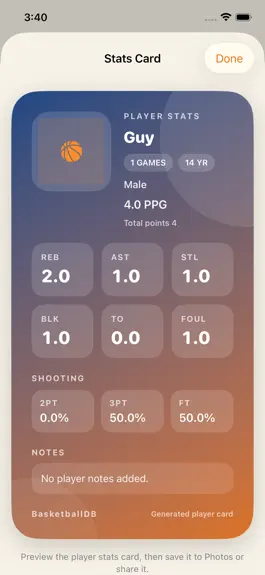
You already care enough to track the game instead of guessing after the buzzer, and Basketball+ respects that. This is a basketball stats tracker, scorebook, and season database for coaches, players, parents, team managers, and serious fans who want clean records without turning every game into a spreadsheet project. Basketball+ helps you keep the box score, player history, team notes, awards, an…
Trends & analysis
Chart rank trend
US · categoryWhy it's surfacing
Scout 8Ratings & velocity
★ -2 in windowRating distribution
100% positive · 1 ratingsGeographic reach
best rank · 1 storefrontRevenue & downloads trend
ARPU $0Update history
3 updates tracked- v8.119d ago
You put real attention into the details of a basketball season, and this update is built for that kind of user. Basketball+ now makes it easier to review game details, share the numbers people ask for, and move through the app without losing the thread of the season. This release continues the basketball-first rebuild around Individual games, Coach games, Sheet, Players, and More. The goal is simple: keep scorekeeping fast, make saved records easier to trust, and give players, parents, coaches, and team managers clearer ways to use the data after the game. - Added share and print actions to read-only Game Detail stats - Added share and print actions to Coach Detail stats - Shared stats now include labels with their values, so PTS, REB, AST, shooting, and detail fields stay clear outside the app - Coach game sharing includes the visible player rows, not just the team total - Game detail sharing includes player, team, season, opponent, date, result, position, stat labels, and notes when available - Print handoff now uses the same labeled summary text as sharing - Read-only game detail cards are cleaner for reviewing saved games - Coach detail screens are easier to scan when a game has multiple player rows - Stats Hub now gives Individual and Coach game history a clearer path into detail views - Overview stats are separated into focused sections for faster review - Spreadsheet navigation from Stats Hub avoids sending you in circles - Empty states are clearer when a saved game cannot be found - Detail screens keep the same basketball terms you already use in the book Better day-to-day flow: - Move from a game list to a saved game detail faster - Review a stat line after the game without entering edit mode - Check team context, season, opponent, result, and date in one card - Scan shooting lines such as 2P, 2P%, 3P, 3P%, FT, and FT% - Review turnovers, fouls, steals, blocks, assists, and rebounds without extra taps - Share a summary with another coach, parent, player, or assistant - Use print as a quick handoff when paper still helps - Keep notes attached to the stat context where they matter - Share text now reads more like a real basketball summary, not a loose list of numbers - Player and team context stay attached when a detail view leaves the screen through sharing or printing This update also keeps the broader Basketball+ workflow intact: - Individual game logging remains focused on one player stat line at a time - Coach mode remains built for multi-player game sessions - Player profiles still support photos, birthdays, gender, and notes - Teams, seasons, and awards stay connected to the record keeping workflow - Spreadsheet review still gives a wide view across saved data - Export tools still support CSV files and JSON backups - Local rewards still track progress for logging, reviewing, exporting, and sharing - The app still keeps records on the device without account setup Polish across the app supports the same practical goal: help you enter the game, save the record, find it later, and share the useful version of it. A basketball stat sheet should not need translation after the final horn. With labeled share and print output, the numbers leave the app with the context they need. Basketball+ is still a straightforward basketball stats tracker and scorebook, but the saved game experience is stronger now. Game Detail and Coach Detail are no longer just places to look. They are places to review, hand off, print, and keep the season moving. Use this update when you want cleaner basketball game summaries, labeled player stats, printable coach records, export-friendly scorekeeping, and a better way to keep the season organized from first tip-off to final result.
- v8.01mo ago
You put real attention into the details of a basketball season, and this update is built for that kind of user. Basketball+ now makes it easier to review game details, share the numbers people ask for, and move through the app without losing the thread of the season. This release continues the basketball-first rebuild around Individual games, Coach games, Sheet, Players, and More. The goal is simple: keep scorekeeping fast, make saved records easier to trust, and give players, parents, coaches, and team managers clearer ways to use the data after the game. - Added share and print actions to read-only Game Detail stats - Added share and print actions to Coach Detail stats - Shared stats now include labels with their values, so PTS, REB, AST, shooting, and detail fields stay clear outside the app - Coach game sharing includes the visible player rows, not just the team total - Game detail sharing includes player, team, season, opponent, date, result, position, stat labels, and notes when available - Print handoff now uses the same labeled summary text as sharing - Read-only game detail cards are cleaner for reviewing saved games - Coach detail screens are easier to scan when a game has multiple player rows - Stats Hub now gives Individual and Coach game history a clearer path into detail views - Overview stats are separated into focused sections for faster review - Spreadsheet navigation from Stats Hub avoids sending you in circles - Empty states are clearer when a saved game cannot be found - Detail screens keep the same basketball terms you already use in the book Better day-to-day flow: - Move from a game list to a saved game detail faster - Review a stat line after the game without entering edit mode - Check team context, season, opponent, result, and date in one card - Scan shooting lines such as 2P, 2P%, 3P, 3P%, FT, and FT% - Review turnovers, fouls, steals, blocks, assists, and rebounds without extra taps - Share a summary with another coach, parent, player, or assistant - Use print as a quick handoff when paper still helps - Keep notes attached to the stat context where they matter - Share text now reads more like a real basketball summary, not a loose list of numbers - Player and team context stay attached when a detail view leaves the screen through sharing or printing This update also keeps the broader Basketball+ workflow intact: - Individual game logging remains focused on one player stat line at a time - Coach mode remains built for multi-player game sessions - Player profiles still support photos, birthdays, gender, and notes - Teams, seasons, and awards stay connected to the record keeping workflow - Spreadsheet review still gives a wide view across saved data - Export tools still support CSV files and JSON backups - Local rewards still track progress for logging, reviewing, exporting, and sharing - The app still keeps records on the device without account setup Polish across the app supports the same practical goal: help you enter the game, save the record, find it later, and share the useful version of it. A basketball stat sheet should not need translation after the final horn. With labeled share and print output, the numbers leave the app with the context they need. Basketball+ is still a straightforward basketball stats tracker and scorebook, but the saved game experience is stronger now. Game Detail and Coach Detail are no longer just places to look. They are places to review, hand off, print, and keep the season moving. Use this update when you want cleaner basketball game summaries, labeled player stats, printable coach records, export-friendly scorekeeping, and a better way to keep the season organized from first tip-off to final result.
- v7.12mo ago
This update focuses on making Basketball+ easier to live with during a season. The goal was to keep the workflow simple, cut down on friction, and make the most used parts of the app feel cleaner and faster to move through. - Game entry is easier to work through, with a smoother path for adding or editing a player game log. - Player profiles are simpler to review, so birthdays, notes, and photos are easier to find when you need them. - The stats area is clearer when you want a fast read on averages, totals, and recent performance. - The spreadsheet view is easier to browse for larger sets of games, especially when you are checking a full season. - Search has been tightened up across players and game history so you can get to the right record faster. - Export tasks are more dependable, with CSV and JSON output handling that is less likely to get in the way. - The backup and restore flow is clearer when you want to save a copy of the local database or load one back in. - Award records are easier to scan, which helps when you are keeping a season timeline for players or teams. - The reference information for scoring, positions, and game status is easier to use as a quick reminder during stat entry. - Help and About screens have been polished so the app is easier to understand the first time you open it. - Several small UI improvements make the app feel more consistent across iPhone and iPad layouts. - General stability fixes help the database, lists, and share actions behave more predictably during normal use. - Under the hood, the app is set up to keep local records organized and responsive as the season grows. - Longer stat sheets and larger player lists should be easier to move through without losing context. - The app keeps the same practical basketball focus, but the day-to-day flow is a little cleaner and easier to trust. - This update is aimed at the people who actually use the data: coaches, players, scorekeepers, and parents who need clean records without extra setup. - Tabs, lists, and detail screens feel more consistent when you move between Game, Add Players, Add Award, Stats, and View. - Records are easier to revisit after you save them, which helps when you are checking a stat line during a busy game. - Search behaves more predictably when you are looking up a player name, team, or note from a larger season log. - Player summaries are easier to scan because averages and totals are grouped more clearly in the stats area. - The spreadsheet screen is less cluttered when you are reviewing a full season of games across a long list. - CSV exports are easier to hand off because the files stay organized around the data people already expect in a stat sheet. - JSON backups are simpler to use when you need to restore the local database or move records to another device. - Award entries are easier to maintain when you want a running list of recognition across the season. - The reference screen remains close at hand for scoring, positions, and game status abbreviations. - Help and About are easier to use as an at-a-glance guide for the app's workflow. - Minor polish across cards, buttons, and tables makes the app feel more complete on both iPhone and iPad. - Stability work keeps the local Core Data store responsive as the number of games and players grows. - This release is meant for the people who will actually use the data every week, not just on opening day. - It keeps the same direct, basketball-first layout, but trims away a few rough edges that show up during real use. - The result is a cleaner day-to-day workflow for scorekeeping, player tracking, and season summaries.
Basketball+ Stats & Scorebook — FAQ
How many downloads does Basketball+ Stats & Scorebook get?
Basketball+ Stats & Scorebook sees an estimated 80–400 downloads per month on the App Store, per AppCurrents modeling.
Is Basketball+ Stats & Scorebook free?
Basketball+ Stats & Scorebook is free to download on the App Store, with no in-app purchases detected.
What is Basketball+ Stats & Scorebook's rating?
Basketball+ Stats & Scorebook holds a 3.00-star average from 2 ratings on the App Store. It currently ranks #76 on the Sports paid chart.
When was Basketball+ Stats & Scorebook released?
Basketball+ Stats & Scorebook launched on the App Store on 02.11.2012. Its latest version shipped 16.07.2026.


