
AvPlan EFB
AvPlan EFB generates an estimated $20–$200/month in revenue from 50–300 downloads/month on the App Store, according to AppCurrents estimates (updated 2026-08-02).
| Est. revenue / month | $20–$200 |
|---|---|
| Est. downloads / month | 50–300 |
| Estimate confidence | low |
| Pricing | Free + IAP |
| Rating | 4.62 ★ (94 ratings) |
| Category | Navigation |
| Released | 09.08.2011 |
| App last updated | 15.07.2026 |
| Platform | iOS |
Modeled monthly estimate · rating velocity · low confidence
About
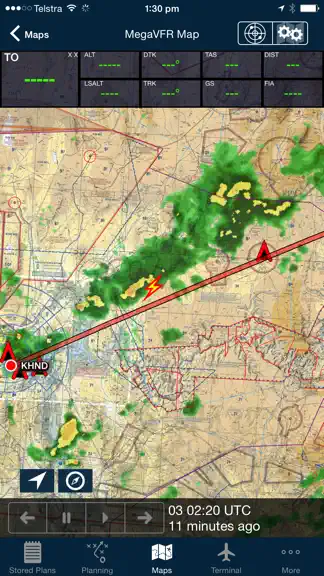
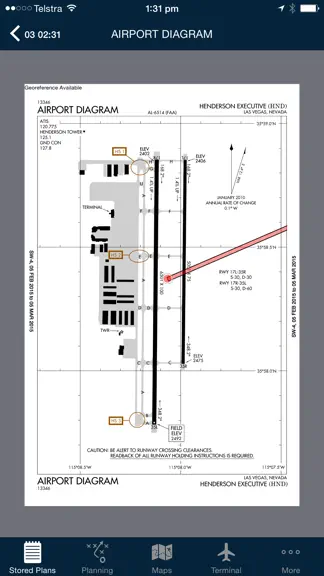
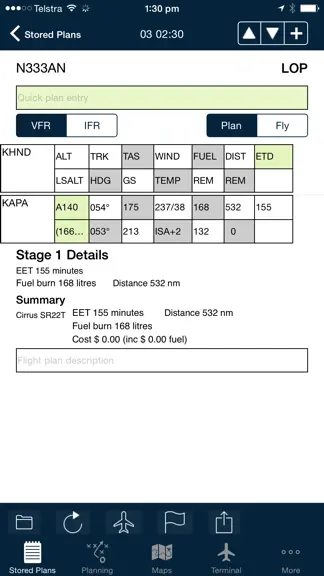
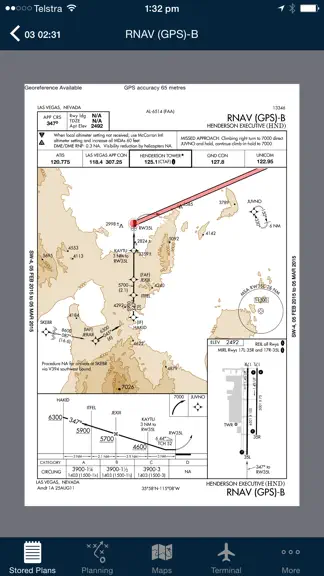
Get flying faster with AvPlan EFB - the premier lifetime Electronic Flight Bag that grows with you. Continuing to lead the market with unparalleled innovation and functionality, AvPlan features multiple firsts with terrain warning, touch to display restricted airspace status, automatic IFR airway planning and geo-referenced airport taxi & instrument approach diagrams to arm you with superior si…
Trends & analysis
Chart rank trend
US · overallWhy it's surfacing
Scout 8Ratings & velocity
★ 0 in windowRating distribution
89% positive · 92 ratingsGeographic reach
best rank · 1 storefrontRevenue & downloads trend
ARPU $0In-app purchases
10 tiersUpdate history
3 updates tracked- v10.0.120d ago
Added in 10.0.1 • Add location to GAF and Satellite views • Burning contingency fuel across stages is now an optional setting for user or enterprise groups • Resolve an issue with the WnB pages and loading profiles • Correctly shade load stations when weights are exceeded • Resolve some stability issues Added in 10.0 • ActivePlates - highlights your location on the vertical profile of RNP approach plates. Highlights the MSA sector and indicates inbound heading to holding patterns. ActivePlates also includes a HUD on the terminal pane which displays the current ground speed, vertical speed required to maintain the published glideslope, the target altitude required to be on the glideslope for your location. The surface winds from the current METAR is also displayed. • Added indication of circuit directions on airport diagrams. These will show correct directions for both day and night operations. • New Weight and Balance display, including a plan view of the aircraft and improved loading of passengers on multi-stage plans. Added an auto-load function for larger aircraft. Added ability to quickly load just the required fuel (for the stage or to the next refuel point). • New synthetic vision display, including airport locations, ADSB traffic, active airspace. Added ability to swipe to move viewport. • New Print/Send functionality. Save preferred documents to print/send preflight and post flight. • Add Tech Log feature for Enterprise customers. Documents can be attached both pre-flight and post-flight and are saved in the AvPlan Cloud. • New optimise altitude function, displaying LSALT and freezing levels. There is now a separate function to optimise the altitude for alternate stages as well. • New GAF display under Weather • New SPFIB briefing functions, including annotations and searching • Added ability to annotate flight plan reports under Planning. Annotated documents can be printed/emailed and archived in the AvPlan Cloud under Print/Send • Approach plate annotations are now also displayed on the map, when overlaying a plate on the map • TAF/METAR/ATIS can be displayed using a button on all plates under Terminal. Additionally, a plate can be added to favourites using a button on all plates.
- v10.025d ago
• ActivePlates - highlights your location on the vertical profile of RNP approach plates. Highlights the MSA sector and indicates inbound heading to holding patterns. ActivePlates also includes a HUD on the terminal pane which displays the current ground speed, vertical speed required to maintain the published glideslope, the target altitude required to be on the glideslope for your location. The surface winds from the current METAR is also displayed. • Added indication of circuit directions on airport diagrams. These will show correct directions for both day and night operations. • New Weight and Balance display, including a plan view of the aircraft and improved loading of passengers on multi-stage plans. Added an auto-load function for larger aircraft. Added ability to quickly load just the required fuel (for the stage or to the next refuel point). • New synthetic vision display, including airport locations, ADSB traffic, active airspace. Added ability to swipe to move viewport. • New Print/Send functionality. Save preferred documents to print/send preflight and post flight. • Add Tech Log feature for Enterprise customers. Documents can be attached both pre-flight and post-flight and are saved in the AvPlan Cloud. • New optimise altitude function, displaying LSALT and freezing levels. There is now a separate function to optimise the altitude for alternate stages as well. • New GAF display under Weather • New SPFIB briefing functions, including annotations and searching • Added ability to annotate flight plan reports under Planning. Annotated documents can be printed/emailed and archived in the AvPlan Cloud under Print/Send • Approach plate annotations are now also displayed on the map, when overlaying a plate on the map • TAF/METAR/ATIS can be displayed using a button on all plates under Terminal. Additionally, a plate can be added to favourites using a button on all plates.
- v9.105mo ago
• Add ability to create/edit user waypoints using NZTM coordinates (for NZ) • Add aircraft instance version to load sheet • Resolve an issue sending a flight plan with long remarks to IFIS • Change some naming of planning options in NZ to better align with NZ terminology • If there is advanced tank data, do not display the arm in the summary • Use underlying class E frequency in current/next FIA frequency box if flying over and not through this airspace • Auto-hide airspace highlighting after 15 seconds • Some stability improvements
AvPlan EFB — FAQ
How much money does AvPlan EFB make?
According to AppCurrents estimates, AvPlan EFB generates approximately $20–$200 per month (low confidence), modeled from its the App Store chart performance, rating velocity, and monetization signals.
How many downloads does AvPlan EFB get?
AvPlan EFB sees an estimated 50–300 downloads per month on the App Store, per AppCurrents modeling.
Is AvPlan EFB free?
AvPlan EFB is free to download on the App Store, monetizing through in-app purchases.
What is AvPlan EFB's rating?
AvPlan EFB holds a 4.62-star average from 94 ratings on the App Store.
When was AvPlan EFB released?
AvPlan EFB launched on the App Store on 09.08.2011. Its latest version shipped 15.07.2026.


