
Bingers: TV & Movie Tracker
Bingers: TV & Movie Tracker generates an estimated $0/month in revenue from 15k–62k downloads/month on the App Store, according to AppCurrents estimates (updated 2026-09-04).
| Est. revenue / month | $0 |
|---|---|
| Est. downloads / month | 15k–62k |
| Estimate confidence | high |
| Pricing | Free |
| Rating | 4.84 ★ (393 ratings) |
| Category | Entertainment |
| Best chart rank | #80 Entertainment Free |
| Released | 04.08.2026 |
| App last updated | 03.09.2026 |
| Platform | iOS |
Modeled monthly estimate · rating velocity · high confidence
About
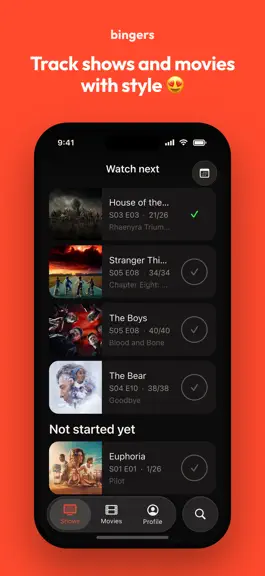
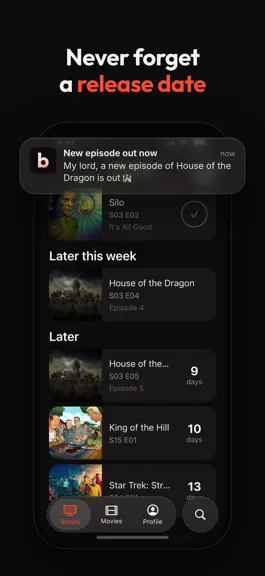
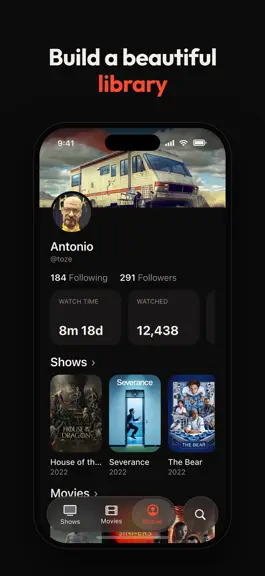
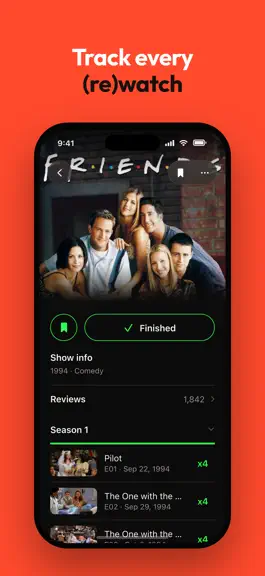
Bingers is the app you use to collect the movies and TV shows you watch or plan to watch. TRACK your shows and movies - Keep track of what you're watching - Add shows and movies you want to watch, including animes - Receive alerts and notifications when new episodes and movies are available DISCOVER something new - Get personalized recommendations based on what you've watched - See trending show…
Trends & analysis
Chart rank trend
US · categoryWhy it's surfacing
Scout 49Ratings & velocity
★ +4.84 in windowGeographic reach
best rank · 8 storefrontsRevenue & downloads trend
ARPU $0Update history
5 updates tracked- v0.1.95d ago
New in 0.1.9: • Import from more places: Simkl, Letterboxd, BetaSeries, Suite TV, Sofa Time, TV Time Data Extractor and Refract backups. Fixes: • Tapping Where to watch could freeze the app for some people. • Some people saw another show's poster in their watch history. • The TV tab opened empty for a small number of people. • Favourite character votes now go to the character, not the actor. • Rails and lists sit the right way round in Arabic. • Long menus scroll on Android, so every watch date is reachable. • The import format list scrolls on small screens. • Shows with nothing watched open on season 1, instead of every season closed. • Dates follow your phone's regional format. • Steadier syncing.
- v0.1.625d ago
Explore has new lists. New, Popular and Most Anticipated now sit alongside Trending, for shows and movies alike, and you can narrow any of them by genre or release year. Explore also leaves out what you already follow, so the rows stay full of things you have not tracked yet. Search reads your language now. Titles match on the name you actually see, so you no longer have to guess what a show is called in English. Watch dates got their own flow. Pick which watch you are editing, then how to date it: the air or release day, a date from the calendar, or no date at all. You can date a whole show in one go, and dates now show on the rows in your feed. They use your region's format too, so the 1st of June is no longer read as the 6th of January. Mis-tapped a rewatch? Remove that one watch and keep the rest. Your account can be private now. Turn on Private profile in Settings and only followers you approve can see your shows, stats and lists, with no public page on bingers.app. Follow requests get their own list, and you can remove a follower without blocking them. Fixes: your Watch time now counts episodes with no runtime of their own using the show's average, so the total on your profile is much closer to the truth. Turning a notification category off now quiets the notification list too, not just the push. List covers use the artwork you picked. Comments open with a back button instead of a pull-down sheet. Your Movies see-all can sort by Release date.
- v0.1.526d ago
Widgets got a pass on both sizes. They follow the app's theme instead of the device's, carry full posters, and tapping the header opens your Watch list instead of the first episode. The episode name is gone from the medium widget, where longer names were being clipped. Your Watch list now shows posters instead of cropped backdrops, and titles come through in your language everywhere, with a Keep original titles switch in Settings if you would rather see them as they were made. Fixes: your list sorting and grouping stick between visits. Shows that come back from a long break file under Watch next, and movies resurface on the day they land. Labels stop clipping at larger text sizes, play counts fit their ring, and title pages reveal their name as you scroll. You can also share a whole show as a card now, next to the episode and movie cards.
- v0.1.429d ago
Everything since your last update, in one go. Switch straight from one episode to the next, right from the episode page: the most requested thing on our board. Share an episode or a movie as a card. Home screen widgets for upcoming episodes and what to watch next. Trailers on every show and movie page. Shows now has three views: List, Rails and Grid, and Movies has List and Grid. Caught up shows get their own profile section, next to Finished and out of In progress. Reorder your lists and your profile sections. A Following tab in comments. Mark a finished season rewatched and see its count. A small celebration when you finish a show. Title pages lead with the production status. One tap to set a watch to its air date. Import from Settings any time, one archive after another: official TV Time, TV Time Out by Refract, TV Time Liberator, Trakt and Refract exports all work. Fixes: watch dates now follow your region instead of always reading month first, syncing is much faster after an import, and links open the app.
- v0.1.01mo ago
Bingers: TV & Movie Tracker — FAQ
How many downloads does Bingers: TV & Movie Tracker get?
Bingers: TV & Movie Tracker sees an estimated 15k–62k downloads per month on the App Store, per AppCurrents modeling.
Is Bingers: TV & Movie Tracker free?
Bingers: TV & Movie Tracker is free to download on the App Store, with no in-app purchases detected.
What is Bingers: TV & Movie Tracker's rating?
Bingers: TV & Movie Tracker holds a 4.84-star average from 393 ratings on the App Store. It currently ranks #80 on the Entertainment free chart.
When was Bingers: TV & Movie Tracker released?
Bingers: TV & Movie Tracker launched on the App Store on 04.08.2026. Its latest version shipped 03.09.2026.


