
Anytune Pro+: Studio Tools
Anytune Pro+: Studio Tools generates an estimated $58k–$950k/month in revenue from 11k–45k downloads/month on the App Store, according to AppCurrents estimates (updated 2026-10-02).
| Est. revenue / month | $58k–$950k |
|---|---|
| Est. downloads / month | 11k–45k |
| Estimate confidence | medium |
| Pricing | Paid $14.99 |
| Rating | 4.87 ★ (8,362 ratings) |
| Category | Music |
| Best chart rank | #29 Music Paid |
| Released | 09.12.2011 |
| App last updated | 19.08.2026 |
| Platform | iOS |
Modeled monthly estimate · rating velocity · medium confidence


About
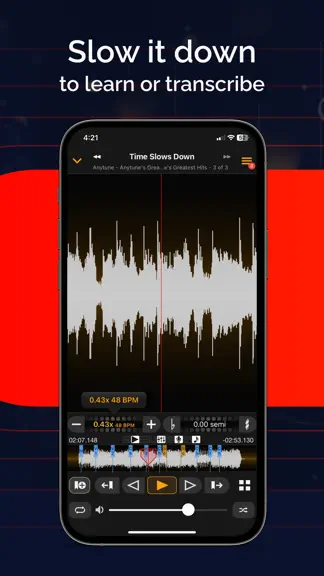
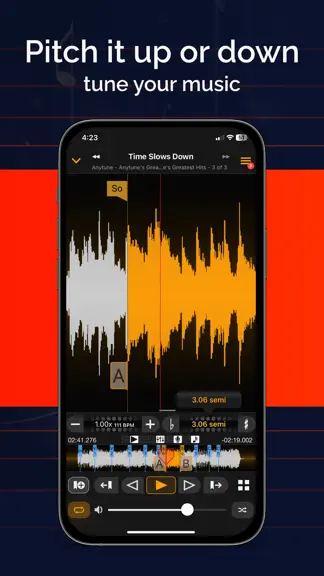
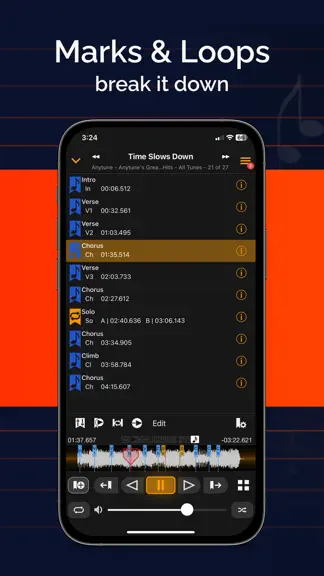
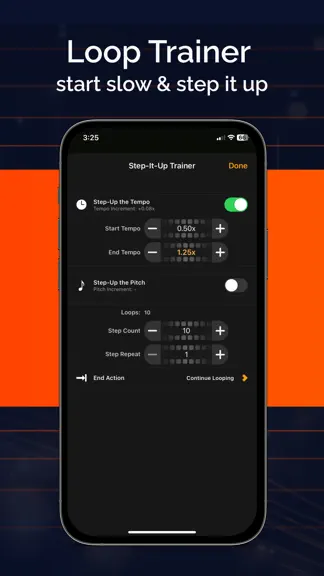
Transform Your Music Journey with Anytune™! Discover a new way to learn, practice, and teach music with Anytune™ – the ultimate music practice app. Learn faster, transcribe easier, and play along at your pace to make practice more fun. A complete suite of tools to practice better. For over a decade, Anytune has been changing the lives of musical artists worldwide. With tons of user-requested feat…
Trends & analysis
Chart rank trend
US · categoryWhy it's surfacing
Scout 19Ratings & velocity
★ -0.01 in windowRating distribution
98% positive · 8k ratingsGeographic reach
best rank · 1 storefrontRevenue & downloads trend
ARPU $10In-app purchases
2 tiersUpdate history
6 updates tracked- v4.9.51mo ago
This update improves performance when working with imported audio files stored in iCloud Drive. It also includes the new features introduced in Anytune 4.9. Sync Imported Audio Files You can now choose where imported media files are stored in Anytune Settings. Keep files “On This Device” and manage them yourself, or choose “iCloud Drive” to sync imported audio files across your devices using iCloud. You still control whether your Anytune data syncs through Anytune Cloud. Rich Text Lyrics Anytune now supports rich text lyrics. Customize your textual tabs and scrolling lyrics with formatting such as color, size, and emphasis. Highlight lyric text in Anytune and use the formatter, or paste rich text from another app. New Tune Info Tap a song title in the player to open the new Tune Info screen. View and edit song details more easily, and quickly access actions such as adding songs to playlists and copying marks.
- v4.9.42mo ago
This update includes a fix for edited song titles reverting to their original names. It also brings you the new features introduced in Anytune 4.9. Sync Imported Audio Files You can now choose where imported media files are stored in Anytune Settings. Keep files “On This Device” and manage them yourself, or choose “iCloud Drive” to sync imported audio files across your devices using iCloud. You still control whether your Anytune data syncs through Anytune Cloud. Rich Text Lyrics Anytune now supports rich text lyrics. Customize your textual tabs and scrolling lyrics with formatting such as color, size, and emphasis. Highlight lyric text in Anytune and use the formatter, or paste rich text from another app. New Tune Info Tap a song title in the player to open the new Tune Info screen. View and edit song details more easily, and quickly access actions such as adding songs to playlists and copying marks.
- v4.9.32mo ago
This update includes important fixes for edited song titles reverting to their original names and a launch issue. It also brings you the new features introduced in Anytune 4.9. Sync Imported Audio Files You can now choose where imported media files are stored in Anytune Settings. Keep files “On This Device” and manage them yourself, or choose “iCloud Drive” to sync imported audio files across your devices using iCloud. You still control whether your Anytune data syncs through Anytune Cloud. Rich Text Lyrics Anytune now supports rich text lyrics. Customize your textual tabs and scrolling lyrics with formatting such as color, size, and emphasis. Highlight lyric text in Anytune and use the formatter, or paste rich text from another app. New Tune Info Tap a song title in the player to open the new Tune Info screen. View and edit song details more easily, and quickly access actions such as adding songs to playlists and copying marks. This release also includes many bug fixes and user experience improvements.
- v4.9.23mo ago
This update adds highly requested features, helpful enhancements, and many improvements inspired by your feedback. Thank you for helping make Anytune better. Sync Imported Audio Files You can now choose where imported media files are stored in Anytune Settings. Keep files “On This Device” and manage them yourself, or choose “iCloud Drive” to sync imported audio files across your devices using iCloud. You still control whether your Anytune data syncs through Anytune Cloud. Rich Text Lyrics Anytune now supports rich text lyrics. Customize your textual tabs and scrolling lyrics with formatting such as color, size, and emphasis. Highlight lyric text in Anytune and use the formatter, or paste rich text from another app. New Tune Info Tap a song title in the player to open the new Tune Info screen. View and edit song details more easily, and quickly access actions such as adding songs to playlists and copying marks. This release also includes many bug fixes and user experience improvements.
- v4.9.13mo ago
This update adds highly requested features, helpful enhancements, and many improvements inspired by your feedback. Thank you for helping make Anytune better. Sync Imported Audio Files You can now choose where imported media files are stored in Anytune Settings. Keep files “On This Device” and manage them yourself, or choose “iCloud Drive” to sync imported audio files across your devices using iCloud. You still control whether your Anytune data syncs through Anytune Cloud. Rich Text Lyrics Anytune now supports rich text lyrics. Customize your textual tabs and scrolling lyrics with formatting such as color, size, and emphasis. Highlight lyric text in Anytune and use the formatter, or paste rich text from another app. New Tune Info Tap a song title in the player to open the new Tune Info screen. View and edit song details more easily, and quickly access actions such as adding songs to playlists and copying marks. This release also includes many bug fixes and user experience improvements.
Anytune Pro+: Studio Tools — FAQ
How much money does Anytune Pro+: Studio Tools make?
According to AppCurrents estimates, Anytune Pro+: Studio Tools generates approximately $58k–$950k per month (medium confidence), modeled from its the App Store chart performance, rating velocity, and monetization signals.
How many downloads does Anytune Pro+: Studio Tools get?
Anytune Pro+: Studio Tools sees an estimated 11k–45k downloads per month on the App Store, per AppCurrents modeling.
Is Anytune Pro+: Studio Tools free?
Anytune Pro+: Studio Tools is a paid app priced at $14.99 on the App Store.
What is Anytune Pro+: Studio Tools 's rating?
Anytune Pro+: Studio Tools holds a 4.87-star average from 8,362 ratings on the App Store. It currently ranks #29 on the Music paid chart.
When was Anytune Pro+: Studio Tools released?
Anytune Pro+: Studio Tools launched on the App Store on 09.12.2011. Its latest version shipped 19.08.2026.


